GuidoTree
Overview
A GuidoTree is an advanced widget that is used to display data in a hierarchical manner. Use of this widget requires knowledge of Guido action events and callbacks and its use is not recommended unless you have this experience.
A tree comprises the GuidoTree widget which will contain one or more GuidoTreeBranch and/or GuidoTreeLeaf widgets that are known as tree nodes. The nodes of the tree can respond to certain events when they are selected with the mouse or keyboard controls. The node widgets are generally not used as input collectors but more as organisers, whereby other input widgets are displayed when the node is selected.
The normal setup of a tree is to place it inside of a GuidoScrollPane to allow the tree to be scrolled up and down, as an expanded tree will usually not be completely visible on the form. The GuidoScrollPane in turn is normally contained within a GuidoSplitPane such that the tree is displayed on the left side of the pane with the right side of the split pane used for displaying information dependant upon the current tree node selection. The examples below demonstrate this type of setup.
Trees can be static or dynamic. A static tree has its shape defined in the GuidoTree definition with all the tree branches and leaves defined in the form. Example 1 below is an example of a static tree. A dynamic tree has only the basic GuidoTree widget defined in the form with the tree branches and leaves being defined dynamically at runtime through form procedures invoked from action events. With this type of tree usually a data buffer containing the tree content is sent from the Scl script up to the Guido form. Once displayed the tree will respond to user actions and allow branches and leaves to be added and deleted. Example 2 below below demonstrates this type of tree.
GuidoPopupMenu's are commonly used with trees to provide a selection of tasks to be performed when a tree node is right clicked with the mouse. Functions such as add, edit, delete, and sort may be provided on these popup menus.
Synopsis
GuidoTree Name Body
Description
The GuidoTree command when processed will define a rectangular pane on the form in which the tree widget will be drawn. The shape of the tree will depend upon the number of tree branches and tree leaves that are placed within it and also any switches that are specified to modify the default behaviour.
Arguments
Name Name is a unique identifier that you assign and is used to differentiate this object from other Guido objects in the form definition.
Body The body of the tree may contain switches as described below to modify its default behaviour and GuidoTreeBranch and GuidoTreeLeaf definitions. The body begins with an opening curly brace and ends with a closing curly brace.
Switches Most switches that can be used on a GuidoPanel may be applied to the GuidoTree. See the reference for GuidoPanel for further information.
| -editable true|false | The -editable switch determines if names of the tree
nodes can be edited. By default the names can be edited.
-editable true -editable false |
| -menu menuHandle | The -menu switch defines the default popup menu to
display when a tree node is right clicked with the mouse. The menu handle
must refer to a GuidoPopupMenu that has
been previously defined. This menu will then be used for any of the tree
nodes whether they are branches or leaves.
-menu $treePopup -menu $treeSwitcher |
| -menu_enabled true|false | The -menu_enabled switch is used to turn the default
popup menu response on or off. By default tree nodes will popup a menu
but you may want to delay this behaviour until some other event has been
initiated by the user.
-menu_enabled true -menu_enabled false |
| -branch_menu menuHandle | The -branch_menu switch defines the default popup
menu to display when a tree branch is right clicked with the mouse. The
menu handle must refer to a GuidoPopupMenu
that has been previously defined. This menu will then be used only on
branch nodes and not on leaf nodes.
-branch_menu $branchPopup -branch_menu $branchSorter |
| -branch_menu_enabled true|false | The -branch_menu_enabled switch is used to turn the
branch popup menu response on or off. By default tree branches will popup
a menu if one is defined, but you may want to delay this behaviour until
some other event has been initiated by the user.
-branch_menu_enabled true -branch_menu_enabled false |
| -leaf_menu menuHandle | The -leaf_menu switch defines the default popup menu
to display when a tree leaf is right clicked with the mouse. The menu
handle must refer to a GuidoPopupMenu
that has been previously defined. This menu will then be used only on
leaf nodes and not on branch nodes.
-leaf_menu $leafPopup -leaf_menu $leafDeleter |
Common Guido switches reference
Object Methods Object methods are functions (procedures) that can be called on a Guido Widget or Container at runtime to invoke some action. Use of a GuidoTree will generally require you to execute object methods to control the behaviour of the tree and to invoke actions on other Guido objects on the form. See the reference on Guido action events and callbacks for further information.
| $treeHandle getRootNode | The getRootNode method will return a reference handle
to the root node of the tree. The root node is the top node in the tree
and is the highest ancestor of any other node in the tree.
set rootNode [$plotParameters getRootNode] |
| $treeHandle getSelectedNode | The getSelectedNode method will return a reference
handle to the currently selected tree node which may be either a branch
or leaf node.
set currentNode [$plotParameters getSelectedNode] set node [$companyInfo getSelectedNode] |
| $treeHandle setSelectedNode $nodeHandle | The setSelectedNode method allows you to set a new
selected node in the tree. You must have the reference handle to the node
that you wish to select. The tree will automatically update itself when
you select the node
$treeHandle setSelectedNode $survey $plotParams setSelectedNode $A0params |
| $treeHandle addSelectedNode $nodeHandle | The addSelectedNode method will add a new node referred
to by the node handle into the tree according to the structure that the
node was created under.
$plotParameters addSelectedNode $newPlotNode |
| $treeHandle removeSelectedNode | The removeSelectedNode method will deselect the current
selected node in the tree. This will leave the tree with no selected node.
$plotParameters removeSelectedNode |
| $treeHandle getSelectedNodes nodeNumber | The GuidoTree allows multiple nodes to be selected at any
one time. The getSelectedNodes method provides a means to iterate
over all the selected nodes by providing the node number within the selection
to get. The first node in the selection is referenced from 0. The method
will return a reference handle to the specified node or -1 if the node
number is greater that the number of selected nodes. This example code
demonstrates how to iterate over all selected nodes in the tree.
set selectedNode 0
set node [$siteInfo getSelectedNodes $selectedNode]
for {set i 0} {$node != -1} {
  puts [$node getName]
  incr selectedNode
  set node [$siteInfo getSelectedNodes $selectedNode]
}
|
| $treeHandle getSelectionCount | The getSelectionCount method returns the number of
currently selected nodes. This method is used in conjunction with getSelectedNodes
to iterate over all the currently selected nodes in a tree. The example
below demonstrates an alternative and more efficient algorithm for iterating
over all selected nodes in a tree than provided above
for {set i 0} {$i < [$siteInfo getSelectionCount]} {incr i} {
  set node [$siteInfo getSelectedNodes $i]
  puts [$node getName]
}
|
| $treeHandle removeAllSelections | The removeAllSelections method will unselect all selected
nodes in the tree. This will leave the tree with no selected node(s).
You may want to call this method after processing a range of selected
nodes to signal that processing has completed.
$siteInfo removeAllSelections |
| $treeHandle setTreeIcons open closed leaf | The setTreeIcons method is used to set alternative
icons to be used when drawing the tree. By default the open / closed folder
icons are used for branches and a large dot is used to represent a tree
leaf. You can set your own icons to represent an open branch, a
closed branch, and a leaf node. The icon locations are referenced
from beneath the SSI_RESOURCE: folder.
$tree setTreeIcons icons/op.gif icons/cl.gif icons/leaf.gif |
| $treeHandle setEditable true|false | The setEditable method is used to set the tree nodes
as being editable or non editable when they are double clicked with the
mouse. Presently even though the node names can be changed the changes
are not persistent and will be lost.
$siteInfo setEditable false |
| $treeHandle setBranchMenu $menuHandle | The setBranchMenu method performs the same function
as the -branch_menu switch in that it defines the default popup
menu to display when a tree branch is right clicked with the mouse. The
menu handle must refer to a GuidoPopupMenu
that has been previously defined. This menu will then be used only on
branch nodes and not on leaf nodes.
$plotParameters setbranchMenu $treeBranchMenu $siteInfo setBranchMenu $companyPopup |
| $treeHandle setLeafMenu $menuHandle | The setLeafMenu method performs the same function
as the -leaf_menu switch in that it defines the default popup menu
to display when a tree leaf is right clicked with the mouse. The menu
handle must refer to a GuidoPopupMenu
that has been previously defined. This menu will then be used only on
leaf nodes and not on branch nodes.
$plotParameters setLeafMenu $treeLeafMenu $siteInfo setLeafMenu $openPitPopup |
| $treeHandle setRefreshedEnabled true|false | The setRefreshedEnabled method allows the tree drawing
algorithm to be turned on and off and also ensures that any multi lingual
translations have been completed before redrawing any new nodes in the
tree. While a dynamic tree is being created it is common practice to turn
refresh enable off until the tree is created and then turn it on. Note
that this method was introduced in V5.1 of the software.
$plotParameters setRefreshedEnabled true $siteInfo setRefreshedEnabled false |
| $treeHandle scrollPathToVisible $nodeHandle | The scrollPathToVisible method will ensures that the
node referenced by nodeHandle is visible in the viewable area of
the tree. The tree will scroll if necessary to show the node.
$plotParameters scrollPathToVisible $A0 $siteInfo scrollPathToVisible $surveyBranch |
| $treeHandle graftTreeNode $branch $graft | The graftTreeNode method allows you to move a leaf
node or an entire tree branch from one part of the tree to another. It
is typically used when drag and drop operations are permitted on the tree.
A graft can only be made onto a tree branch.
$plotParameters graftTreeNode $A3 $A0parameters $siteInfo graftTreeNode $surveyBranch geoGrid |
| $treeHandle getLastDropNode | The getLastDropNode method returns a reference handle
to the last node that a drag and drop method was performed on. See Guido action events and callbacks for more
information on drag and drop actions.
set node [$plotParameters getLastDropNode] |
GuidoTreeBranch
Synopsis
GuidoTreeBranch Name Body
Description
The GuidoTreeBranch command when processed will define a tree node that is connected to either the root node of the tree or another GuidoTreeBranch known as the parent node. A tree branch may itself be a parent for a number of child nodes that can be either branches or leaves.
A tree branch node is represented by a plus sign which is followed by the branch icon. The icon can be set using the treeIcons method of the GuidoTree but by default a tree branch is represented by a folder icon or an open folder icon if the branch is currently expanded.
Arguments
Name Name is a unique identifier that you assign and is used to differentiate this object from other Guido objects in the form definition.
Body The body of the tree branch may contain switches to insert and enable menus. The body begins with an opening curly brace and ends with a closing curly brace.
Switches
| -menu menuHandle | The -menu switch defines a popup menu to display when
the tree branch node is right clicked with the mouse. The menu handle
must refer to a GuidoPopupMenu that has
been previously defined.
-menu $branchPopup -menu $treeSwitcher |
| -menu_enabled true|false | The -menu_enabled switch is used to turn the popup
menu response on or off. By default the menu will popup but you may want
to delay this behaviour until some other event has been initiated by the
user.
-menu_enabled true -menu_enabled false |
Object Methods The object methods described for GuidoTreeLeaf are also available for GuidoTreeBranch. See the section below on tree leaf object methods for details.
| $parentNode addChild $childNode | The addChild method will add a new node referred to
by $childNode under the tree branch node handle referred to by
$parentNode. This method is used when creating a dynamic tree structure
at runtime
$rootNode addChild $childNode $easternAreaBranch addChild $newProjectBranch |
| $parentNode getChildCount | The getChildCount method returns a count of the number
of child nodes of the branch node referred to by $parentNode has.
This number can be used in a loop to iterate over all the child nodes.
set totalBranches [$rootNode getChildCount] set noPits [$operatingPits getChildCount] |
| $parentNode getChildAt index | The getChildAt method returns a reference handle to
the child at the given index position within the branch. Note that
index positions start at 0 for the first node. If the index number is
greater than the number of nodes a Tcl error is thrown.
set firstBranch [$rootNode getChildAt 0] set pit [$operatingPits getChildAt 3] |
| $parentNode getChildIndex $childNode | The getChildIndex method returns the index number
for the child referenced by $childNode. Note that index positions
in the branch begin at 0. If the child node does not exist with this tree
branch then a Tcl error is thrown.
set ndx [$rootNode getChildIndex $newProjectBranch] set pos [$operatingPits getChildIndex $bigPit] |
| $parentNode setChildIndex $childNode index | The setChildIndex method moves / inserts the child
node referred to by $childNode to the specified index number
of the tree branch referred to by $parentNode. Note that index
positions in the branch begin at 0.
$rootNode setChildIndex $newProjectBranch 0 $operatingPits setChildIndex $bigPit 4 |
| $parentNode removeChild $childNode | The removeChild method will remove the node referred
to by $childNode under the tree branch node handle referred to
by $parentNode. If the child node does not exist within this tree
branch then a Tcl error is thrown.
$rootNode removeChild $childNode $operatingPits removeChild $bigPit |
GuidoTreeLeaf
Synopsis
GuidoTreeLeaf Name Body
Description
The GuidoTreeLeaf command when processed will define a tree node that is connected to a GuidoTreeBranch which is known as the parent node. A leaf node cannot have any child nodes.
By default a tree leaf is represented by a large solid dot icon. The icon can be changed by using the treeIcons method of the GuidoTree.
Arguments
Name Name is a unique identifier that you assign and is used to differentiate this object from other Guido objects in the form definition.
Body The body of the tree leaf may contain switches to insert and enable menus. The body begins with an opening curly brace and ends with a closing curly brace.
Switches
| -menu menuHandle | The -menu switch defines a popup menu to display when
the tree leaf node is right clicked with the mouse. The menu handle must
refer to a GuidoPopupMenu that has been
previously defined.
-menu $branchPopup -menu $treeSwitcher |
| -menu_enabled true|false | The -menu_enabled switch is used to turn the popup
menu response on or off. By default the menu will popup but you may want
to delay this behaviour until some other event has been initiated by the
user.
-menu_enabled true -menu_enabled false |
| $node getParent | The getParent method will return a reference handle
to the parent node of $node.
set parentNode [$node getParent] |
| $node isLeaf | The isLeaf method returns true if $node is
a leaf node and false if $node is a branch node.
set leaf [$node isLeaf] if {[$node isLeaf]} then {puts "Leaf node"}
|
| $node getMenu | The getMenu method returns a reference handle to the
popup menu assigned to $node.
set menuHandle [$treeNode getMenu] |
| $node setmenu $popupmenuHandle | The setmenu method defines a popup menu to display
when the tree node is right clicked with the mouse. The menu handle must
refer to a GuidoPopupMenu that has been
previously defined.
$eastProject setmenu $branchPopup $pit1Node setmenu $LeafPopup |
| $node isMenuEnabled | The isMenuEnabled method returns true or false depending
on the enabled state of its popup menu.
set menuState [$treeNode isMenuEnabled] if {![$node isMenuEnabled]} then {$node setMenuEnabled true}
|
| $node setMenuEnabled true|false | The setMenuEnabled method is used to turn the popup
menu response on or off.
$treeNode setMenuEnabled true $pitNode setMenuEnabled false |
Examples
Example 1
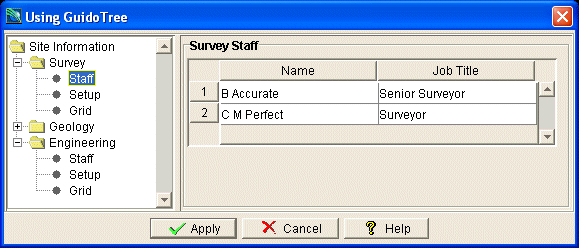
The example form below demonstrates using a simple static tree to organise information on the form. The form uses a common setup technique of placing the GuidoTree inside a GuidoScrollPane which is then inserted into a GuidoSplitPane. This allows the tree to be scrolled with the right pane of the GuidoSplitPane available for changing content.
Notice that focus gained and focus lost actions are set on individual tree nodes in order to invoke a particular action when the user selects the nodes. In this example when a node is selected a panel containing other widgets is displayed in the right hand pane of the form.
# GuidoTree Example 1
set formDef {
  proc showPanel {panelHandle} {
    global siteInfo surveyGrid XXX
    $panelHandle setVisible true
    set selectedNode 0
  }
  proc hidePanel {panelHandle} {
    $panelHandle setVisible false
  }
  GuidoForm guidoTree {
    -label "Using GuidoTree"
    -layout BoxLayout Y_AXIS
    -default_buttons
    GuidoSplitPane splitPane {
      -divider_location 30%
      GuidoScrollPane scrollPane {
        -height 10
        -width 10
        GuidoTree siteInfo {
          -label "Site Information"
          -editable false
          GuidoTreeBranch survey {
            -label "Survey"
            GuidoTreeLeaf surveyStaff {
              -label Staff
              -action focusGained {[showPanel $surveyStaffPanel]}
              -action focusLost   {[hidePanel $surveyStaffPanel]}
            }
            GuidoTreeLeaf surveySetup {
              -label Setup
              -action focusGained {[showPanel $surveySetupPanel]}
              -action focusLost   {[hidePanel $surveySetupPanel]}
            }
            GuidoTreeLeaf surveyGrid {
              -label Grid
              -action focusGained {[showPanel $surveyGridPanel]}
              -action focusLost   {[hidePanel $surveyGridPanel]}
            }
          }
          GuidoTreeBranch geology {
            -label Geology
            GuidoTreeLeaf geologyStaff {
              -label Staff
              -action focusGained {[showPanel $geologyStaffPanel]}
              -action focusLost   {[hidePanel $geologyStaffPanel]}
            }
            GuidoTreeLeaf geologySetup {
              -label Setup
              -action focusGained {[showPanel $geologySetupPanel]}
              -action focusLost   {[hidePanel $geologySetupPanel]}
            }
            GuidoTreeLeaf geologyGrid {
              -label Grid
              -action focusGained {[showPanel $geologyGridPanel]}
              -action focusLost   {[hidePanel $geologyGridPanel]}
            }
          }
          GuidoTreeBranch engineering {
            -label Engineering
            GuidoTreeLeaf engineeringStaff {
              -label Staff
              -action focusGained {[showPanel $engineeringStaffPanel]}
              -action focusLost   {[hidePanel $engineeringStaffPanel]}
            }
            GuidoTreeLeaf engineeringSetup {
              -label Setup
              -action focusGained {[showPanel $engineeringSetupPanel]}
              -action focusLost   {[hidePanel $engineeringSetupPanel]}
            }
            GuidoTreeLeaf engineeringGrid {
              -label Grid
              -action focusGained {[showPanel $engineeringGridPanel]}
              -action focusLost   {[hidePanel $engineeringGridPanel]}
            }
          }
        }
      }
      GuidoPanel content {
        -width 40
        -height 10
        -layout OverlayLayout
        # --------------------------------------------------
        # Survey
        GuidoPanel surveyStaffPanel {
          -label "Survey Staff"
          -border etched true
          -width 40
          -height 10
          -visible false
          -layout BoxLayout
          GuidoScrollPane surveyScroller {
            -height 5
            GuidoTable surveyStaffTable {
              -instances 1 1 50
              GuidoField surveyName {
                -label "Name"
                -width 14
              }
              GuidoField surveyJob {
                -label "Job Title"
                -width 14
              }
            }
          }
        }
        GuidoPanel surveySetupPanel {
          -label "Survey System Setup"
          -border etched true
          -width 40
          -height 10
          -visible false
          -layout CentreLineLayout
          GuidoFileBrowserField surveyTransFile {
            -label "Translate file"
            -width 27
            -file_mask "*.ssi"
          }
          GuidoFileBrowserField surveyDir {
            -label "Master folder"
            -width 27
            -browser_type Directory
          }
        }
        GuidoPanel surveyGridPanel {
          -label "Survey Grid Transformation Coordinates"
          -border etched true
          -width 40
          -height 10
          -visible false
          -layout BorderLayout
          GuidoPanel surveyGridPanel1 {
            -position West
            -layout CentreLineLayout
            GuidoField surveyX1 {
              -label "X1"
              -width 10
            }
            GuidoField surveyY1 {
              -label "Y1"
              -width 10
            }
          }
          GuidoPanel surveyGridPanel2 {
            -position Center
            -layout CentreLineLayout
            GuidoField surveyX2 {
              -label "X2"
              -width 10
            }
            GuidoField surveyY2 {
              -label "Y2"
              -width 10
            }
          }
        }
        # --------------------------------------------------
        # Geology
        GuidoPanel geologyStaffPanel {
          -label "Geology Staff"
          -border etched true
          -width 40
          -height 10
          -visible false
          -layout BoxLayout
          GuidoScrollPane geologyScroller {
            -height 5
            GuidoTable geologyStaffTable {
              -instances 1 1 50
              GuidoField geologyName {
                -label "Name"
                -width 14
              }
              GuidoField geologyJob {
                -label "Job Title"
                -width 14
              }
            }
          }
        }
        GuidoPanel geologySetupPanel {
          -label "Geology System Setup"
          -border etched true
          -width 40
          -height 10
          -visible false
          -layout CentreLineLayout
          GuidoFileBrowserField geologyTransFile {
            -label "Translate file"
            -width 27
            -file_mask "*.ssi"
          }
          GuidoFileBrowserField geologyDir {
            -label "Master folder"
            -width 27
            -browser_type Directory
          }
        }
        GuidoPanel geologyGridPanel {
          -label "Geology Grid Transformation Coordinates"
          -border etched true
          -width 40
          -height 10
          -visible false
          -layout BorderLayout
          GuidoPanel geologyGridPanel1 {
            -position West
            -layout CentreLineLayout
            GuidoField geologyX1 {
              -label "X1"
              -width 10
            }
            GuidoField geologyY1 {
              -label "Y1"
              -width 10
            }
          }
          GuidoPanel geologyGridPanel2 {
            -position Center
            -layout CentreLineLayout
            GuidoField geologyX2 {
              -label "X2"
              -width 10
            }
            GuidoField geologyY2 {
              -label "Y2"
              -width 10
            }
          }
        }
        # --------------------------------------------------
        # Engineering
        GuidoPanel engineeringStaffPanel {
          -label "Engineering Staff"
          -border etched true
          -width 40
          -height 10
          -visible false
          -layout BoxLayout
          GuidoScrollPane engineeringScroller {
            -height 5
            GuidoTable engineeringStaffTable {
              -instances 1 1 50
              GuidoField engineeringName {
                -label "Name"
                -width 14
              }
              GuidoField engineeringJob {
                -label "Job Title"
                -width 14
              }
            }
          }
        }
        GuidoPanel engineeringSetupPanel {
          -label "Engineering System Setup"
          -border etched true
          -width 40
          -height 10
          -visible false
          -layout CentreLineLayout
          GuidoFileBrowserField engineeringTransFile {
            -label "Translate file"
            -width 27
            -file_mask "*.ssi"
          }
          GuidoFileBrowserField engineeringDir {
            -label "Master folder"
            -width 27
            -browser_type Directory
          }
        }
        GuidoPanel engineeringGridPanel {
          -label "Engineering Grid Transformation Coordinates"
          -border etched true
          -width 40
          -height 10
          -visible false
          -layout BorderLayout
          GuidoPanel engineeringGridPanel1 {
            -position West
            -layout CentreLineLayout
            GuidoField engineeringX1 {
              -label "X1"
              -width 10
            }
            GuidoField engineeringY1 {
              -label "Y1"
              -width 10
            }
          }
          GuidoPanel engineeringGridPanel2 {
            -position Center
            -layout CentreLineLayout
            GuidoField engineeringX2 {
              -label "X2"
              -width 10
            }
            GuidoField engineeringY2 {
              -label "Y2"
              -width 10
            }
          }
        }
      }
    }
  }
}
# setup some data for demonstration purposes. In the real world this information
# would more than likely be read from a configuration file or database.
set surveyName(0)   "B Accurate"
set surveyJob(0)    "Senior Surveyor"
set surveyName(1)   "C M Perfect"
set surveyJob(1)    "Surveyor"
set surveyTransFile "/Surpac/Survey/trans_srv.ssi"
set surveyDir       "/MiningData/Survey"
set surveyX1        "1000"
set surveyY1        "1000"
set surveyX2        "2000"
set surveyY2        "2000"
set geologyName(0)   "A Composite"
set geologyJob(0)    "Senior Geologist"
set geologyName(1)   "D H Sampler"
set geologyJob(1)    "Geologist"
set geologyTransFile "/Surpac/Geology/trans_geo.ssi"
set geologyDir       "/MiningData/Geology"
set geologyX1        "3000"
set geologyY1        "3000"
set geologyX2        "4000"
set geologyY2        "4000"
set engineeringName(0)   "P Ramp"
set engineeringJob(0)    "Senior Surveyor"
set engineeringName(1)   "Z Ring"
set engineeringJob(1)    "Surveyor"
set engineeringTransFile "/Surpac/Engineering/trans_eng.ssi"
set engineeringDir       "/MiningData/Engineering"
set engineeringX1        "5000"
set engineeringY1        "5000"
set engineeringX2        "6000"
set engineeringY2        "6000"
# Create and run the form
SclCreateGuidoForm formHandle $formDef {}
$formHandle SclRun {}
if {"$_status" == "cancel"} {
  puts "Cancelling"
  return
}
|
Example 2
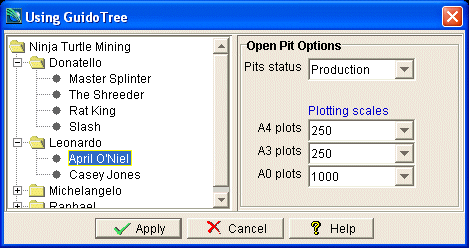
The example form below demonstrates using a dynamic GuidoTree. In this example some configuration data is sent from the server Scl script up to the client Guido form via the use of an invisible GuidoField called companyOpps. This field is then interrogated by an initialisation form procedure called populateTree which creates the tree branches and leaf nodes as the configuration data from the server is processed.
The tree initialisation procedure places a tree branch popup menu called branchMenu onto each branch and a leaf menu called leafMenu onto each leaf node in the tree via an action event called mouseReleased (see Guido action events and callbacks for further information). This will display a popup menu when ever a node is right clicked with the mouse. Note that the menu selections only print a message but the example shows the mechanics for doing something more useful.
The example shows techniques for dynamically organising and displaying data that is sensitive to the current node selection. Note that the tree data is read only with any changes you make being lost. To make the form fully functional routines to update the data buffer stored in the companyOpps field need to be developed. This example provides a good starting point for developing a functional dynamic tree.
# GuidoTree Example 2 - A Dynamic Tree
set formDef {
  # procedure to create the tree prior to the form being displayed
  proc populateTree {} {
    global company companyName companyOpps
    set rootNode [$company getRootNode]
    $rootNode setLabel [$companyName getCurrentValue]
    set dataBuf [$companyOpps getCurrentValue]
    foreach project $dataBuf {
      set projectName  [lindex $project 0]
      set pits         [lindex $project 5]
      GuidoTreeBranch "$projectName" {
        -label $projectName
        -action focusGained {[projects]}
      }
      upvar 0 $projectName branchNode
      $rootNode addChild $branchNode
      foreach pit $pits {
        set pitName [lindex $pit 0]
        GuidoTreeLeaf "$pitName" {
          -label $pitName
          -action focusGained {[pits]}
        }
        upvar 0 $pitName leafNode
        $branchNode addChild $leafNode
      }
    }
    $company setSelectedNode $branchNode

  }
  # procedure to set the content of the project panel
  # when one of the project tree nodes is selected
  proc displayProject {} {
    global company companyName companyOpps
    global projectStatus startDate finishDate pitSuper
    set currentNode [$company getSelectedNode]
    set thisProject [$currentNode getName]
    set dataBuf [$companyOpps getCurrentValue]
    foreach project $dataBuf {
      set projectName  [lindex $project 0]
      if {"$thisProject" == "$projectName"} {
        $projectStatus setCurrentValue [lindex $project 1]
        $startDate     setCurrentValue [lindex $project 2]
        $finishDate    setCurrentValue [lindex $project 3]
        $pitSuper      setCurrentValue [lindex $project 4]
        break
      }
    }
  }
  # procedure to set the content of the pit panel
  # when one of the pit tree nodes is selected
  proc displayPit {} {
    global company companyName companyOpps
    global pitStatus a4 a3 a0
    set currentNode [$company getSelectedNode]
    set thisPit     [$currentNode getName]
    set thisProject [[$currentNode getParent] getName]
    set dataBuf [$companyOpps getCurrentValue]
    foreach project $dataBuf {
      set projectName  [lindex $project 0]
      if {"$thisProject" == "$projectName"} {
        foreach pit [lindex $project 5] {
          set pitName  [lindex $pit 0]
          if {"$thisPit" == "$pitName"} {
            $pitStatus setCurrentValue [lindex $pit 1]
            $a4 setCurrentValue [lindex $pit 2]
            $a3 setCurrentValue [lindex $pit 3]
            $a0 setCurrentValue [lindex $pit 4]
            break;
          }
        }
      }
    }
  }
  # procedure to set the content of the project panel and then make it visible
  proc projects {} {
    global projectPanel pitPanel tb1
    $projectPanel setVisible true
    $pitPanel setVisible false
    displayProject
  }
  # procedure to set the content of the pit panel and then make it visible
  proc pits {} {
    global projectPanel pitPanel
    $projectPanel setVisible false
    $pitPanel setVisible true
    displayPit
  }
  # procedure invoked from the add menu item on the branch menu
  proc addProject {} {
    puts "Adding a new project"
  }
  # procedure invoked from the rename menu item on the branch menu
  proc renameProject {} {
    puts "Rename a project"
  }
  # procedure invoked from the delete menu item on the branch menu
  proc deleteProject {} {
    puts "Delete a project"
  }
  # the branch menu definition
  GuidoPopupMenu branchMenu {
    GuidoMenuItem bAdd {
      -label "New project"
       -action mouseReleased {[addProject]}
    }
    GuidoMenuItem bRename {
      -label "Rename project"
      -action mouseReleased {[renameProject]}
    }
    GuidoMenuItem bDelete {
      -label "Delete project"
      -action mouseReleased {[deleteProject]}
    }
  }
  # procedure invoked from the add menu item on the leaf menu
  proc addPit {} {
    puts "Adding a new pit"
  }
  # procedure invoked from the rename menu item on the leaf menu
  proc renamePit {} {
    puts "Rename a pit"
  }
  # procedure invoked from the delete menu item on the leaf menu
  proc deletePit {} {
    puts "Delete a pit"
  }
  # the leaf menu definition
  GuidoPopupMenu leafMenu {
    GuidoMenuItem lAdd {
      -label "New pit"
       -action mouseReleased {[addPit]}
    }
    GuidoMenuItem lRename {
      -label "Rename pit"
      -action mouseReleased {[renamePit]}
    }
    GuidoMenuItem lDelete {
      -label "Delete pit"
      -action mouseReleased {[deletePit]}
    }
  }
  # the actual form definition starts here
  GuidoForm guidoTree {
    -label "Using GuidoTree"
    -layout BoxLayout Y_AXIS
    -default_buttons
    -action initial {[populateTree]}
    GuidoSplitPane splitPane {
      GuidoScrollPane scrollPane {
        -height 10
        -width 10
        GuidoTree company {
          -editable false
          -branch_menu $branchMenu
          -leaf_menu $leafMenu
        }
      }
      GuidoPanel content {
        -width 30
        -height 10
        -layout OverlayLayout
        # this panel is never visible, its is used to hold the data buffers
        GuidoPanel projectPanel {
          -visible false
          GuidoField companyName {}
          GuidoField companyOpps {}
        }
        GuidoPanel projectPanel {
          -label "Project Options"
          -border etched true
          -width 30
          -height 10
          -visible false
          -layout CentreLineLayout
          GuidoComboBox projectStatus {
            -label "Project status"
            -width 7
            -value_in Exploration Production Both
          }
          GuidoFiller fil1a {
            -height 1
          }
          GuidoFiller fil1b {}
          GuidoFiller fil2a {}
          GuidoLabel lab1 {
            -label "Project Details"
            -font_highlight 0 0 200
          }
          GuidoField startDate {
            -label "Start date"
            -width 10
          }
          GuidoField finishDate {
            -label "Finish date"
            -width 10
          }
          GuidoField pitSuper {
            -label "Pit Super"
            -width 10
          }
        }
        GuidoPanel pitPanel {
          -label "Open Pit Options"
          -border etched true
          -width 30
          -height 10
          -visible false
          -layout CentreLineLayout
          GuidoComboBox pitStatus {
            -label "Pits status"
            -width 7
            -value_in Design Production Completed
          }
          GuidoFiller fil1a {
            -height 1
          }
          GuidoFiller fil1b {}
          GuidoFiller fil2a {}
          GuidoLabel lab1 {
            -label "Plotting scales"
            -font_highlight 0 0 200
          }
          GuidoComboBox a4 {
            -label "A4 plots"
            -width 7
            -value_in 250 500 1000 2000 5000
          }
          GuidoComboBox a3 {
            -label "A3 plots"
            -width 7
            -value_in 250 500 1000 2000 5000
          }
          GuidoComboBox a0 {
            -label "A0 plots"
            -width 7
            -value_in 250 500 1000 2000 5000
          }
        }
      }
    }
  }
}
# setup some data for demonstration purposes. In the real world this information
# would more than likely be read from a configuration file or database.
set companyName "Ninja Turtle Mining"
set companyOpps [list [list \
                      [list "Donatello" "Production" "12-Apr-05" "" "Donatello" [list \
                             [list "Master Splinter" Completed 250 250 1000] \
                             [list "The Shreder" Production 250 500 1000] \
                             [list "Rat King" Production 500 1000 5000] \
                             [list "Slash" Design 250 500 1000] \
                       ]] \
                       [list "Leonardo" "Production" "12-Apr-05" "" "Leonardo" [list \
                             [list "April O'Niel" Production 250 250 1000] \
                             [list "Casey Jones" Design 250 500 1000] \
                       ]] \
                       [list "Michelangelo" "Production" "12-Apr-05" "" "Michelangelo" [list \
                             [list "Hun" Completed 250 250 1000] \
                             [list "Krangr" Production 250 500 1000] \
                             [list "Behop" Production 500 1000 5000] \
                             [list "Rock Steady" Production 250 500 1000] \
                       ]] \
                       [list "Raphael" "Exploration" "12-Apr-05" "" "Raphael" [list \
                             [list "Wingnut" Production 250 250 1000] \
                             [list "Screwloose" Production 250 500 1000] \
                             [list "Mondo Gecko" Design 500 1000 5000] \
                       ]] \
                ]]
# Create and run the form
# Note that the value for the invisible form fields companyName & companyOpps is set above!
SclCreateGuidoForm formHandle $formDef {}
$formHandle SclRun {}
if {"$_status" == "cancel"} {
  puts "Cancelling"
  return
}
|