


GuidoScrollPane
Overview
A GuidoScrollPane is a container object that creates a scrolling region on the form. The scroll pane may have a vertical scroll bar, a horizontal scroll bar, or both depending upon the available space and the size of the object contained within the scroll pane.
The concept of the scroll pane is to provide a viewport into another object that is too large to be displayed on the form. By providing vertical and/or horizontal scroll bars this larger object can be scrolled under the pane to bring sections of it into view.
Normally Guido container objects like a GuidoPanel or a GuidoTable are placed into a scroll pane but other objects such as a GuidoLabel or GuidoTextArea can also be contained in a scroll pane.
Synopsis
GuidoScrollPane Name Body
Description
The GuidoScrollPane command when processed will define a container section on the form. Vertical and/or horizontal scroll bars will be automatically added as needed. This is governed by the size of the scroll pane as set with the -width and -height switches or the -scroll_size switch described below.
Arguments
Name Name is a unique identifier that you assign and is used to differentiate this object from other Guido objects in the form definition.
Body The body of the scroll pane may contain a number of switches to modify the default behaviour and the object definitions of the items (usually GuidoPanels) to be placed into the scroll pane. The body begins with an opening curly brace and ends with a closing curly brace. If there is no required body the curly braces {} are required as a place holder for this argument.
Switches The following switches can be used to modify the default behaviour of the scroll pane:
| -scroll_size columns rows | The -scroll_size switch specifies the size of the
scroll pane using normal character width and height measurements. The
columns specifies the width and rows specifies the height.
You can also use the standard -width and -height switches
if you only require a size in one direction.
-scroll_size 10 5 -scroll_size 8 12 |
Common Guido switches reference
Examples
Example 1
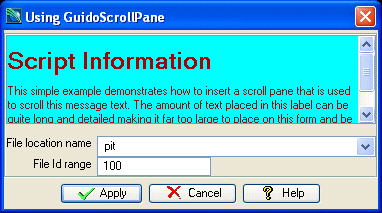
The example form below demonstrates using a GuidoScrollPane that contains a GuidoLabel with a long html format message. The message is too large for the allocated space so a horizontal scroll bar is inserted to scroll the message up and down. You may also want to see GuidoPanel for information on panels and layouts.
# GuidoScrollPane Example 1
# define the form
set formDef {
  GuidoForm form {
    -label "Using GuidoScrollPane"
    -default_buttons
    -layout BoxLayout Y_AXIS
    GuidoScrollPane scroller {
      -scroll_size 20 5
      GuidoLabel info {
        -width 18
        -label {
                <html>
                <body bgcolor="#00FFFF" text="#AA0000">
                <h1>Script Information</h1>
                This simple example demonstrates how to insert a scroll pane that is used to scroll this message text.
                The amount of text placed in this label can be quite long and detailed making it far too large to
                place on this form and be entirely visible. By using a scroll pane all of the text is still available
                to the user but it only occupies a few lines on the form.
                </html>
               }
      }
    }
    GuidoFiller spacer {
      -height 0.5
    }

    GuidoPanel main {
      -layout CentreLineLayout

      GuidoFileBrowserField location {
        -label "File location name"
        -width 25
        -format none
        -null false
        -start_dir SSI_PLOTTING:
        -file_mask "*.str *.dtm"
        -link idRange
      }

      GuidoField idRange {
        -label "File Id range"
        -width 10
        -format range
        -null false
      }
    }
  }
}
# Create and run the form
SclCreateGuidoForm formHandle $formDef {}
$formHandle SclRun {}
puts "The file location is $location"
puts "Using an Id range of $idRange"
|
Example 2
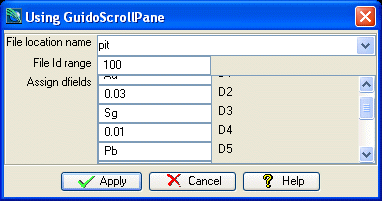
The example form below demonstrates using a GuidoScrollPane that contains a GuidoPanel that in turn contains a number of fields and labels to assign dfield values. Note the use of the -label switch on the GuidoScrollPane that sets a label next to the pane on the form.
# GuidoScrollPane Example 2
# define the form
set formDef {
  GuidoForm form {
    -label "Using GuidoScrollPane"
    -default_buttons
    -layout CentreLineLayout
    GuidoFileBrowserField location {
      -label "File location name"
      -width 25
      -format none
      -null false
      -start_dir SSI_PLOTTING:
      -file_mask "*.str *.dtm"
      -link idRange
    }
    GuidoField idRange {
      -label "File Id range"
      -width 10
      -format range
      -null false
    }
    GuidoScrollPane scroller {
      -label "Assign dfields"
      -scroll_size 20 5
      GuidoPanel scrollingPanel {
        -layout CentreLineLayout
        GuidoField d1 {
          -width 10
          -format none
        }
        GuidoLabel l1 {
          -label "D1"
        }
        GuidoField d2 {
          -width 10
          -format none
        }
        GuidoLabel l2 {
          -label "D2"
        }
        GuidoField d3 {
          -width 10
          -format none
        }
        GuidoLabel l3 {
          -label "D3"
        }
        GuidoField d4 {
          -width 10
          -format none
        }
        GuidoLabel l4 {
          -label "D4"
        }
        GuidoField d5 {
          -width 10
          -format none
        }
        GuidoLabel l5 {
          -label "D5"
        }
        GuidoField d6 {
          -width 10
          -format none
        }
        GuidoLabel l6 {
          -label "D6"
        }
        GuidoField d7 {
          -width 10
          -format none
        }
        GuidoLabel l7 {
          -label "D7"
        }
        GuidoField d8 {
          -width 10
          -format none
        }
        GuidoLabel l8 {
          -label "D8"
        }
        GuidoField d9 {
          -width 10
          -format none
        }
        GuidoLabel l9 {
          -label "D9"
        }
        GuidoField d10 {
          -width 10
          -format none
        }
        GuidoLabel l10 {
          -label "D10"
        }
      }
    }
  }
}
# Create and run the form
SclCreateGuidoForm formHandle $formDef {}
$formHandle SclRun {}
|
Example 3
See the reference on GuidoTable for an example of scroll panes and tables.
See Also
Guido
GuidoForm
GuidoPanel
Common
guido switches
GuidoPanel
Layout Managers