


Guido action callbacks
Action callbacks in Guido are used to modify the form at runtime in some manner. This may be to change a value in a field, to change the value list of a combo box, to add a row to a table, or any other action that physically changes the form.
To attach an action callback to a Guido widget or container object use the -action switch to register the event type and the callback procedure (see the examples in the table below). There are a number of event types that can occur on a form to cause an action callback to be invoked. The full list of available action events that can be caught is provided in the table below.
Standard Actions
| Event Name | Event Description |
| initial | The callback procedure is invoked prior to the form actually being displayed.
This action is commonly used to set an initial state for the form.
-action initial {[initialProc]}
|
| final | The callback procedure is invoked prior to the form being
un-displayed after the validation sequence has completed.
-action final {[finalProc]}
|
| stateChanged | The callback procedure is invoked whenever the state of a
widget or container changes by a dependency or some other action that
causes the widget to be turned on or off (made visible/invisible or greyed
out)
-action stateChanged {[stateChangedProc]}
|
| valueChanged | The callback procedure is invoked whenever the value within
a widget changes by the user typing a new value or selecting a new value
such as selecting a checkbox or a value from a combo box list. Note that
the value changed action is not fired until focus leaves the widget.
-action valueChanged {[valueChangedProc]}
|
| focusGained | The callback procedure is invoked whenever the widget or
container gets input focus either via a mouse click or by the standard
tab order on the form.
-action focusGained {[focusGainedProc]}
|
| focusLost | The callback procedure is invoked whenever the widget or
container looses input focus
-action focusLost {[focusLostProc]}
|
| rowAdded | The callback procedure is invoked whenever a row in a GuidoTable
is added
-action rowAdded {[rowAddedProc]}
|
| rowInserted | The callback procedure is invoked whenever a row in a GuidoTable
is inserted
-action rowInserted {[rowInsertedProc]}
|
| rowDeleted | The callback procedure is invoked whenever a row in a GuidoTable
is deleted
-action rowDeleted {[rowDeletedProc]}
|
| keyPressed | The callback procedure is invoked whenever a key is pressed
within a widget that has focus
-action keyPressed {[keyPressedProc]}
|
| keyReleased | The callback procedure is invoked whenever a key is released
within a widget that has focus
-action keyReleased {[keyReleasedProc]}
|
| keyTyped | The callback procedure is invoked whenever a key is pressed
and released within a widget that has focus. Key typed events are also
generated if the key is held down for a period of time and a number of
characters are created.
-action keyTyped {[keyTypedProc]}
|
| mouseClicked | The callback procedure is invoked whenever the mouse key
is clicked within a widget that has focus
-action mouseClicked {[mouseClickedProc]}
|
| mousePressed | The callback procedure is invoked whenever the mouse pointer
is over a widget or container and a mouse button is pressed in
-action mousePressed {[mousePressedProc]}
|
| mouseReleased | The callback procedure is invoked whenever the mouse pointer
is moved over a widget or container and a mouse button is released
-action mouseReleased {[mouseReleasedProc]}
|
| mouseEntered | The callback procedure is invoked whenever the mouse pointer
moves over a widget or container on the form
-action mouseEntered {[mouseEnteredProc]}
|
| mouseExited | The callback procedure is invoked whenever the mouse pointer
is moved out of a widget or contained on the form
-action mouseExited {[mouseExitedProc]}
|
| mouseDragged | The callback procedure is invoked when a mouse button is
pressed on a component and then dragged. Mouse dragged events will continue
to be delivered to the component where the drag originated until the mouse
button is released (regardless of whether the mouse position is within
the bounds of the component).
-action mouseDragged {[mouseDraggedProc]}
|
| mouseMoved | The callback procedure is invoked when the mouse button has
been moved on a component (with no buttons no down).
-action mouseMoved {[mouseMovedProc]}
|
Drag and Drop Actions
It is possible to perform drag and drop operations on Guido forms. Drag and Drop requires knowledge of the underlying Java classes and event model. For more detailed information consult the Java documentation on Drag and Drop.
| Event Name | Event Description |
| dragSourceGestureRecognized | The callback procedure is invoked to notify a Guido object
that a drag operation has begun.
-action dragSourceGestureRecognized {[dragSourceGestureProc]}
|
| dragSourceDropEnd | The callback procedure is invoked to signify that the Drag
and Drop operation is complete
-action dragSourceDropEnd {[dragSourceDropEndProc]}
|
| dragSourceEnter | The callback procedure is invoked as the mouse enters a hotspot
for a drop operation
-action dragSourceEnter {[dragSourceEnterProc]}
|
| dragSourceExit | The callback procedure is invoked as the mouse cursor exists
a drop hotspot
-action dragSourceExit {[dragSourceExitProc]}
|
| dragSourceOver | The callback procedure is invoked as the mouse moves over
the drop hotspot
-action dragSourceOver {[dragSourceOverProc]}
|
| dragSourceActionChanged | The callback procedure is invoked when the user has modified
the drag gesture somehow. This is caused by pressing the key modifiers
such as Shift, Ctrl, or Alt or pressing/depressing the mouse buttons.
-action dragSourceActionChanged {[dragSourceActionChangedProc]}
|
| dropTargetEnter | The callback procedure is invoked when a drag operation has
encountered the drop target object
-action dropTargetEnter {[dropTargetEnterProc]}
|
| dropTargetExit | The callback procedure is invoked when the drag operation
has departed the drop target object without dropping
-action dropTargetExit {[dropTargetExitProc]}
|
| dropTargetOver | The callback procedure is invoked when a drag operation is
ongoing on the drop target object
-action dropTargetOver {[dropTargetOverProc]}
|
| dropTarget | The callback procedure is invoked when the drag operation
has terminated with a drop on this drop target
-action dropTarget {[dropTargetProc]}
|
| dropTargetActionChanged | The callback procedure is invoked if the user has modified
the current drop gesture somehow. This is caused by pressing the key modifiers
such as Shift, Ctrl, or Alt or pressing/depressing the mouse buttons.
-action dropTargetActionChanged {[dropTargetActionChangedProc]}
|
Object Methods
An action callback will almost always require the use of Object Methods to perform some function. Most commonly the getCurrentValue and setCurrentValue methods are called on widgets to get and/or set the value contained in them. It is also common to use the setVisible and getVisible methods to show and hide widgets and containers dynamically. See the manual reference on Guido Object Methods for a full description on all available methods.
Handling Advanced Actions (The Guido Event Object)
Depending upon the type of action, your callback procedure may require further information on the event that caused the action. For example if it was a mouse button event, you may want to know which mouse button was actually pressed. This information is available behind the scenes in a special Guido object called the Guido Event object.
Action callback procedures allow for a special named argument to be included in the standard procedure argument list (when specified with the -action switch). If the keyword GUIDO_EVENT is one of your named arguments, then a reference handle to the actual Guido Event object in memory will be passed to your callback procedure.
Once you have a reference handle to the Guido Event object, you can then invoke any of the following object methods on it.
| $eventObject getSource | Return a reference handle to the source object of this event.
set sourceHandle [$eventObj getSource] |
| $eventObject getAction | Return the action string for this event.
puts "Debug [$eventObj getAction]" |
| $eventObject getEventObject | Return a reference handle to the native Java event object
(java.awt.AWTEvent). A lot of information can be determined about the
event from this object. See the java
documentation for detailed information.
set javaObj [$eventObj getEventObject] |
| $eventObject getData | Return a reference handle to the data object for this event.
The data object is dependent on the type of event in action
set dataObj [$eventObj getData] |
| $eventObject getDataType | Return the type of data that the event object contains. The
return result will be one of String, Text, or Object.
if  {"[$eventObj getDataType]" == "String"} {
  # process the event
}
|
| $eventObject isDataTypeSupported type | Returns a Boolean true or false value if the event data supports
the given type. Type must be String, Text, or Object.
if  {[$eventObj isDataTypeSupported "Text"]} {
  # process the event
}
|
See example 3 below for further details on using the GUIDO_EVENT object in callback procedures.
Examples
Example 1
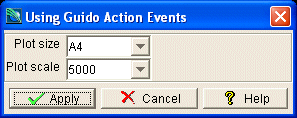
The more common types of action events to register callbacks on are initial, final, and valueChanged. The example below shows a simple use of action callbacks
  # GuidoAction Example 1
  # define the form
  set formDef {
     proc setDefaultScale {size scale} {
      set selectedSize [$size getCurrentValue]

      if {"$selectedSize" == "A0"} {
        $scale setCurrentValue 250
      } elseif {"$selectedSize" == "A1"} {
        $scale setCurrentValue 500
      } elseif {"$selectedSize" == "A2"} {
        $scale setCurrentValue 1000
      } elseif {"$selectedSize" == "A3"} {
        $scale setCurrentValue 2500
      } elseif {"$selectedSize" == "A4"} {
        $scale setCurrentValue 5000
      }
    }
     GuidoForm form {
      -label "Using Guido Action Events"
      -default_buttons
      -action initial {[setDefaultScale $plotSize $plotScale]}
      GuidoComboBox plotSize {
        -label "Plot size"
        -width 5
        -value_in A0 A1 A2 A3 A4
        -null false
        -action valueChanged {[setDefaultScale $plotSize $plotScale]}     }

      GuidoComboBox plotScale {
        -label "Plot scale"
        -width 5
        -value_in 250 500 1000 2500 5000
        -exclusive false
        -null false
      }
    }
  }
  # Create and run the form
  SclCreateGuidoForm formHandle $formDef {}
  $formHandle SclRun {}
  puts "Plot sheet size = $plotSize"
  puts "Plotting scale  = $plotScale"
|
Example 2
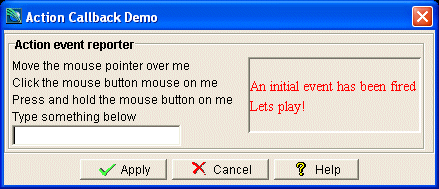
The following example shows a callback handler that has been attached to mouse motion events, mouse button events, and keyboard events. Cut and paste the code below into a Tcl script to see how the callbacks behave.
# GuidoAction Example 2
# define the form
set formDef {
proc callbackHandler {report theEvent} {
# handle form events     if {"$theEvent" == "initial"} {
set msg "<html><font color=red>An initial event has been fired<br>Lets play!</font></html>"
} elseif {"$theEvent" == "final"} {
  set msg ""
  puts "A final event has been fired but the form is not displayed now"
# handle mouse events     } elseif {"$theEvent" == "mouseEntered"} {
  set msg "<html><font color=red>Your pointing the mouse at me</font></html>"

} elseif {"$theEvent" == "mouseExited"} {
  set msg "<html><font color=green>Your not pointing the mouse at me</font></html>"

} elseif {"$theEvent" == "mouseClicked"} {
  set msg "<html><font color=blue>Hey! you clicked the mouse on me</font></html>"

} elseif {"$theEvent" == "mousePressed"} {
  set msg "<html><font color=purple>Your holding the mouse button down on me</font></html>"

} elseif {"$theEvent" == "mouseReleased"} {
  set msg "<html><font color=brown>OK you let the mouse button go now</font></html>"
# handle keyboard events     } elseif {"$theEvent" == "keyPressed"} {
  set msg "<html><font color=blue>You have got a key pressed and held done</font></html>"

} elseif {"$theEvent" == "keyReleased"} {
  set msg "<html><font color=purple>OK now you have let the key go</font></html>"

} elseif {"$theEvent" == "keyTyped"} {
  set msg "<html><font color=red>The key press has turned into a keyTyped event</font></html>"

} elseif {"$theEvent" == "clear"} {
 set msg ""
} else {
  set msg "ERROR: This should ever happen!"
}

$report setCurrentValue $msg
}

GuidoForm form {
  -label "Action Callback Demo"
  -default_buttons
  -action initial {[callbackHandler $reportLab "initial"]}
  -action final {[callbackHandler $reportLab "final"]}     GuidoPanel top {
  -label "Mouse action event reporter"
  -border etched true
  -layout BoxLayout X_AXIS

GuidoPanel labels {
  -layout BoxLayout Y_AXIS

GuidoLabel lab1 {
  -label "Move the mouse pointer over me"
  -action mouseEntered {[callbackHandler $reportLab "mouseEntered"]}
  -action mouseExited {[callbackHandler $reportLab "mouseExited"]}         }
GuidoLabel lab1 {
  -label "Click the mouse button mouse on me"
  -action mouseClicked {[callbackHandler $reportLab "mouseClicked"]}         }
GuidoLabel lab1 {
  -label "Press and hold the mouse button on me"
  -action mousePressed {[callbackHandler $reportLab "mousePressed"]}
  -action mouseReleased {[callbackHandler $reportLab "mouseReleased"]}

GuidoField keys {
  -label "Type something below"
  -width 15
  -action keyPressed  {[callbackHandler $reportLab "keyPressed"]}
  -action keyReleased {[callbackHandler $reportLab "keyReleased"]}
  -action keyTyped    {[callbackHandler $reportLab "keyTyped"]}         }
							}
GuidoFiller fil1 {
  -width 1
}
GuidoPanel report {
  -border loweredBevel false
  -layout BoxLayout Y_AXIS
GuidoLabel reportLab {
  -width 15
  -height 4
  -action mouseEntered {[callbackHandler $reportLab "clear"]}         }
}
}
}
}
}

SclCreateGuidoForm form_handle $formDef {}
$form_handle SclRun {}
|
Example 3
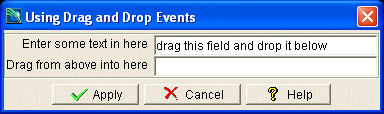
The Following example shows a simple drag and drop setup. In order for a Guido object to be draggable it must set an action handler for the dragSourceGestureRecognized event. The action procedure for this event doesn't need to do anything except be registered, this simply signals that the object is capable of being dragged. An object that wishes to enable drop events must register an action handler for the dropTarget event. Its callback handler must extract the data from the event object and then do with it what it wants (in this example the current value is set to the dragged data).
Note the use of the keyword GUIDO_EVENT (highlighted in the example) in the argument list of the callback handlers. This allows a reference to the event object to be provided to the callback procedures such that the event can be further interrogated.
  # GuidoAction Example 3

  # define the form
  set formDef {
     proc startDrag {event} {
      #We dont have to do anything here except have the callback registered
    }

    proc getDroppedInfo {event} {
      if {"[$event getDataType]" == "String"} {
        # handle a drop event by setting the current value to the dropped data
        set field [$event getSource]
        $field setCurrentValue [$event getData]
      }
    }
     GuidoForm form {
      -label "Using Drag and Drop Events"
      -default_buttons

      GuidoField dragField {
        -label "Enter some text in here"
        -width 20
        -default "drag this field and drop it below"
        -null false
        -action dragSourceGestureRecognized  {[startDrag GUIDO_EVENT]}     }

      GuidoField dropField {
        -label "Drag from above into here"
        -width 20
        -null false
        -action dropTarget {[getDroppedInfo GUIDO_EVENT]}     }
    }
  }

  # Create and run the form
  SclCreateGuidoForm formHandle $formDef {}
  $formHandle SclRun {}
|
See Also
Guido
Dependency
Callbacks
Action Callbacks
Validation Callbacks
Common guido switches