GuidoField
Overview
A GuidoField is the most common widget that you will use on your forms. It provides a text box input region into which any number characters can be typed. By using the many switches that are available to modify the behaviour of the GuidoField, an extremely flexible input widget can be defined.
GuidoFields are used for a variety of purposes that include entering text, numbers, ranges, dfields, colours, and more. All these items can be validated with the desired criteria. By also using the -low_bound and -high_bound switches the input can be further restricted to a range of values. It can also be used as a status item component. See the common Guido switches reference for further information and the examples below.
Synopsis
GuidoField Name Body
Description
The GuidoField command when processed will define a text box input region on the form. The types of input and ranges of values that can be entered may be further refined using a number of available switches to modify the default behaviour of the widget.
Arguments
Name Name is a unique identifier that you assign and is used to differentiate this object from other Guido objects in the form definition. The name you assign will become the name of a variable in the Tcl interpreter that will contain the value as entered into the field on the form.
Body The body of the field may contain a number of switches to modify the default behaviour of the field. The body begins with an opening curly brace and ends with a closing curly brace. If there is no required body the curly braces {} are required as a place holder for this argument.
Switches
The GuidoField widget can accept any of the common Guido object and Guido widget switches. See the Common Guido widget reference for further details and the examples below for further information.
Common Guido switches reference
Examples
Example 1
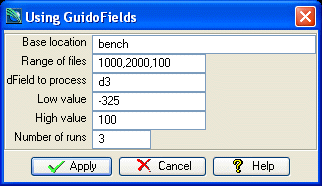
The example form below demonstrates using GuidoFields with a number of different switches. The values as entered on the form are displayed to the message window after the form is applied.
# GuidoField Example 1
# define the form
set formDef {
  GuidoForm form {
    -label "Using GuidoFields"
    -default_buttons
    GuidoField location {
      -label "Base location"
      -width 20
      -format none
      -null false
    }
    GuidoField idRange {
      -label "Range of files"
      -width 10
      -format range
      -null false
    }
    GuidoField dField {
      -label "dField to process"
      -width 10
      -format string_field
      -null false
    }
    GuidoField lowValue {
      -label "Low value"
      -width 10
      -format double
      -low_bound -99999
      -high_bound 99999
      -null false
    }
    GuidoField highValue {
      -label "High value"
      -width 10
      -format double
      -low_bound 0
      -high_bound 99999
      -null false
    }
    GuidoField noOfRuns {
      -label "Number of runs"
      -width 5
      -format integer
      -low_bound 0
      -high_bound 10
      -null false
    }
  }
}
# Create and run the form
SclCreateGuidoForm formHandle $formDef {}
$formHandle SclRun {}
puts "Input files $location$idRange"
puts "Processing on $dField between $lowValue and $highValue"
puts "Perfoming $noOfRuns iterations"
|
Example 2
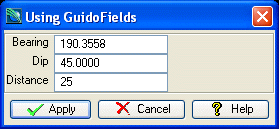
The following example demonstrates more GuidoFields and the use of some of the validation switches to control the input data
# GuidoField Example 2
# define the form
set formDef {
  GuidoForm form {
    -label "Using GuidoFields"
    -default_buttons
    GuidoField bearing {
      -label "Bearing"
      -width 10
      -format dms_angle
      -low_bound 0
      -high_bound 360
      -null false
    }
    GuidoField dip {
      -label "Dip"
      -width 10
      -format dms_angle
      -low_bound 0
      -high_bound 360
      -null false
    }
    GuidoField distance {
      -label "Distance"
      -width 10
      -low_bound 1
      -format double
      -null false
    }
  }
}
# Create and run the form
SclCreateGuidoForm formHandle $formDef {}
$formHandle SclRun {}
puts "Bearing = $bearing"
puts "Dip = $dip"
puts "Distance = $distance"
|