Using the Translation Manager
The Translation Manager has 5 frames of input that it uses to perform all the functions required on Master, Work and Translation database files. Depending on the mode that the software is started in, some frames may be disabled.

Each frame is designed for a different task:
- Paths
- Create/Merge Language translations
- Edit Working File
- Edit Translation File
- Load from TCL Files
This frame gives the user quick access to the paths of all resources needed by the Translation Manager, depending on the usage mode. This may include the Master and Work databases, translation files and the path to a Surpac installation.
This frame is designed to allow the Source Code Administrator to perform given tasks on the master database. These tasks include creating new languages, creating files for sending to translators, and merging work and translation files back into the master database file.
As the name suggests, this frame is designed to allow you to edit the work database file. The editing functions it allows are additions, deletions, and edits on existing messages. Since no updates go directly to the master database file, they all get written to a work database file, which is later merged back into the master file. This frame also allows you to search the master file for an exiting message, or filter the messages based on a number of criteria.
In a similar vein, this frame allows you to edit the translation file. This frame is basically designed to show the translator the english text, and give them a place to enter the text in the other language. The translator can also perform some simple filtering to determine what messages remain untranslated.
The final frame is one for the programmers. All new menus and form dialogs in the Surpac system use TCL as their language. This function will search an individual file, or a directory full of tcl files, for language text that has not been translated, and will insert these entries into the work file. This is faster, easier and more accurate than making the additions manually.
Between these five frames, all functions required by all people editing the language translation files can be accomplished.
Status Region
The status region of the software can be found on the bottom of the screen (in all frames), and it gives valuable information about the state of the software. The information available is:
- A list of the files and paths to files that you are currently using.
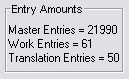
- A count of various numbers in the system.
- Master Entries is the number of entries in master file.
- Work entries are the number of entries in the work file.
- Listed entries are the entries displayed in the left-hand list of message keys. If you have filtered the list, the count will display the number of entries in the filter.
- Translation entries are the number of entries in the translation file.
It will look something like this:
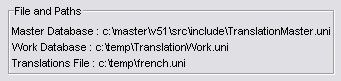
You should pay attention to these, as if the paths are not correct, then you will be either putting data in the wrong work file (which cannot be merged with another work file) or you will not be seeing all of the available text.
This area provides counts of the number of messages in all areas, and can be useful in determining whether the correct information is available also. The display will look something like this: