


Paths Setup
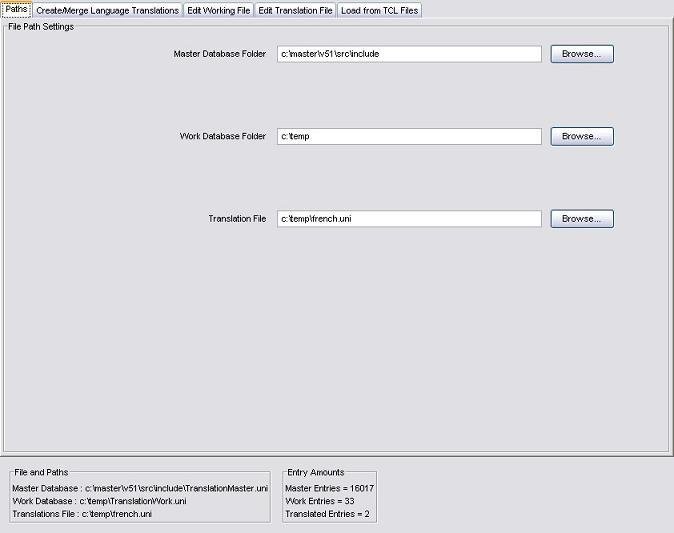
The paths panel in Master mode:
Program Resources
This panel allows the user to set up any of the four different types of resources that may be required:
- Master Database Folder
- Work Database Folder
- Translation File
- Surpac Installation Folder
The folder containing the master translation database.
The folder containing the work translation database. If the work file does not already exist at this location, it will be created after the first operation on the work file.
The file containing translations for a number of messages in a particular language.
The location of a working Surpac installation. This folder must contain the folders nt_i386 and share to be considered valid, as it is used to extract information from message files.
Path Setup
Different resources are required by the Translation Editor depending on the mode you are using it in, so the paths visible here will vary.
In Master mode, you can set the Master and Work file folders, and a Translation file.
In Work mode, you can set the Master and Work file folders.
In Translation Mode, you can set a Translation file and the Surpac Installation Path.
To change the path to any of these resources select the appropriate Browse button, and then use the file selection window to select the directory or file required. Changing any of these paths will refresh the relevent information immediately.
Paths can also be specified by typing the absolute path of the file/folder into the appropriate text field and pressing the 'Enter' key to apply the change.
Path Errors
Any errors concerning a path that you have entered will be reported in red text at the bottom of the panel, e.g.:
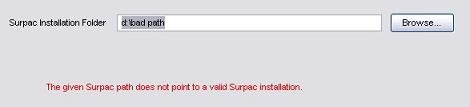
Keep in mind that any operations within the program requiring you to enter the path to a specific resource will be disabled until the path to that resource is valid.