


Load From TCL Files
- What are TCL Messages?
- TCL Message Extraction
- TCL Message Editing
- Merging TCL Messages into Work File
- Update of TCL Files
All new User Interface development is done using TCL as the scripting language to build user dialog forms. It is also used to create menus. Therefore, since a large amount of the text to be translated is going to come from TCL scripts, this frame allows you to simply select a TCL file (or a directory full of TCL files), and all text will be taken from the TCL files and entered into your work file.
In Guido TCL scripts, the following denote areas that contain messages. The parser in this function looks for the following keywords:
- -caption
- -label
- -tip
- -value_in
It will parse any text out of those keywords, handling very long, multi-line messages without problems. Sometimes, this process may result in incorrect messages, but they should be easy to sort out once they're in the work file.

To load text from TCL files, you must first select the file(s) to load. The top text area will take the path to a single TCL file, or a directory containing TCL files. The function can also be made to search recursively through all directories underneath the selected directory (by selecting or unselecting the "Recurse Sub-directories" check box.
So simply enter the file or directory (full path) in the top text box, or select one by pressing the Browse button, which will bring up a file selection window allowing you to select the required file or folder.
You may then select a category to put all message found in. All messages have a category. This is to allow selective targeting of the translation process. To allow for this targeting, you may choose to put all messages found into a particular category. If you leave this field blank, default categories will be used, except in the case of tool tips, which are stored as tool tips regardless of the given or default category.
To begin extracting messages, click the Start button. All text found will be used as the message key. For performance and a number of other reasons, message keys should not be too long. For this reason, message keys are limited in this function to 100 characters in length. If a message text is less than 100 characters, it will be stored in memory until merged. If the text is longer than 100 characters, it will be given an ID generated automatically from the TCL filename, the type of message, and its sequence in the file. This ID will then be placed into the Large Messages list in the lower porion of the panel as shown:
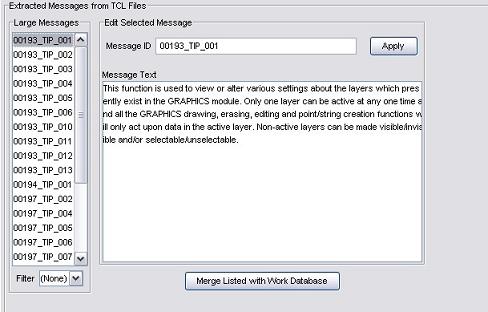
The Filter combo box can be used to display a specific type of message (i.e. tip, caption, label, value_in) or all messages. (None)
After extraction, the status panel will be updated with the number of large and small messages extracted.
Once you have a list of extracted messages, you can edit the ID and message before merging. To edit a message, click it in the Large Messages list and the current ID and message text will appear in the Message ID and Message Text fields. The ID should be renamed to something more descriptive, and like any other large message key must be unique and contain only uppercase and no spaces.
Merging TCL Messages into Work File
Once you have made the required changes to the extracted messages, they can be merged with the work file by clicking Merge Listed with Work Database. This will attempt to merge all small messages currently stored in memory, as well as all visible messages in the Large Message list. As large messages are successfully merged into the work file, they are removed from the list.
Duplicates are not added to the work file; if a message is found with an ID or text already in the database you have loaded, it will be left in the list, and may be edited before attempting to merge it with the work file again.
Since the ID's of extracted messages may be changed during the extraction and merging process, it is important that the changes be reflected in the TCL files, otherwise Guido form definitions may reference message ID's that are out of date.
Updates are now performed automatically after the merge process. The new ID's of long messages merged are substituted in place of the corresponding text in the file from which they were originally extracted. In the case where a message contains text which is identical to that of another message that has already been merged with the work file, the ID of the first message encountered with that text is substituted into the TCL file instead.