


GuidoTable
Overview
A GuidoTable is a container object that turns any subordinate Guido widgets (fields and combo boxes, etc) into multiline entry widgets. A common usage is to display values from a database table where each column in the table will have several values. GuidoTables are commonly defined within a GuidoScrollPane so that scroll bars are provided when the number of rows is too great to be displayed on the form.
The use of tables requires a reasonable knowledge of Tcl arrays and lists. This is because the returned values of the widgets defined within the table are returned as an array of values index from 0. See the examples below which demonstrate retrieving values from widgets defined in GuidoTables.
To create a column in the table you simply define a normal widget such as a GuidoField in the body of the GuidoTable. The label that you assign to the widget becomes the column header. The number of rows that are initially in the table are controlled by the -instances switch described below. An important note is that the table will not have row or column headers if it is not defined within a GuidoScrollPane.
Synopsis
GuidoTable Name Body
Description
The GuidoTable command when processed will define a rectangular section on the form that contains any number of Guido widgets that have been defined within it. Column and row headings are inserted automatically if the table as been defined inside of a GuidoScrollPane.
Arguments
Name Name is a unique identifier that you assign and is used to differentiate this object from other Guido objects in the form definition.
Body The body of the table may contain a number of switches to modify the default behaviour and the widget definitions of the items to be placed into the table. The body begins with an opening curly brace and ends with a closing curly brace. If there is no required body the curly braces {} are required as a place holder for this argument.
Switches The following switches can be used to modify the default behaviour of the table:
| -instances initial minimum maximum | The -instances switch determines the dynamics of the
table by specifying integer values for the parameters as follows
When the table is in interactive mode the user cannot remove less than the minimum number of rows or add more than the maximum number of rows. The minimum and maximum parameters are optional. If they are not specified the minimum number of rows is 0 with no practical maximum. -instances 10 -instances 10 1 -instances 10 1 1000 -instances 5 5 20 |
| -interactive true|false | The -interactive switch determines whether rows can
be added and deleted from the table by the script user. Setting interactive
to true will allow the user to add rows to the table when the tab key
is pressed on the last field of the last row. A popup menu with options
to add and delete rows is also available by right clicking the mouse on
the row headers. When interactive is set to false the table cannot exceed
the maximum row count set with the -instances switch.
By default the table is set to interactive false. -interactive true -interactive false |
| -column_sorting true|false | The -column_sorting switch determines whether column
sorting is permitted. By default column sorting is set to true which allows
the user to sort values within columns in ascending order by clicking
the mouse on the column header.
-column_sorting true -column_sorting falseNote that this switch only works for tables defined within a GuidoScrollPane |
| -blank_row_headings true|false | The -blank_row_headings switch allows you to remove
the default numbers from the row headers. The row header will still be
present but it will not contain any labels. By default row headers contain
numbers beginning from one.
-blank_row_headings true -blank_row_headings falseNote that this switch only works for tables defined within a GuidoScrollPane |
| -row_headings heading | The -row_headings switch allows you to change the
default row headings. Normally row headings are automatically generated
and are numbered from one for each row. By specifying a space separated
list of headings you can provide your own custom labels. If there are
more rows than the labels you have provided then the numbering mechanism
resumes for rows that do not have labels.
-row_headings A B C D E F G H I J -row_headings North East West SouthNote that this switch only works for tables defined within a GuidoScrollPane |
| -row_header_width width | The -row_header_width switch specifies the width of
the row header label. Please note that the width is specified in pixels
and not in character size.
-row_header_width 50Note that this switch only works for tables defined within a GuidoScrollPane |
| -row_headings_visible true|false | The -row_headings_visible switch specifies whether
the table should display row headings. By default this is set to true
so that row heading are displayed
-row_headings_visible false -row_headings_visible trueNote that this switch only works for tables defined within a GuidoScrollPane |
Common Guido switches reference
Examples
Example 1
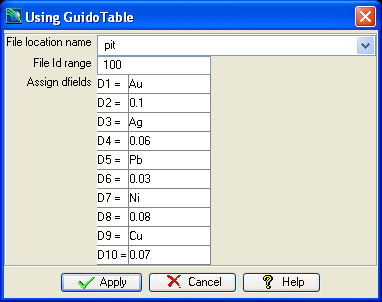
The example form below demonstrates using a GuidoTable that is not contained in a GuidoScrollPane. This example is similar to Example2 for GuidoScrollPane but uses a table of dfields rather than individual fields for the 10 dfields. It displays some interesting points:
- Note how default values are set by initialising Tcl array elements that correspond to the name of the GuidoField dfield in the table.
- Note the use of the -instances 10 10 10 switch. This basically says to initialise the table to 10 rows and to also ensure that there is a minimum of 10 rows and a maximum of 10 rows. In other words we are guaranteed to have 10 rows in the table, no more and no less.
- The -interactive false switch disallows rows from being dynamically created or deleted.
- See how the values entered into the table are accessed as Tcl array elements after the form is applied. This can be done in a loop with a variable reference or as actual array elements. Both methods are shown below.
- Note that the table is actually defined within a GuidoPanel. This is because tables defined outside of GuidoScrollPanes will try and occupy all available space on the form regardless of the -width settings on the different components. By placing the table inside a panel more control is gained of the sizing of the table widgets.
# GuidoTable Example 1
# define the form
set formDef {
  GuidoForm form {
    -label "Using GuidoTable"
    -default_buttons
    -layout CentreLineLayout
    GuidoFileBrowserField location {
      -label "File location name"
      -width 25
      -format none
      -null false
      -start_dir SSI_PLOTTING:
      -file_mask "*.str *.dtm"
      -link idRange
    }
    GuidoField idRange {
      -label "File Id range"
      -width 10
      -format range
      -null false
    }
    GuidoPanel panel {
      -label "Assign dfields"
      -layout BorderLayout
      GuidoTable dfieldsTable {
        -instances 10 10 10
        -interactive false
        -position West
        GuidoLabel dfieldLab {
          -width 3
        }
        GuidoField dfield {
          -width 7.6
          -format none
        }
      }
    }
  }
}
# set defaults for the dfield labels in the table
# if the table elements exist prior to form creation
# then they will be used for default value
for {set i 0} {$i < 10} {incr i} {
  set dfieldLab($i) "D[expr $i + 1] ="
}
# Create and run the form
SclCreateGuidoForm formHandle $formDef {}
$formHandle SclRun {}
if {"$_status" == "cancel"} {
  puts "form cancelled"
  return
}
# this is how we retreive values from the table widgets
# Widgets in a table are turned into arrays in the Tcl interpreter
# so to access a value we need to provide an array index into the
# widget that begins at 0 and goes to rows - 1
set count [array size dfield]
for {set i 0} {$i < $count} {incr i} {
  puts "D[expr $i + 1] = $dfield($i)"
}
# you can also access array elements individually by specifying an exact element
puts "Yes D1 is $dfield(0) and D2 is $dfield(1)"
|
Example 2
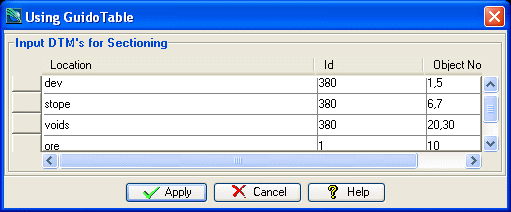
This is a more traditional example that demonstrates using a GuidoTable defined within a GuidoScrollPane. In this form you will notice that the table columns have headings and the rows also have headings, although they are blank due to the -blank_row_headings true switch. The -instances 5 1 20 switch sets the table to have 5 rows initially but can grow to 20 and must have a minimum of 1 row. This is an interactive table that allows the user to dynamically add and remove rows by right clicking on the row headers to bring up the table popup menu.
Notice how the values are accessed in the loop at the bottom of the script. Each of the widgets that were defined in the table (location, id, and objects) become Tcl arrays once the form is applied. To access any of the values you must supply an array index that begins at 0 for row 1.
# GuidoTable Example 2
# define the form
set formDef {
  GuidoForm form {
    -label "Using GuidoTable"
    -default_buttons
    -layout BoxLayout Y_AXIS
    GuidoScrollPane scroller {
      -label "Input DTM's for Sectioning"
      -border etched true
      -width 45
      -height 8
      GuidoTable inputFiles {
        -instances 5 1 20
        -interactive true
        -column_sorting false
        -blank_row_headings true
        -row_header_width 10
        GuidoFileBrowserField location {
          -label "Location"
          -width 25
          -format none
          -null false
          -file_mask "*.dtm"
          -link id
        }
        GuidoField id {
          -label "Id"
          -width 10
          -format range
          -null false
        }
        GuidoField objects {
          -label "Object Nos"
          -width 10
          -format range
          -null false
        }
      }
    }
  }
}
# Create and run the form
SclCreateGuidoForm formHandle $formDef {}
$formHandle SclRun {}
if {"$_status" == "cancel"} {
  puts "form cancelled"
  return
}
# this is how we retrieve values from the table widgets
# Widgets in a table are turned into arrays in the Tcl interpreter
# so to access a value we need to provide an array index into the
# widget that begins at 0 and goes to rows - 1
set count [array size location]
for {set i 0} {$i < $count} {incr i} {
  puts "Sectioning objects $objects($i) from file $location($i)$id($i).dtm"
}
|
See Also
Guido
GuidoForm
Common guido switches
GuidoScrollPane
GuidoPanel
Layout
Managers