


GuidoPatternBrowserField
Overview
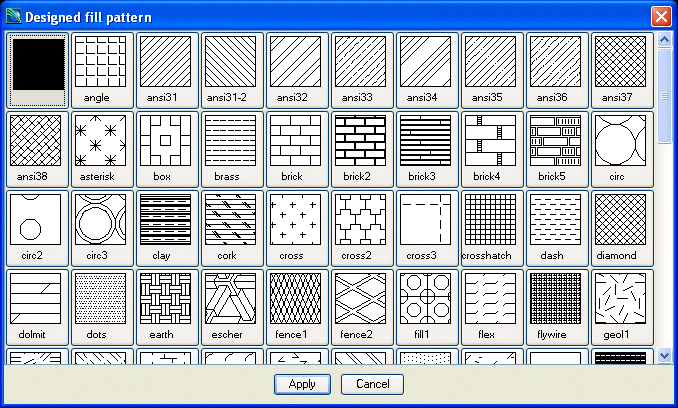
A GuidoPatternBrowserField is a special implementation of a GuidoComboBox that is used to select a pattern fill for plotting operations from all available pattern fills in the system. The drop down list when selected will contain the names of all defined patterns on your system. The browser field also has access to the pattern previewer (displayed below) to assist with the selection of the pattern fill. The GuidoPatternBrowserField will understand all the switches that can be used for a GuidoComboBox.
Synopsis
GuidoPatternBrowserField Name Body
Description
The GuidoPatternBrowserField command when processed will define a rectangular text entry region on the form with two triangle icons on the right. The down arrow icon allows the drop down list to be displayed when pressed with the mouse and the right arrow icon will popup the pattern previewer when pressed with the mouse. It accepts any of the standard Guido switches as described for GuidoComboBox.
Arguments
Name Name is a unique identifier that you assign and is used to differentiate this object from other Guido objects in the form definition. The name you assign will become the name of a variable in the Tcl interpreter that will contain the value as entered into the field on the form.
Body The body of the field may contain a number of switches to modify the default behaviour of the field. The body begins with an opening curly brace and ends with a closing curly brace. If there is no required body the curly braces {} are required as a place holder for this argument.
Switches Any switch that can be used on a GuidoComboBox may be applied to the GuidoPatternBrowserField. See the reference for GuidoComboBox for further information. Common Guido switches reference
Examples
Example 1
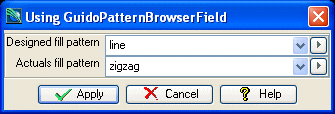
The example form below demonstrates using GuidoPatternBrowserFields to set the required patterns for various plotting attributes. Note the use of the form procedure setPatterns defined at the top of the form that is required to set the list of available patterns fills into the drop down lists. The procedure is invoked via the -action initial switch set on both of the GuidoPatternBrowserFields which will populate the drop down lists just prior to the form being displayed on the screen.
This simple example can be copied and pasted to suite, but to gain an understanding of events and actions see the reference on Guido actions events and callbacks.
# GuidoPatternBrowserField Example 1
# define the form
set formDef {
  # form procedure to initialise the pattern browsers
  proc setPatterns {pattern} {
    set buffer [ GuidoExecServer GetPatternNames { } ]
    set num_values [ GuidoGetParamBufferValue $buffer num_values ]
    for {set idx 0} {$idx < $num_values} {incr idx} {
      $pattern addItem [GuidoGetParamBufferValue $buffer value_$idx]
    }
  }
  GuidoForm form {
    -label "Using GuidoPatternBrowserField"
    -default_buttons
    GuidoPatternBrowserField designPattern {
      -label "Designed fill pattern"
      -width 20
      -format none
      -null false
      -action initial {[setPatterns $designPattern]}
    }
    GuidoPatternBrowserField actualsPattern {
      -label "Actuals fill pattern"
      -width 20
      -format none
      -null false
      -action initial {[setPatterns $actualsPattern]}
    }
  }
}
# Create and run the form
SclCreateGuidoForm formHandle $formDef {}
$formHandle SclRun {}
puts "Design fill pattern : $designPattern"
puts "Actuals fill pattern: $actualsPattern"
|
See Also
Guido
GuidoComboBox
GuidoField
GuidoComboBox
GuidoForm
Common
guido switches