GuidoDatabaseTableBrowser, GuidoTableFieldBrowser, & GuidoColumnValueBrowser
Overview
Guido provides three widgets to assist with interacting with the currently open database. They are all special implementations of a GuidoComboBox that provide drop down lists containing information from the database. All the browsers will understand the switches that can be used for a GuidoComboBox.
The purpose for each of the database browsers is:
- GuidoDatabaseTableBrowser
The GuidoDatabaseTableBrowser is used to select a table name from the open database.
- GuidoTableFieldBrowser
The GuidoTableFieldBrowser is used to select a field (column) name from a nominated table in the open database.
- GuidoColumnValueBrowser
The GuidoColumnValueBrowser is used to select an actual field (column) value from a specified field in the nominated table of the currently open database.
Using the database browser widgets requires knowledge of Guido methods, Guido action events, and form procedures. See the reference on Guido action events and callbacks for further information.
Synopsis
GuidoDatabaseTableBrowser Name Body
Description
The GuidoDatabaseTableBrowser command when processed will define a rectangular text entry region on the form with a triangle icon on the right that allows a drop down list to be displayed when pressed with the mouse. The drop down list will contain the names of all tables in the currently open database.
For the GuidoDatabaseTableBrowser to function correctly a reference to the currently open database must be obtained from the server. To do this you must use the GuidoExecServer and GuidoGetParamBufferValue commands as in a manner similar to the following in your form
set buffer [GuidoExecServer LegacyGetCurrentDatabaseHandle {}]
set dbhandle [GuidoGetParamBufferValue $buffer DatabaseHandle]
See the examples below to gain more context to the use of these two commands
to get a reference to the current open database.
Arguments
Name Name is a unique identifier that you assign and is used to differentiate this object from other Guido objects in the form definition. The name you assign will become the name of a variable in the Tcl interpreter that will contain the value as entered into the field on the form.
Body The body of the field may contain a number of switches to modify the default behaviour of the field. The body begins with an opening curly brace and ends with a closing curly brace. If there is no required body the curly braces {} are required as a place holder for this argument.
Switches Any switch that can be used on a GuidoComboBox may be applied to the GuidoDatabaseTableBrowser. See the reference for GuidoComboBox for further information.
| -database Tcl variable | The -database switch makes a connection between the
form and the actual open database on the server. A handle to the open
database must be retrieved and stored into the given Tcl variable
name using the GuidoExecServer and GuidoGetParamBufferValue commands.
See the examples below.
-database dbHandle -database geoDatabaseRefNote that the -database and -database_handle switches cannot be used together. They both make a connection to the open database but use a different scripting style to do this. |
| -database_handle database reference | The -database_handle switch makes a connection between
the form and the actual open database on the server. A handle to the open
database must be retrieved and stored into a Tcl variable, which is then
passed through this switch by expending the variable to get the actual
reference value. The database handle (reference) must be previously obtained
using the GuidoExecServer and GuidoGetParamBufferValue
commands. See the examples below.
-database $dbHandle -database $geoDatabaseRefNote that the -database and -database_handle switches cannot be used together. They both make a connection to the open database but use a different scripting style to do this. |
| -table_types list of table types | The -table_types switch is used to filter the list
of tables names that is returned from the server. You can specify that
the tables must match one or more of the categories that you provide.
The list of possible categories is interval | point | collar | survey | translation | survey_stations | discrete_sample | prism | ringdes_collar | station_errors -table_types interval -table_types interval point discrete_sample -table_types survey_stations station_errors |
| $fieldName updateBrowserList | The updateBrowserList is not a normal switch and is
referred to as a Guido object method. It must be invoked after the body
of the GuidoDatabaseTableBrowser has been defined to actually query the
server to populate the list of valid table names into the drop down list.
The method call actually takes place at run time just prior to the form
being displayed on the screen. See the example below for further details.
$tableName updateBrowserList |
Common Guido switches reference
Synopsis
GuidoDatabaseTableFieldBrowser Name Body
Description
The GuidoDatabaseTableFieldBrowser command when processed will define a rectangular text entry region on the form with a triangle icon on the right that allows a drop down list to be displayed when pressed with the mouse. The drop-down list will contain the names of all tables in the currently open database.
For the GuidoDatabaseTableFieldBrowser to function correctly a reference to the currently open database must be obtained from the server. To do this you must use the GuidoExecServer and GuidoGetParamBufferValue commands as in a manner similar to the following in your form
set buffer [GuidoExecServer LegacyGetCurrentDatabaseHandle {}]
set dbhandle [GuidoGetParamBufferValue $buffer DatabaseHandle]
See the examples below to gain more context to the use of these two commands to get a reference to the current open database.
Arguments
Name Name is a unique identifier that you assign and is used to differentiate this object from other Guido objects in the form definition. The name you assign will become the name of a variable in the Tcl interpreter that will contain the value as entered into the field on the form.
Body The body of the field may contain a number of switches to modify the default behaviour of the field. The body begins with an opening curly brace and ends with a closing curly brace. If there is no required body the curly braces {} are required as a place holder for this argument.
Switches Any switch that can be used on a GuidoComboBox may be applied to the GuidoDatabaseTableFieldBrowser. See the reference for GuidoComboBox for further information.
| -database Tcl variable | The -database switch makes a connection between the
form and the actual open database on the server. A handle to the open
database must be retrieved and stored into the given Tcl variable
name using the GuidoExecServer and GuidoGetParamBufferValue commands.
See the examples below.
-database dbHandle -database geoDatabaseRefNote that only the Tcl variable name is given and is not prefixed with a $ sign. The -database and -database_handle switches cannot be used together. They both make a connection to the open database but use a different scripting style to do this. |
| -database_handle database reference | The -database_handle switch makes a connection between
the form and the actual open database on the server. A handle to the open
database must be retrieved and stored into a Tcl variable, which is then
passed through this switch by expending the variable to get the actual
reference value. The database handle (reference) must be previously obtained
using the GuidoExecServer and GuidoGetParamBufferValue
commands. See the examples below.
-database_handle $dbHandle -database_handle $geoDatabaseRefNote that the -database and -database_handle switches cannot be used together. They both make a connection to the open database but use a different scripting style to do this. |
| -table Tcl variable | The -table switch makes a connection between the form
and the actual database table on the server. The name of the table to
list fields for must be stored into the given Tcl variable name
which will later be inspected by the form processing engine to retrieve
the list of field names.
-table tableName -table interval_tableNote that only the Tcl variable name is given and is not prefixed with a $ sign. The -table and -table_handle switches cannot be used together. They both make a connection to the database table but use a different scripting style to do this. |
| -table_handle table name | The -table_handle switch makes a connection between
the form and the actual database table on the server. The name of the
table must be specified here by actual name or by expanding a Tcl variable
that has the name stored in it.
-table_handle "collar" -table_handle $tableNameNote that the -table and -table_handle switches cannot be used together. They both make a connection to the database table but use a different scripting style to do this. |
| -field_types mandatory | optional | calculated | The -field_types switch is used to filter the types
of field names that is returned from the server. You can specify that
the tables must match one of the categerories mandatory | optional
| calculated.
-table_types calculated -table_types optional |
| $fieldName updateBrowserList | The updateBrowserList is not a normal switch and is
referred to as a Guido object method. It must be invoked after the body
of the GuidoDatabaseTableFieldBrowser has been defined to actually query
the server to populate the list of valid field names for the specified
table into the drop down list. The method call actually takes place at
run time just prior to the form being displayed on the screen. See the
examples below for further details.
$fieldName updateBrowserList |
Common Guido switches reference
Synopsis
GuidoColumnValueBrowser Name Body
Description
The GuidoColumnValueBrowser command when processed will define a rectangular text entry region on the form with a triangle icon on the right that allows a drop down list to be displayed when pressed with the mouse. The drop down list will contain the values for the given field (column) of the nominated table. The GuidoColumnValueBrowser differs slightly in appearance from the other database browser widgets in that it also has a refresh icon/button next to the triangle icon. Pressing this icon with the mouse will do an instant update of the list of values from the database table.
The refresh icon is also used to ensure that all column values have been downloaded from the server. There is a default record load limit specified in the SETTINGS function on the Applications tab called Database Column Value Browsers - maximum records to load. This value specifies the default limit of records to initially load from the database column and is used to ensure reasonable performance when processing. It is possible that large database tables could have a significant impact on performance if all the values where loaded when the form is invoked. By pressing the refresh icon all values for the table field will be loaded into the GuidoColumnValueBrowsers drop down list.
The GuidoColumnValueBrowser has a search facility to help you locate values easily in large lists. When the list is visible, list items will be matched as the script user types characters into the text entry field. The list must be sorted for this functionality to work, see the -sorted_list switch below.
For the GuidoColumnValueBrowser to function correctly a reference to the currently open database must be obtained from the server. To do this you must use the GuidoExecServer and GuidoGetParamBufferValue commands as in a manner similar to the following in your form
set buffer [GuidoExecServer LegacyGetCurrentDatabaseHandle {}]
set dbhandle [GuidoGetParamBufferValue $buffer DatabaseHandle]
See the examples below to gain more context to the use of these two commands to get a reference to the current open database.
Arguments
Name Name is a unique identifier that you assign and is used to differentiate this object from other Guido objects in the form definition. The name you assign will become the name of a variable in the Tcl interpreter that will contain the value as entered into the field on the form.
Body The body of the field may contain a number of switches to modify the default behaviour of the field. The body begins with an opening curly brace and ends with a closing curly brace. If there is no required body the curly braces {} are required as a place holder for this argument.
Switches Any switch that can be used on a GuidoComboBox may be applied to the GuidoColumnValueBrowser. See the reference for GuidoComboBox for further information.
| -database Tcl variable | The -database switch makes a connection between the
form and the actual open database on the server. A handle to the open
database must be retrieved and stored into the given Tcl variable
name using the GuidoExecServer and GuidoGetParamBufferValue commands.
See the examples below.
-database dbHandle -database geoDatabaseRefNote that only the Tcl variable name is given and is not prefixed with a $ sign. The -database and -database_handle switches cannot be used together. They both make a connection to the open database but use a different scripting style to do this. |
| -database_handle database reference | The -database_handle switch makes a connection between
the form and the actual open database on the server. A handle to the open
database must be retrieved and stored into a Tcl variable, which is then
passed through this switch by expanding the variable to get the actual
reference value. The database handle (reference) must be previously obtained
using the GuidoExecServer and GuidoGetParamBufferValue
commands. See the examples below.
-database_handle $dbHandle -database_handle $geoDatabaseRefNote that the -database and -database_handle switches cannot be used together. They both make a connection to the open database but use a different scripting style to do this. |
| -table Tcl variable | The -table switch makes a connection between the form
and the actual database table on the server. The name of the table to
list fields for must be stored into the given Tcl variable name
which will later be inspected by the form processing engine to retrieve
the list of field names.
-table tableName -table interval_tableNote that only the Tcl variable name is given and is not prefixed with a $ sign. The -table and -table_handle switches cannot be used together. They both make a connection to the database table but use a different scripting style to do this. |
| -table_handle table name | The -table_handle switch makes a connection between
the form and the actual database table on the server. The name of the
table must be specified here by actual name or by expanding a Tcl variable
that has the name stored in it.
-table_handle "collar" -table_handle $tableNameNote that the -table and -table_handle switches cannot be used together. They both make a connection to the database table but use a different scripting style to do this. |
| -column Tcl variable | The -column switch makes a connection between the
form and the table column (field) on the server. The name of the column
to list values for must be stored into the given Tcl variable name
which will later be inspected by the form processing engine to retrieve
the list of values.
-column fieldName -table surveyFieldNote that only the Tcl variable name is given and is not prefixed with a $ sign. The -column and -column_handle switches cannot be used together. They both make a connection to the table column but use a different scripting style to do this. |
| -column_handle column name | The -column_handle switch makes a connection between
the form and the table column (field) on the server. The name of the table
must be specified here by actual name or by expanding a Tcl variable that
has the name stored in it.
-table_handle "hole_id" -table_handle $fieldNameThe -column and -column_handle switches cannot be used together. They both make a connection to the table column but use a different scripting style to do this. |
| -distinct true|false | The -distinct switch is used to ensure that the list
of column values contain no duplicates. If the database column allows
duplicate values then specifying -distinct true will filter out
any duplicate values that may be present in the list.
-distinct true |
| -constrain_by_column constraint | The -constrain_by_column switch is used to filter
or constrain the column values returned from the server. The constraint
is specified as a normal database constraint and more than one constraint
can be applied.
-constrain_by_column "hole_id >= RC01000"
-constrain_by_column "hole_id <= RC02000"
When both example constraints are applied as above the only possible hole_id values that would be returned are holes between RC01000 and RC02000. -constrain_by_column "level > 1500"This example would only allow column values to be returned where the matching level was greater than 1500 |
| -shared_list GuidoWidgetName -sorted_list true|false |
The -shared_list and -sorted_list are standard
GuidoComboBox switches but they have particular
relevance to a GuidoColumnValueBrowser as the size of returned list can
be very large, 5000+ records. These two switches help to both conserve
computer memory and also assist with locating values in the drop down
list. See GuidoComboBox for further information
and the examples below.
-shared_list firstLevel -sorted_list true |
| $fieldName updateBrowserList | The updateBrowserList is not a normal switch and is
referred to as a Guido object method. It must be invoked after the body
of the GuidoColumnValueBrowser has been defined to actually query the
server to populate the list of column values for the specified table column
into the drop down list. The method call actually takes place at run time
just prior to the form being displayed on the screen. See the examples
below for further details.
$value updateBrowserList $holeId updateBrowserList |
Common Guido switches reference
Examples
Example 1
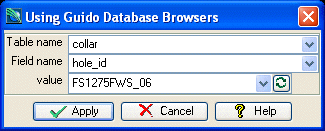
The example form below demonstrates using a number of GuidoDatabaseTableBrowser switches and action callback methods (form procedures).
The line towards the end of the form,
set databaseHandle [getDatabaseHandle]
makes the connection to the current open database on the server by calling the form procedure at the top of the form definition that uses the GuidoExecServer and GuidoGetParamBufferValue functions.
This stores a reference to the database into the Tcl variable databaseHandle that has been set onto each of the browser fields via the -database switch.
When the connection is established a call is made to update the browser list on tableName.
Once the tableName browser list is updated it in turn causes the fieldName browser to be updated via an action callback that has been set with the line,
-action valueChanged {[updateValues $fieldName $fieldValue]}
When the browser list on fieldName has been updated it in turn causes an action event to fire on the fieldValue browser that will populate the drop down list with all the available field (column) values for the currently selected field.
When the form is displayed you will notice that as you change the value for tableName the allowable selections for fieldName change automatically. This is because the -action switch on tableName causes the form procedure updateFieldname to be run each time the table name selection changes. The same relationship exists between the fieldName and fieldValue browsers.
This simple example can be copied and pasted to suit but to gain an understanding of events and actions in progress see the reference on Guido actions events and callbacks.
# GuidoDatabaseBrowser Example 1
# define the form
set formDef {
  # --------------------------------------------------------------------------------------
  # Form procedure to retrieve the database handle
  proc getDatabaseHandle {} {
    # ask the server for the current database handle
    set buffer [GuidoExecServer LegacyGetCurrentDatabaseHandle {}]
    # extract and return the handle reference from the returned data buffer
    return [GuidoGetParamBufferValue $buffer DatabaseHandle]
  }
  # --------------------------------------------------------------------------------------
  # Form procedure to update the field name depending upon the value in the tableName field
  # This procedure is invoked when a valueChanged event occurs on the tableName field
  proc updateFieldName {table field} {
    # set the table handle to be the current value of tableName
    $field setTableHandle [$table getCurrentValue]
    # updated the field name list with the new tableName value
    $field updateBrowserList
  }
  # --------------------------------------------------------------------------------------
  # Form procedure to update the field value list depending upon the
  # value in the tableName field
  # This procedure is invoked when a valueChanged event occurs on the tableName field
  proc updateValues {field value} {
     $value setTableHandle [$field getTableHandle]
     $value setColumnHandle [$field getCurrentValue]
     $value updateBrowserList
  }
  set databaseHandle [getDatabaseHandle]
  GuidoForm form {
    -label "Using Guido Database Browsers"
    -default_buttons
    GuidoDatabaseTableBrowser tableName {
      -label "Table name"
      -width 20
      -format db_charset
      -null false
      -database databaseHandle
      -action valueChanged {[updateFieldName $tableName $fieldName]}
    }
    GuidoTableFieldBrowser fieldName {
      -label "Field name"
      -width 20
      -format none
      -null false
      -database databaseHandle
      -action valueChanged {[updateValues $fieldName $fieldValue]}
    }
    GuidoColumnValueBrowser fieldValue {
      -label "value"
      -width 20
      -format none
      -null false
      -database databaseHandle
    }
    # get the database handle and store into a Tcl variable called databaseHandle
    # which is specified on each of the browsers in the "-database" switch

    # update the browser list for table names
    $tableName updateBrowserList
  }
}
# Create and run the form
SclCreateGuidoForm formHandle $formDef {}
$formHandle SclRun {}
|
Example 2
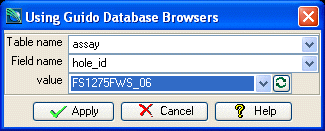
The form below is the same as example 1 except is demonstrates using the -database_handle switch method for specifying the database on the browser fields. It introduces the -tables_types switch to filter the selectable tables to be only of interval type (ie assay) and it also uses the -field_types switch to allow only mandatory and optional fields to be displayed so that there are no calculated fields in the fieldName drop down list.
# GuidoDatabaseBrowser Example 2
# define the form
set formDef {
  # --------------------------------------------------------------------------------------
  # Form procedure to retrieve the database handle
  proc getDatabaseHandle {} {
    # ask the server for the current database handle
    set buffer [GuidoExecServer LegacyGetCurrentDatabaseHandle {}]
    # extract and return the handle reference from the returned data buffer
    return [GuidoGetParamBufferValue $buffer DatabaseHandle]
  }
  # --------------------------------------------------------------------------------------
  # Form procedure to update the field name depending upon the value in the tableName field
  # This procedure is invoked when a valueChanged event occurs on the tableName field
  proc updateFieldName {table field} {
    # set the table handle to be the current value of tableName
    $field setTableHandle [$table getCurrentValue]
    # updated the field name list with the new tableName value
    $field updateBrowserList
  }
  # --------------------------------------------------------------------------------------
  # Form procedure to update the field value list depending upon the
  # value in the tableName field
  # This procedure is invoked when a valueChanged event occurs on the tableName field
  proc updateValues {field value} {
     $value setTableHandle [$field getTableHandle]
     $value setColumnHandle [$field getCurrentValue]
     $value updateBrowserList
  }
  set databaseHandle [getDatabaseHandle]
  GuidoForm form {
    -label "Using Guido Database Browsers"
    -default_buttons
    GuidoDatabaseTableBrowser tableName {
      -label "Table name"
      -width 20
      -format db_charset
      -null false
      -database_handle $databaseHandle
      -table_types interval
      -action valueChanged {[updateFieldName $tableName $fieldName]}
    }
    GuidoTableFieldBrowser fieldName {
      -label "Field name"
      -width 20
      -format none
      -null false
      -database_handle $databaseHandle
      -field_types mandatory
      -action valueChanged {[updateValues $fieldName $fieldValue]}
    }
    GuidoColumnValueBrowser fieldValue {
      -label "value"
      -width 20
      -format none
      -null false
      -database_handle $databaseHandle
    }
    # get the database handle and store into a Tcl variable called databaseHandle
    # which is specified on each of the browsers in the "-database" switch

    # update the browser list for table names
    $tableName updateBrowserList
  }
}
# Create and run the form
SclCreateGuidoForm formHandle $formDef {}
$formHandle SclRun {}
|
Example 3
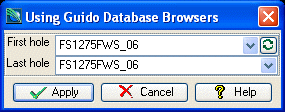
The form below demonstrates using a GuidoColumnValueBrowser in conjunction with a GuidoComboBox to get the first and last collar values for processing. It makes use of the sorted_list and share_list switches to enable quick binary searching and to share the list associated with the firstCollar field with the lastCollar field. This improves performance and memory use especially when the available list of collar values is large.
# GuidoDatabaseBrowser Example 3
# define the form
set formDef {
  # --------------------------------------------------------------------------------------
  # Form procedure to retrieve the database handle
  proc getDatabaseHandle {} {
    # ask the server for the current database handle
    set buffer [GuidoExecServer LegacyGetCurrentDatabaseHandle {}]
    # extract and return the handle reference from the returned data buffer
    return [GuidoGetParamBufferValue $buffer DatabaseHandle]
  }
  set databaseHandle [getDatabaseHandle]
  GuidoForm form {
    -label "Using Guido Database Browsers"
    -default_buttons
    GuidoColumnValueBrowser firstCollar {
      -label "First hole"
      -width 20
      -format none
      -null false
      -database_handle $databaseHandle
      -table_handle collar
      -column_handle hole_id
      -sorted_list true
    }
    GuidoComboBox lastCollar {
      -label "Last hole"
      -width 17.5
      -format none
      -null false
      -sorted_list true
      -shared_list firstCollar
    }
    # get the database handle and store into a Tcl variable called databaseHandle
    # which is specified on each of the browsers in the "-database" switch

    # update the browser list for table names
    $firstCollar updateBrowserList
  }
}
# Create and run the form
SclCreateGuidoForm formHandle $formDef {}
$formHandle SclRun {}
puts "Processing holes between $firstCollar and $lastCollar"
|