


GSLIB
For detailed description of GSLIB programs, refer to 'Journel, A G and Deutsch, C V, 1998. GSLIB: Geostatistical Software Library and User's Guide, Second Edition, Oxford University Press, New York.' The interface was created and tested using GSLIB 2.907. Using an earlier or later version of GSLIB may cause the interface to fail or produce incorrect results.
The GSLIB interface consists of the following GSLIB programs:
- KT3D - 3D kriging (simple & ordinary kriging)
- IK3D / POSTIK - indicator kriging
- NSCORE - normal score transformation
- SGSIM / POSTSIM - Sequential gaussian simulation (Also uses HISTSMTH)
- SISIM / POSTSIM Sequential indicator simulation.
There are a number of GSLIB tools for which no interface is provided (for example, the Postscript plotting programs, the variogram calculation / plotting programs and GSLIB specific utilities like ADDCOORD).
The general form of the interface is:
- Present a form for entering GSLIB inputs.
- Create the parameter file(s).
- Convert string input file(s) to GSLIB format ("GeoEAS" format).
- Invoke the necessary GSLIB program(s).
- Read the results back to inform a Block Model.
This creates a number of (possibly large) files in the process. The files can be left after the process is finished for investigation (or cleaned up automatically if you are uninterested). They can be used for running the GSLIB programs again if you wish.
GeoEas Format
The GeoEas file format is comprised of header lines and data lines:
- The first line contains text of the your choice, usually a data set title (similar to the "purpose" field of the string file).
- The second line contains the number of fields (values) in each data line (nvar).
- The next nvar lines contain the names of the fields (one name per line).
- Numeric data follows as space-delimited numeric data (nvar values per line).
There are no missing value indicators in the standard GeoEas format.
For example:
Gold samples
4
y
x
z
Au
25.000 82.500 21.789 0.732 1
35.000 82.500 21.582 0.000 1
35.000 87.500 22.769 0.171 1
35.000 92.500 24.196 0.578 1
35.000 97.500 25.622 0.984 1
35.000 142.500 28.082 0.866 1
.
.
.
Ellipsoid Definition
Anisotropic search ellipsoids and geometric ellipsoids for variograms are specified in the same way. Three angles and three ranges are specified.
Imagine the ellipsoid is oriented with its longest axis (hMax) oriented N-S, its second longest axis (hMin) oriented E-W and it's third axis vertical (Vert). The rotations required to make the Y axis the principal structural direction are as follows:
- The first rotation angle (Angle1) rotates the Y axis in the horizontal plane. This angle is in degrees clockwise.
- The second rotation angle (Angle2) rotates the principal direction from the horizontal. This is measured in negative degrees down from the horizontal.
- The third rotation angle (Angle3) leaves the principal direction unchanged. The two directions perpendicular to that principal direction are rotated clockwise relative to the principal direction when looking away from the origin.
For example:
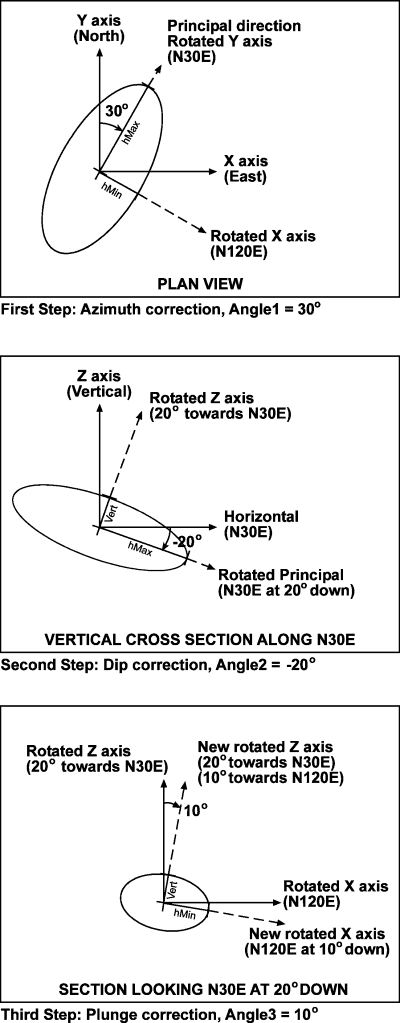
hMax is the maximum horizontal size of the ellipse (along the Y axis) before rotation, hMin is the minimum horizontal size of the ellipse (along the X axis) before rotation and Vert is the vertical size of the ellipse (along the Z axis) before rotation.