


GSLIB 3D kriging
To run this function: Choose Block model > Estimation > GSLIB > 3D kriging, or...
Files Tab
Input
Location, ID number, String range, D-field
You must complete each of these inputs to describe the string file or files from which the sample data is to be obtained. Enter the Location and Id range of the required string file. Enter the String range and the description field to define the data from the string file which are to be used for estimation. The specified data will be converted from a string file to the geoEAS format input file that GSLIB requires.
Minimum
All samples strictly less than this value are ignored. The default value is -1E+21.
Maximum
All samples strictly greater than this value are ignored. The default value is 1E+21.
Output
Estimate
Specify an attribute to store the estimated grade. Unestimated blocks will be flagged with a large negative number (-999).
Estimation variance
Specify an attribute to store the kriging variance for each block.
Constrain interpolation
If you want to estimate a subset of the block model blocks by use of a block model constraint, check this box.
Debug file
The name of the GSLIB debug file to create.
Debug level
The higher the debugging level, the more output. The normal levels (none, low) summarize the results. Medium and high provide all the kriging matrices and data used for the estimation of every point/block. It is recommended that a high debugging level not be used with a large block model.
Clean up
When the form is Applied, a number of (temporary) files are created, either for input to GSLIB or as output from GSLIB. If you check this box, the temporary files will be cleaned up (deleted).
Kriging Options Tab
Kriging Type
Specify which type of kriging to use.
Stationary simple kriging
Mean
Specify the mean to use for simple kriging.
Ordinary kriging
Non-stationary simple kriging with means
Mean Attribute
A gridded data file (.grd) will be created. The value of the specified attribute will be written for each user block to be estimated. These means will be used in the Simple Kriging of each block.
Kriging with an external drift
Drift Attribute
A gridded data file (.grd) will be created. The value of the specified attribute will be written for each user block to be estimated. These external drift values will be used for non-stationary kriging.
D-field
The field containing the external drift values for the samples to be used for non-stationary kriging.
Maximum samples per octant
The maximum number of samples per octant (octant search is not used if this value is left at 0). The octant search ensures that data are taken on all sides of the point being estimated. This is particularly important with drillhole data. An octant search ensures that data is sourced from more than one drillhole.
Minimum samples to krige a block
The minimum number of data points to use for kriging a block, for example 1. If fewer than this number of samples are found, the block will be left unestimated.
Maximum samples to krige a block
The maximum number of data points to use for kriging a block. For example, specifying 8 uses the closest eight sample points to the centroid of the block being sampled.
Block descretization
The number of descretization points in X, Y and Z (if the number of descretization points is set to 1 for X, Y and Z then point kriging is performed at the block centroid). These points are evenly distributed on an X x Y x Z grid inside each block being estimated.
Search radius
The search radius in the maximum horizontal direction (hMax), the minimum horizontal direction (hMin) and the vertical direction (Vert). See Ellipsoid Definition for more detail on specifying these radii. For example, the Search radius might be 100.
Search angles
The angle parameters that describe the orientation of the search ellipsoid, for example 0. See Ellipsoid Definition for more detail on specifying these angles.
Drift indicators
Check the box(es) to model the specified trend.
Trend option
Specify whether to estimate the variable or the trend.
Variograms Tab
An acceptable variogram model for GSLIB consists of a nugget effect and any positive linear combination of standard variogram models: spherical, exponential, gaussian, power or hole effect.
Nugget
Specify the nugget constant for the variogram, for example 0.
Type
Select the type of structure represented by this line of the table. The structure types supported by GSLIB are:
- Spherical
- Exponential
- Gaussian
- Power
- Hole effect
Cc
Specify the c parameter for this structure, for example 9.7.
hMax
An example value is 83.
hMin
An example value is 83.
Vert
The maximum horizontal range, minimum horizontal range and vertical range. An example value is 83. See Ellipsoid Definition for more detail on specifying these values.
Angle1
An example value is 0.
Angle2
An example value is 0.
Angle3
Specify the angles defining the geometric anisotropy. An example value is 0. See Ellipsoid Definition for more detail on specifying these angles.
Results
Press Cancel to cancel the function or Apply to invoke GSLIB.
The flow of data is:
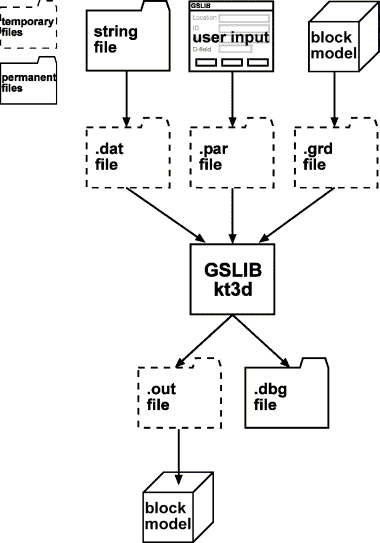
GSLIB (kt3d) requires a sample (.dat) file, a parameter (.par) file and a (.grd) file of gridded data (if you are using Non-stationary simple kriging with means or Kriging with an external drift).
The sample (.dat) file is created from the specified string file, the form input is used to create the parameter (.par) file and the gridded data is extracted from the block model.
The file names are created from the location of the sample file and the relevant file name extension.
GSLIB (kt3d) creates two files, a (.out) file of kriged results and a (.dbg) file with information about the kriging results. The kriged results are automatically loaded into the specified block model attributes. The GSLIB screen output is written to the message window prefixed with:
GSLIB>
If you selected Clean up on the Files tab, the temporary files will be deleted after the results have been loaded into the block model.
Messages
Removing GSLIB intermediate files.
You selected Clean up on the Files tab, so the temporary files created for or by GSLIB are being removed.
Error loading file filename0.str
There was an error loading the specified string file.
You must select a model first.
You must open a block model before you can use this function.
File c:\Program Files\Gslib90\kt3d.exe not found
kt3d.exe could not be found in the specified directory. Make sure the gslib90 user option is pointing to the directory containing kt3d.exe.
Invoking "c:\Program Files\Gslib90\kt3d.exe" sample.par ...
kt3d.exe is being invoked with the specified parameter file.
You have terminated "c:\Program Files\Gslib90\kt3d.exe" sample.par. Results were not loaded.
You chose to abort the kriging process. This terminated the executable using the progress feedback cancel button before the results were loaded.
"c:\Program Files\Gslib90\kt3d.exe" sample.par terminated prematurely. Results were not loaded.
kt3d crashed or otherwise ended prematurely (for example, it was terminated outside of Surpac by using Task Manager) before the results were loaded.
Error writing file "sample.dat".
Error writing file "sample.par".
Error writing file "sample.grd".
An error occurred while writing the specified file. Check that there is enough room to write the file.
Error opening file sample.dat
Error opening file sample.par
Error opening file sample.grd
An error occurred while trying to open the specified file for writing. Check that the file is not read-only or in use by another process.
Error opening file sample.out
An error occurred while trying to open the specified file for reading. Check that kt3d.exe did not end prematurely and that the file is not in use by another process.
Created sample.dat.
Created sample.par.
Created sample.grd.
The specified file was successfully created.
You have terminated the loading of results. Results were only partially loaded.
You chose to abort the block model loading process.
Number of blocks estimated 4096
The number of blocks actually informed is reported.
Attribute mean does not exist
The specified block model attribute does not exist. Select a different Mean or Drift Attribute.