


Normal score transformation
To run this function: Choose Block model > Estimation > GSLIB > Normal score transformation, or...
Files Tab
Input location, ID number, String range, D-field, Weight
You must complete each of these inputs to describe the string file or files from which the sample data is to be obtained. Enter the Location and Id range of the required string file. Enter the String range and the description field(s) to define the data from the string file which are to be used for estimation. The specified data will be converted from a string file to the geoEAS format input file that GSLIB requires.
The declustering weight field can be left blank if there aren't any declustering weights.
Minimum
All samples strictly less than this value are ignored.
Maximum
All samples strictly greater than this value are ignored.
Output location
The specified output location will be combined with the ID number to create the name of the resultant output string file.
Clean up
When the form is Applied, a number of (temporary) files are created, either for input to GSLIB or as output from GSLIB. If you check this box, the temporary files will be cleaned up (deleted).
Transformation Tab
Smooth the distribution
Check this box if you want to consider a smoothed histogram of the data for transformation.
Scaling type
Select whether to perform arithmetic or logarithmic (base 10) scaling
Number of Z values
The number of evenly spaced z values for the smoothed histogram, for example 100.
Minimum Z
The lower limit of the evenly spaced z values, for example 0.0.
Maximum Z
The upper limit of the evenly spaced z values, for example 1.0.
Max Perturbations
After Number of Z values x Max Perturbations perturbations, smoothing is stopped. An example value is 750.
Report after
After Number of Z values x Report after perturbations, the current objective function(s) are reported. An example value is 50.
Min objective
When the normalised objective function reaches this value, smoothing is considered complete. An example value is 0.0001.
Seed
A random number seed (a large, odd integer).
Smoothing window size
The size of the smoothing half-window, for example 5.
Closeness to target mean
Check this box if you wish to consider closeness to a target mean.
Weight
The weight that scales the automatically calculated weight for closeness to a target mean.
Closeness to target variance
Check this box if you wish to consider closeness to target variance.
Weight
The weight that scales the automatically calculated weight for closeness to a target variance.
Closeness to target smoothness
Check this box if you wish to consider closeness to target smoothness.
Weight
The weight that scales the automatically calculated weight for closeness to target smoothness.
Closeness to specified quantiles
Check this box if you wish to consider closeness to specified quantiles.
Weight
The weight that scales the automatically calculated weight for closeness to specified quantiles.
Specify mean
Check this box and enter a target mean if it is different from the mean of the data.
Specify variance
Check this box and enter a target variance if it is different from the variance of the data.
Quantiles from data
The number of quantiles defined from the data, for example 5.
User defined quantiles
cdf
z
Specify quantiles consistent with the data to control peaks and troughs in he smoothed distribution.
Results
Press Cancel to cancel the function or Apply to invoke GSLIB.
The flow of data is:
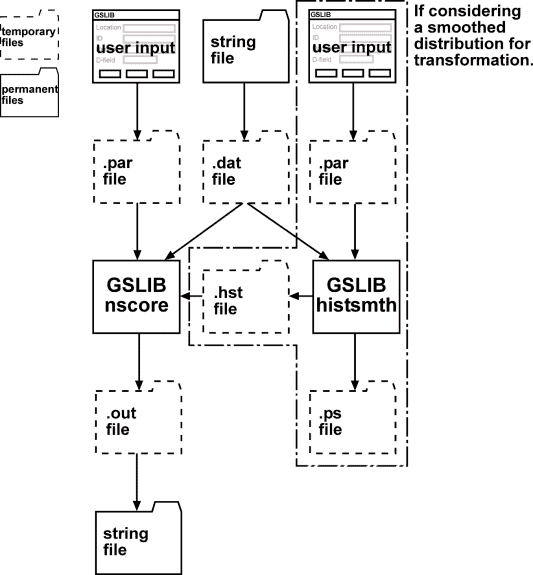
Normal score transformation with GSLIB is a one or two step process:
- If you want to use a smoothed reference distribution for this process, GSLIB (histsmth) requires the sample (.dat) file and a parameter (.par) file.
The sample (.dat) file is created from the specified string file and the form input is used to create the parameter (.par) file.
The file names are created from the location of the sample file and the relevant file name extension.
GSLIB (histsmth) creates two files, a (.hst) file of the smoothed histogram and a (.ps) plot file of the histogram. The smoothed histogram is automatically loaded into GSLIB (nscore) when the transformation is performed. The GSLIB screen output is written to the message window prefixed with:
GSLIB>
If you don't want to consider a smoothed histogram, this step is skipped.
- GSLIB (nscore) requires a sample (.dat) file and a parameter (.par) file.
The sample (.dat) file is created from the specified string file and the form input is used to create the parameter (.par) file.
The file names are created from the location of the sample file and the relevant file name extension.
GSLIB (nscore) creates two files, a (.out) file of normal score values and a (.dbg) file with information about the simulated results. The normal score values are automatically converted into a string file. The GSLIB screen output is written to the message window prefixed with:
GSLIB>
After GSLIB (nscore) has finished the transformation, a string file is created with the normal score values. The file name is constructed from the specified Output location and ID number. The results are stored as:
- D1 Original data values.
- D2 Original declustering weights (if specified, otherwise 0.0).
- D3 Normal score values.
When modelling a variogram for use in sgsim, the data in D3 must be used.
If you selected Clean up on the Files tab, the temporary files will be deleted after the results have been converted into a string file.
Messages
Removing GSLIB intermediate files.
You selected Clean up on the Files tab, so the temporary files created for or by GSLIB are being removed.
Error loading file filename0.str
There was an error loading the specified string file.
File c:\Program Files\Gslib90\nscore.exe not found
File c:\Program Files\Gslib90\histsmth.exe not found
nscore.exe or histsmth.exe could not be found in the specified directory. Make sure that GSLIB has been installed, and that the GSLIB installation directory option - on the applications tab in default preferences - is pointing to the directory containing nscore.exe.
Invoking "c:\Program Files\Gslib90\histsmth.exe" sample2.par ...
Invoking "c:\Program Files\Gslib90\nscore.exe" sample.par ...
nscore.exe or histsmth.exe is being invoked with the specified parameter file.
You have terminated "c:\Program Files\Gslib90\histsmth.exe" sample2.par. Results were not loaded.
You have terminated "c:\Program Files\Gslib90\nscore.exe" sample.par. Results were not loaded.
You chose to abort the transformation process. This terminated the executable using the progress feedback cancel button before the results were loaded.
"c:\Program Files\Gslib90\histsmth.exe" sample2.par terminated prematurely.
			Results were not loaded.
"c:\Program Files\Gslib90\nscore.exe" sample.par terminated prematurely. Results were not loaded.
nscore or histsmth crashed or otherwise ended prematurely (for example, it was terminated outside of Surpac by using Task Manager) before the results were loaded.
Error writing file "sample.dat".
Error writing file "sample.par".
Error writing file "sample2.par".
An error occurred while writing the specified file. Check that there is enough room to write the file.
Error opening file sample.dat
Error opening file sample.par
Error opening file sample2.par
An error occurred while trying to open the specified file for writing. Check that the file is not read-only or in use by another process.
Error opening file sample.out
An error occurred while trying to open the specified file for reading. Check that nscore.exe and histsmth.exe did not end prematurely and that the file is not in use by another process.
Created sample.dat.
Created sample.par.
Created sample2.par.
The specified file was successfully created.
Results are in the file sample0.str
The normal score transformed values have been written to the specified string file.
Error saving strings to file sample0.str
There was a problem writing the normal score transformed values to the specified string file. Check that the file is not read-only or in use by another process.