


Tutorials
Tutorials provide step-by-step examples of how to perform a task, using a specific dataset. All tutorials are installed with the software from the DVD. Additionally, they can be downloaded.
The following tutorials are available:
CD installation
When you install Surpac from the CD, all tutorials are installed into:
<installation directory>\demo_data\tutorials\
Each directory will contain a PDF document, as well as data files. You can quickly navigate to the folder through the tutorial profile.
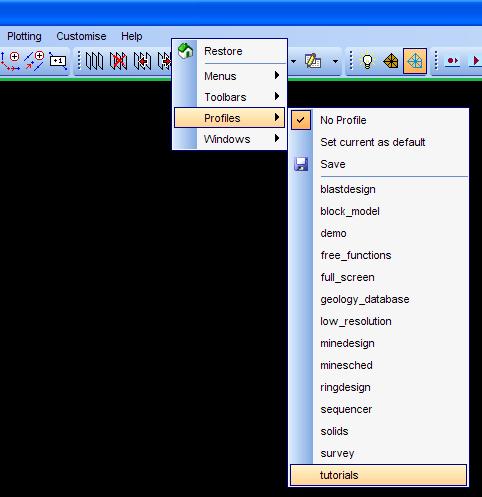
To access the tutorial profile:
- Right-click in the blank area to the right of the main menus.
- Select Profiles, and then Tutorial, as shown below:
To display a tutorial:
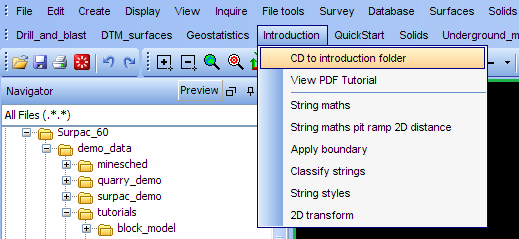
- Click the menu item for the tutorial
- Select the "CD to ..." menu item to change directory to the folder, as shown below.
- Select View PDF Tutorial.
Many steps in each tutorial can be demonstrated by a macro.
To run a macro :
- Click the menu item for the tutorial, as shown above.
- Select the menu item for the macro.
or
- Double-click the macro name from the Navigator.
Internet download
Tutorials are automatically installed with the software from a CD installation. If you have downloaded the software, you will need to download the Help and the Tutorials as well. You can obtain these from www.GEOVIA-support.com.
For further assistance, please contact your local support office.