


Introduction
Overview
In Surpac you can create plots using:
- autoplot
- file-based plotting
Autoplot is essentially What You See Is What You Get (WYSIWYG) plotting from the Surpac graphical viewport. It is simple and easy to use.
File-based plotting allows you to perform more complex plotting functions.
You can use the Surpac Plotting window or Dassault Systèmes DraftSight™ to view and edit the data before printing or plotting it. DraftSight is useful for adding mark-up and outputting to .dwg and other file formats.
Requirements
Before you begin this tutorial you must have:
- basic understanding of Surpac
- Surpac installed
- the data set accompanying this tutorial
It is recommended that you work through the Introduction to Surpac tutorial before attempting this tutorial.
Workflow
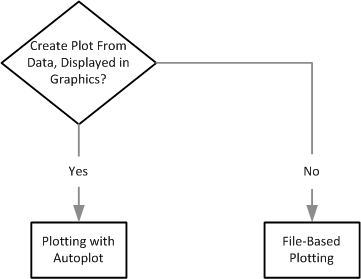
 Note: This workflow demonstrates the steps in this tutorial. There are other ways to achieve a result.