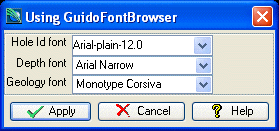
GuidoFontBrowser and GuidoFontNameBrowser
Overview
A GuidoFontBrowser is a special implementation of a GuidoField in that it provides a font chooser popup browser to assist with entering font names/styles/sizes as required. The font chooser is invoked via selecting the small triangle icon to the right of the text input box or by pressing the Assist key (Usually F1) when the field has input focus. The GuidoFontBrowser will understand all the switches that can be used for a GuidoField.
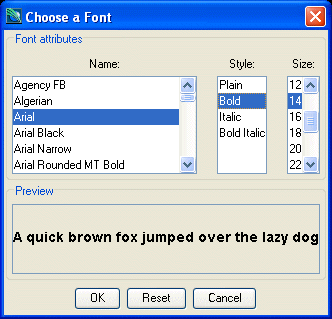
A GuidoFontNameBrowser is a special implementation of a GuidoComboBox in that the drop down list is populated with available font names. Note that this widget does not allow selection of font styles and font names. The GuidoFontNameBrowser is purely for selection of a font name. The GuidoFontNameBrowser will understand all the switches that can be used for a GuidoComboBox.
Synopsis
GuidoFontBrowser Name Body
Description
The GuidoFontBrowser command when processed will define a rectangular text entry region on the form with a triangle icon on the right that allows the font chooser popup to be invoked when pressed with the mouse. It accepts any of the standard Guido switches but one important one of note is -format font which ensures that a valid font name, font style, and font size are specified.
Arguments
Name Name is a unique identifier that you assign and is used to differentiate this object from other Guido objects in the form definition. The name you assign will become the name of a variable in the Tcl interpreter that will contain the value as entered into the field on the form.
Body The body of the field may contain a number of switches to modify the default behaviour of the field. The body begins with an opening curly brace and ends with a closing curly brace. If there is no required body the curly braces {} are required as a place holder for this argument.
Switches Any switch that can be used on a GuidoField may be applied to the GuidoFontBrowser. See the reference for GuidoField for further information.
| -format font | The -format switch is a standard Guido Widget switch
and can be used with a font browser to validate that a correct font specification
has been entered. There are two possibilities for a font format the first
being only the font name, or secondly a 3 part specification described
by font name-style-size.
-format font |
Common Guido switches reference
Synopsis
GuidoFontNameBrowser Name Body
Description
The GuidoFontNameBrowser command when processed will define a rectangular text entry region on the form with a triangle icon on the right that allows for a drop down list to be selected. It accepts any of the standard Guido switches but one important one of note is -format font which ensures that a valid font name is specified.
Arguments
Name Name is a unique identifier that you assign and is used to differentiate this object from other Guido objects in the form definition. The name you assign will become the name of a variable in the Tcl interpreter that will contain the value as entered into the field on the form.
Body The body of the field may contain a number of switches to modify the default behaviour of the field. The body begins with an opening curly brace and ends with a closing curly brace. If there is no required body the curly braces {} are required as a place holder for this argument.
Switches Any switch that can be used on a GuidoField may be applied to the GuidoFontBrowser. See the reference for GuidoField for further information.
| -allowDefault true | false | The -allowDefault switch determines whether the font
called default will be present in the drop down list of font names. By
default the 'default' name will appear in the list.
-allowDefault false |
| -format font | The -format switch is a standard Guido Widget switch
and can be used with a font browser to validate that a correct font specification
has been entered. There are two possibilities for a font format the first
being only the font name, or secondly a 3 part specification described
by font name-style-size.
-format font |
| $fieldName updateBrowserList | The updateBrowserList is not a normal switch and is
referred to as a Guido object method. It must be invoked after the body
of the GuidoFontNameBrowser has been defined to actually populate the
list of valid font names into the drop down list. The method call actually
takes place at run time just prior to the form being displayed on the
screen. See the example below for further details.
$fontName updateBrowserList |
Common Guido switches reference
Examples
Example 1
The example form below demonstrates using a GuidoFontBrowser and GuidoFontNameBrowsers to get font names. The first field drillHoleFont uses a popup browser to enter a fully qualified font name-style-size name while the other two fields only require the font name without style and size information. Note the use of the -allowDefault false switch on the geologyFont field to prevent the font name default from appearing in the list. Both of the GuidoFontNameBrowser fields must also execute the updateBrowserList method in order to populate the lists of font names.
# GuidoFontBrowser and GuidoFontNameBrowser Example 1
# define the form
set formDef {
  GuidoForm form {
    -label "Using GuidoColourBrowserField"
    -default_buttons
    GuidoFontBrowser drillholeFont {
      -label "Hole Id font"
      -width 12.5
      -format font
      -null false
    }
    GuidoFontNameBrowser depthFont {
      -label "Depth font"
      -width 10
      -format font
      -null false
    }
    $depthFont updateBrowserList
    GuidoFontNameBrowser geologyFont {
      -label "Geology font"
      -width 10
      -allowDefault false
      -format font
      -null false
    }
    $geologyFont updateBrowserList
  }
}
# Create and run the form
SclCreateGuidoForm formHandle $formDef {}
$formHandle SclRun {}
puts "Fonts for:"
puts "  collars = $drillholeFont"
puts "  depths  = $depthFont"
puts "  geology = $geologyFont"
|