


GuidoFileChooser
Overview
A GuidoFileChooser is similar to a GuidoFileBrowserField in that it provides a file chooser application to assist with locating files on mass storage devices. The difference is that the file chooser application is actually part of the form itself rather than a separate popup window. The GuidoFileChooser will understand most of the switches that can be used for a GuidoField.
Synopsis
GuidoFileChooser Name Body
Description
The GuidoFileChooser command when processed will define a panel on the form into which all the standard file chooser controls will be drawn. It accepts any of the standard Guido switches and the behaviour of the file chooser can be further refined using a number of specialised switches described below.
Arguments
Name Name is a unique identifier that you assign and is used to differentiate this object from other Guido objects in the form definition. The name you assign will become the name of a variable in the Tcl interpreter that will contain the names of the selected files.
Body The body of the file chooser may contain a number of switches to modify its default behaviour. The body begins with an opening curly brace and ends with a closing curly brace. If there is no required body the curly braces {} are required as a place holder for this argument.
Switches Most of the common switches that can be used on a GuidoField may be applied to the GuidoFileChooser. See the reference for GuidoField for further information.
| -browser_type file | directory | The -browser_type switch sets the type of pathnames
that can be selected in the browser. The choices are either file
or directory with file being the default. The file
setting will allow you to select a filename whereas the directory
setting will only allow you to select a directory (folder) name.
-browser_type file -browser_type directory |
| -file_mask mask_specification | The -file_mask switch allows you to filter the types
of files displayed in the file chooser by their extension. This prevents
all files in the current directory from being shown to make it easier
for the script user to locate the file(s) of interest. Multiple file masks
can be specified.
-file_mask "*.str *.dtm" -file_mask "*.ddb" -file_mask "pit*.str" |
| -multiple_selection true | false | The -multiple_selection switch allows you to specify
if the file chooser should return a single file or allow multiple filenames
to be returned. By default the setting is false so only a single file
name will be returned. Multiple files are selected by highlighting a number
of files in chooser using the standard Windows mechanism (control-click,
shift-click). Multiple file names are returned into the text area as follows;
The directory portion (if any) is specified first then each selected file
name is listed enclosed in double quotation marks. If only one file is
selected it is returned as normal with no special quoting characters.
See example 2 below for sample code to retrieve the filenames.
-multiple_selection false -multiple_selection true |
| -use_plugin_alias true | false | The -use_plugin_alias switch controls whether the
browser will accept all matching file types for the file mask that you
have specified. For example if you specify "*.str" as the file
mask a number of other file formats such as Minex GM3 files, Autocad dxf
files, etc, could also be loaded via a plugin as a string file. The default
is false which means do not do this and only accept files with
the given mask.
-use_plugin_alias false -use_plugin_alias true |
Common Guido switches reference
Examples
Example 1
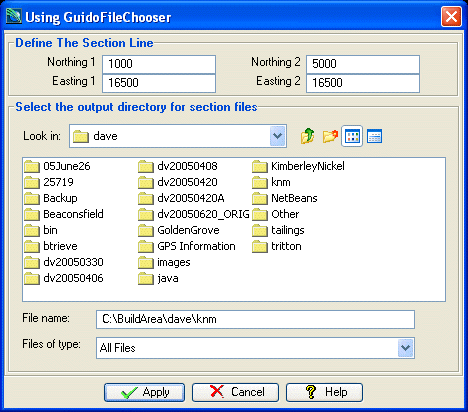
The example form below demonstrates using a GuidoFileChoosers for the selection of an output directory by use of the -browser_type directory switch. Also note the -width and -height switch can be used to adjust the default dimensions of the File Chooser.
# GuidoFileChooser Example 1
# define the form
set formDef {
  GuidoForm form {
    -label "Using GuidoFileChooser"
    -default_buttons
    -layout BoxLayout Y_AXIS
    GuidoPanel otherInputsPanel {
      -label "Define The Section Line"
      -border etched true
      -layout BoxLayout X_AXIS
      GuidoFiller fil1 {
        -width 3
      }
      GuidoPanel left {
        -layout CentreLineLayout
        GuidoField northing1 {
          -label "Northing 1"
          -width 10
          -format double
          -null false
        }
        GuidoField easting1 {
          -label "Easting 1"
          -width 10
          -format double
          -null false
        }
      }
      GuidoFiller fil2 {
        -width 3
      }
      GuidoPanel right {
        -layout CentreLineLayout
        GuidoField northing2 {
          -label "Northing 2"
          -width 10
          -format double
          -null false
        }
        GuidoField easting2 {
          -label "Easting 2"
          -width 10
          -format double
          -null false
        }
      }
      GuidoFiller fil3 {
        -width 3
      }
    }
    GuidoPanel fileChooserPanel {
      -label "Select the output directory for section files"
      -border etched true
      -layout BoxLayout Y_AXIS
      GuidoFileChooser outputDir {
        -width 40
        -browser_type directory
      }
    }
  }
}
# Create and run the form
SclCreateGuidoForm formHandle $formDef {}
$formHandle SclRun {}
if {"$_status" == "cancel"} {
  puts "Cancelling"
  return
}
puts "Section at $northing1, $easting1 to $northing2, $easting2"
puts "Output section files to $outputDir"
|
Example 2
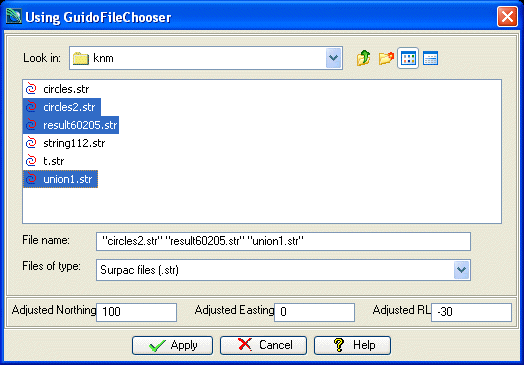
The example form below demonstrates using a GuidoFileChooser in multiple selection mode via the use of the -multiple_selection true switch. Take note of the code that follows the form SclRun command that is used to access each of the selected files.
# GuidoFileChooser Example 2
# define the form
set formDef {
  GuidoForm form {
    -label "Using GuidoFileChooser"
    -default_buttons
    -layout BoxLayout Y_AXIS
    GuidoPanel fileChooserPanel {
      -border etched true
      -layout BoxLayout Y_AXIS
      GuidoFileChooser files {
        -file_mask "*.str"
        -multiple_selection true
      }
    }
    GuidoPanel otherInputsPanel {
      -border etched true
      -layout BoxLayout X_AXIS
      GuidoField adjustY {
        -label "Adjusted Northing"
        -width 7
        -format double
        -null false
      }
      GuidoFiller filler1 {
        -width 1.5
      }
      GuidoField adjustX {
        -label "Adjusted Easting"
        -width 7
        -format double
        -null false
      }
      GuidoFiller filler2 {
        -width 1.5
      }
      GuidoField adjustZ {
        -label "Adjusted RL"
        -width 7
        -format double
        -null false
      }
    }
  }
}
# Create and run the form
SclCreateGuidoForm formHandle $formDef {}
$formHandle SclRun {}
if {"$_status" == "cancel"} {
  puts "Cancelling"
  return
}
# split the returned file names into a list
set fileList [split $files]
# initialise a directory name
set directory ""
foreach file $fileList {
  # determine where the first double quote is
  set ndx [string first \" $file]
  if {$ndx > 0} {
    # is past the first character so we have a directory path to deal with
    set directory [string range $file 0 [expr $ndx - 1]]
    set file [string range $file $ndx end]
    set ndx 0
  }
  if {$ndx == 0} {
    # prepend any directory and remove the double quotes
    set fileName [file join $directory [string range $file 1 end-1]]
  } else {
    # only one file selected so no quote marks are present
    set fileName $file
  }
  # now peform a string maths operation to adjust the files coords with the other inputs
  puts "Processing $fileName"
}
puts "Finished"
|
See Also
Guido
GuidoField
GuidoFileBroswerField
GuidoForm
Common guido switches