GuidoFileBrowserField
Overview
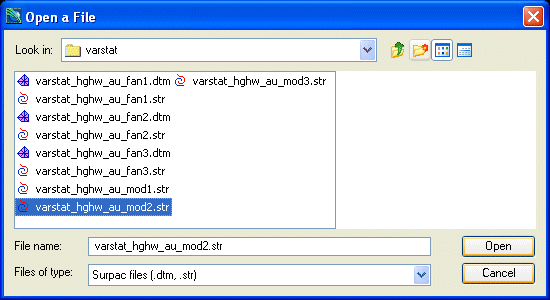
A GuidoFileBrowserField is a special implementation of a GuidoField in that it provides a file chooser application to assist with locating files on mass storage devices. The file chooser is invoked via selecting the small triangle icon to the right of the text input box or by pressing the Assist key (Usually F1) when the field has input focus. The GuidoFileBrowserField will understand all the switches that can be used for a GuidoField plus a number of specialised switches described below. An example file chooser popup is shown below.
Synopsis
GuidoFileBrowserField Name Body
Description
The GuidoFileBrowserField command when processed will define a text box input region on the form with a small triangle icon at its right. It accepts any of the standard Guido switches and the behaviour of the file chooser can be further refined using a number of specialised switches.
Arguments
Name Name is a unique identifier that you assign and is used to differentiate this object from other Guido objects in the form definition. The name you assign will become the name of a variable in the Tcl interpreter that will contain the value as entered into the field on the form.
Body The body of the field may contain a number of switches to modify the default behaviour of the field. The body begins with an opening curly brace and ends with a closing curly brace. If there is no required body the curly braces {} are required as a place holder for this argument.
Switches Any switch that can be used on a GuidoField may be applied to the GuidoFileBrowserField. See the reference for GuidoField for further information.
| -absolutePath true | false | The -absolutePath switch effects how a file name is
returned into the text field. By default relative pathnames are returned,
this means that a directory path that is relative to your current working
directory is used (ie ../../data/pit1.str). By setting this switch to
true an absolute pathname will be returned. Absolute paths are
referenced from the drive name that the selected file resides on (ie C:/surpac/data/pit1.str).
-absolutePath true -absolutePath false |
| -browser_type file | directory | The -browser_type switch sets the type of pathnames
that can be selected in the browser. The choices are either file
or directory with file being the default. The file
setting will allow you to select a filename whereas the directory
setting will only allow you to select a directory (folder) name.
-browser_type file -browser_type directory |
| -extension true | false | The -extension switch allows you to specify whether
to return the file extension of the selected file or trim if off. By default
file extensions are returned. To trim the extension set this switch to
false-extension false -extension true |
| -file_mask mask_specification | The -file_mask switch allows you to filter the types
of files displayed in the file chooser by their extension. This prevents
all files in the current directory from being shown to make it easier
for the script user to locate the file(s) of interest. Multiple file masks
can be specified.
-file_mask "*.str *.dtm" -file_mask "*.ddb" -file_mask "pit*.str" |
| -link idFieldName | The -link switch allows the selected file to be broken
up into the traditional Surpac location and Id pairs. Most Surpac
functions input files as a location name and an Id range which may represent
a cross section number, a bench level, an underground level, etc; see
ranges for further information.
When using the -link switch you must have two fields defined on your form. The first is for the location data and this is defined as a GuidoFileBrowserField with the second being a normal GuidoField for input of the Id range. The -link switch makes a connection between the two fields such that the location part of the file name is copied into the GuidoFileBrowserField and the Id portion is placed into the Id field. The extension of the file is removed. When using the -link switch you specify the name of your Id field after the link switch in order to make the connection between the two fields. See example 2 below for further information -link IdRange -link sections |
| -multiple_selection true | false | The -multiple_selection switch allows you to specify
if the file chooser should return a single file or allow multiple filenames
to be returned. By default the setting is false so only a single file
name will be returned. Multiple files are selected by highlighting a number
of files in chooser using the standard Windows mechanism (control-click,
shift-click). Multiple file names are returned into the text area with
a semi colon character ';' separating each name.
-multiple_selection false -multiple_selection true |
| -start_dir path_specification | The -start_dir switch allows you to specify the directory
(folder) that the file chooser should start in. This does not change your
current working directory but rather gets the file chooser to automatically
begin looking for files in a particular directory. The path specification
can be standard windows notation but, you are advised to use forward slashes
'/' rather than backslashes '\' for path separators, or it can be specified
as a Surpac Logical name.
-start_dir "c:/survey/pickups" -start_dir "SSI_PLOTTING:" |
| -use_plugin_alias true | false | The -use_plugin_alias switch controls whether the
browser will accept all matching file types for the file mask that you
have specified. For example if you specify "*.str" as the file
mask a number of other file formats such as Minex GM3 files, Autocad dxf
files, etc, could also be loaded via a plugin as a string file. The default
is false which means do not do this and only accept files with
the given mask.
-use_plugin_alias false -use_plugin_alias true |
Common Guido switches reference
Examples
Example 1
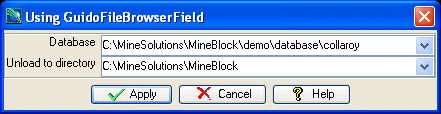
The example form below demonstrates using GuidoFileBrowserFields in both normal file mode and also in directory mode using the -browser_type directory switch. Also note the use of -absolutePath true to force the returned database name to be absolute from the root directory, and the use of -extension true to trim the file extension off the database file name. Specifying the -file_mask "*.ddb" means that only files with a .ddb extension will be shown in the file chooser.
# GuidoFileBrowserField Example 1
# define the form
set formDef {
  GuidoForm form {
    -label "Using GuidoFileBrowserField"
    -default_buttons
    GuidoFileBrowserField ddbFile {
      -label "Database"
      -width 30
      -format none
      -null false
      -file_mask "*.ddb"
      -absolutePath true
      -extension false
    }
    GuidoFileBrowserField outputDir {
      -label "Unload to directory"
      -width 30
      -format none
      -null false
      -browser_type directory
      -absolutePath true
    }
  }
}
# Create and run the form
SclCreateGuidoForm formHandle $formDef {}
$formHandle SclRun {}
puts "Unloading database $ddbFile to directory $outputDir"
|
Example 2
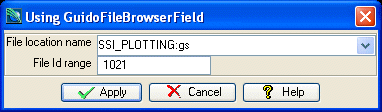
The example form below demonstrates using a GuidoFileBrowserField linked to another GuidoField on the form. Note the use of -link idRange to make the connection to the GuidoField called idRange. This example also uses -start_dir SSI_PLOTTING to make the file chooser automatically look in the plotting directory when it starts.
# GuidoFileBrowserField Example 2
# define the form
set formDef {
  GuidoForm form {
    -label "Using GuidoFileBrowserField"
    -default_buttons
    GuidoFileBrowserField location {
      -label "File location name"
      -width 25
      -format none
      -null false
      -start_dir SSI_PLOTTING:
      -file_mask "*.str *.dtm"
      -link idRange
    }
    GuidoField idRange {
      -label "File Id range"
      -width 10
      -format range
      -null false
    }
  }
}
# Create and run the form
SclCreateGuidoForm formHandle $formDef {}
$formHandle SclRun {}
puts "The file location is $location"
puts "Using an Id range of $idRange"
|