


About attributes for reblocking
The attributes and attribute values in a reblocked model are based on the attributes and values in the source block model.
The Block Model Converter creates the reblocked model as a multiple percentile block model, using only floating-point attribute types.
 More
MoreYou set the attributes for reblocking in the Reblocking Attributes tab.
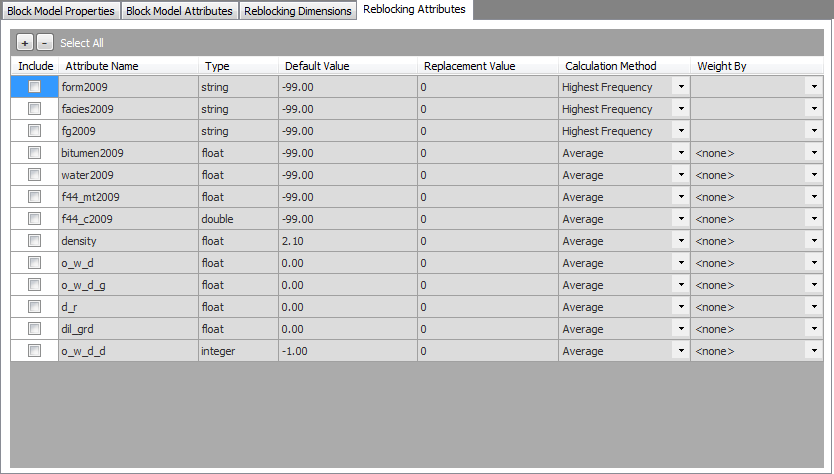
Columns in the Reblocking Attributes tab
| Column | Description |
|---|---|
| Include | Select this check box to include the attribute in the reblocked model. |
| Attribute Name | The name of the attribute. Display-only. |
| Type | The type of attribute. Display-only. |
| Default Value | The default value of the attribute. Display-only. |
| Replacement Value | The value to replace the default attribute value used in the reblocking calculations or if no value is provided. |
| Calculation Method |
The method to calculate the values of the attributes in the blocks of the reblocked model. For string and integer attributes, the options are:
For numeric attributes, the options are:
For more information about the calculation methods, see See "About reblocking and attributes of multiple percentile block models". |
| Weight By | The attribute to use as a weighting value for the average calculation methods. If you select the <none> option, the attribute is weighted by volume. This column is available only when the Calculation Method is set to any of the average calculation methods.  Tip: This value is usually the density or a specific gravity attribute. Tip: This value is usually the density or a specific gravity attribute. |
About string attributes
A string attribute belongs to a group and/or a category. A group can have one ore more categories. For example, in the source block model there is a string attribute "material" with values of "ore" and "waste". The Block Model Converter identifies a group named "material" with categories of "ore" and "waste". Each group also has an unclassified category to calculate portions of a block in the reblocked block model that may not be applicable to any of the categories. The label for the unclassified category is set in the Options dialog box.
Attributes of the reblocked model
The reblocked model has attributes for each group/category/floating point attribute combinations.
The name of the new attribute is constructed by concatenating these three items:
- the name of the group
- the name of the category
- one of the following: density (or specific gravity), fraction, or the selected floating point attribute name
 Note: If the average calculation method is used and a weight-by attribute is provided for the floating point attribute name, its associated weight-by attribute name is also included.
For example, if the "material" group has the "ore" and "waste" categories and the "mined" floating point attribute included, then the following attributes are created in the reblocked model:
material_ore_mined
material_waste_mined
material_unclass_mined
Each group also has a fractional attribute to define the percentage of the new block to which the calculated attribute value applies. This value does not appear in the tree view, but it is generated in the block model data that results from reblocking. The label for the fractional attribute is set in the Options dialog box.