


Triangulate All Connected Segments
Choose this function if you have a set of closed segments that you want to triangulate completely, and there are at least two connected open or closed segments joining each of the closed sections (polygons) together.
To run this function: Choose Solids > Triangulate > Connected segments > All, or...
All segments in the current layer which are connected to any other segment, or individually selected segments can be used to create a closed solid. After creating the solid, you should validate the solid to check for errors in the triangulation. A valid solid will be formed when all segments cross at coincident points, and sufficient control strings exist. Invalid solids can be created when:
- Lines pass through or very near to points.
- Two or more points are very close to one another, but not coincident.
- Two lines intersect in 3D, but do not contain any points where they intersect.
These problems can be solved by ensuring that wherever two segments cross, they contain exactly coincident points. If all segments cross at coincident points, adding more control strings near the error can also help. Control strings can be open or closed, and be of any string or segment number and direction, but must be snapped to existing points.
There are some general guidelines that should be followed to get the most out of this function. For a description of the algorithm used to create the triangulation, go here.
NOTE: The algorithm uses a semi-random approach to producing the final triangulation. This will cause consecutive runs of the functions to potentially cause different results. If a particular data set is producing good results sometimes, and bad results other times, it is an indication that more control is required to consistently produce a good solid.
Form options
Object and Trisolation
The Object and trisolation fields defined what object will be created.
Selection Method
- All strings and segments in a layer. This method uses every segment in the entire layer as part of the triangulation. This would be used if you had a set of strings that are known to form a good triangulation.
- Range of strings. This allows you to choose exactly which strings and segments are used in the triangulation. This does not triangulate between certain segments, but will include every part of each segment in the triangulation if it can. If you want to only triangulate between two connected segments, see the Triangulate Control Segments function.
- Selected control segments. This allows you to choose a segment, and all the segments that are physically connected to that segment are also included in the triangulation. This is useful if you have a number of separate ore bodies in a layer, and you only want to triangulate one at a time.
- Selected segments. This allows you to explicitly click on each segment that should be included in the triangulation. Just like the range option, this will not just go between selected segments, but will include all of the selected segments in the triangulation. If you want to only triangulate between two connected segments, see the Triangulate Control Segments function.
String Range Options
If the Range of Strings selection method is chosen, these fields define the string and segments that will be included in the triangulation.
Triangulation algorithm
This option is used to control the normal generating aspect of the triangulation procedure (described in detail here). This option is generally only turned off if you are having trouble creating a valid triangulation, and there are some difficult situations that the algorithm has to deal with. Some of these could be:
- The segments that connect the closed cross sections lie on exactly the same plane as that cross section. This makes some of the work incredibly difficult.
- There are more than four line segments coming out of any one point. This is a situation that should be avoided in general, but turning off this option may help.
Examples:
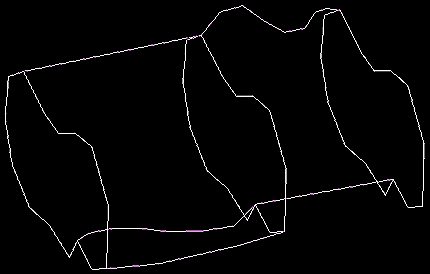
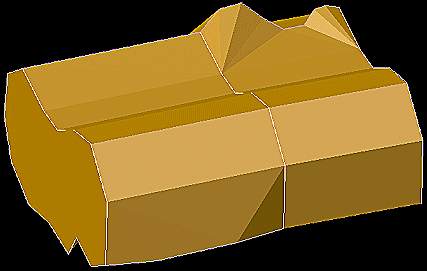
Triangulating all connected strings and segments in a layer (automatically closing solid)
|
|
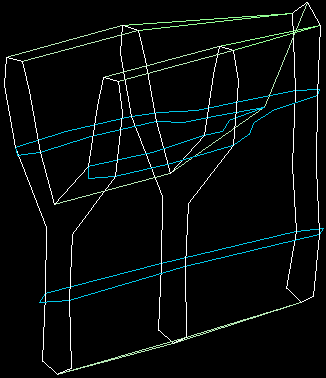
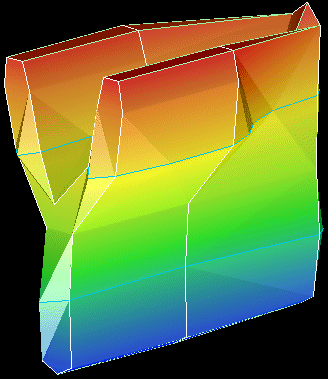
Triangulating all connected strings and segments in a layer
|
|