


Report volume of solids
You can use this function to generate a report that indicates the status, whether or not the trisolation has been validated and the surface area and volume of each trisolation of an object in Graphics. To see the data in set elevations you can select Report by Interval or Report by Elevation Range .
To run this function: Choose Surfaces > Volumes > Report volume of solids, or Solids > Solids tools > Report volume of solids, or...
OBJECT REPORT calculates the volume of closed, validated trisolations.
You must use one of the following functions to create closed, validated objects and/or trisolations:
NEIGHBORS AND VALIDATE OBJECT
NEIGHBORS AND VALIDATE TRISOLATION
SET OBJECT DIRECTION
SET TRISOLATION DIRECTION
OBJECT OPEN SIDES
TRISOLATION OPEN SIDES
Fields on the Object report form
| Field | Description |
|---|---|
| Layer Name | The layer name is taken from the name of the solid. |
| Define the report file to create | |
| Location | The name and save location for the report. |
| ID Number | The id number of the report. This is appended to the file name defined in Location. |
| Report Format |
The type of report created. For example, when you select .htm as the report format, you produce a Web page report.
|
| Decimals |
The number of decimal places displayed for areas and volumes in the output report.
|
| Check overlaps |
|
| Report by |
Total - Reports the volume of all objects in total. Interval - Reports the volume of objects by the interval specified in Elevation interval. Elevation Range - Reports the volume of objects by the interval specified in Elevation range. |
| Elevation range | The value that defines a set of elevations. This field is only available when Elevation Range is selected for Report by. |
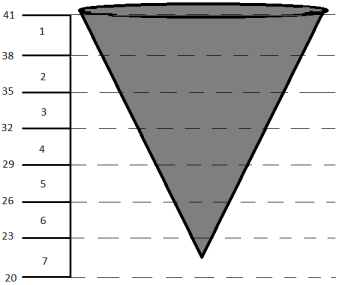
| Elevation interval |
The value used to create a set of elevations between the minimum and maximum Z extents of each object. This field is only available when Interval is selected for Report by.
The following image shows a positive value, with elevation interval=3, maximum Z value =41, and minimum Z value = 22.
The following image shows a negative value, with elevation interval=3, maximum Z value =41, and minimum Z value = 22.
|
 Note: The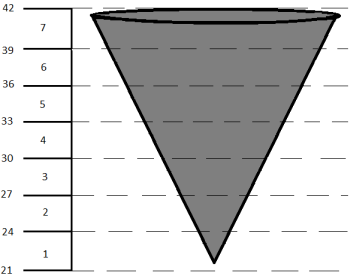
Output
The file is created. The file name of the report is displayed in the message window.