GuidoPasswordField
Overview
A GuidoPasswordField is a special implementation of a GuidoField in that it provides a text box region for input and it will understand all the switches that can be used for a GuidoField. It differs by not displaying the characters typed at the keyboard but by echoing a specified character, usually an asterisk, for each key typed. Its use is limited to specific situations where you may want to get a database password, a login code, zip file key, or similar.
Synopsis
GuidoPasswordField Name Body
Description
The GuidoPasswordField command when processed will define a text box input region on the form. The types of input and ranges of values that can be entered may be further refined using a number of available switches to modify the default behaviour of the widget.
Arguments
Name Name is a unique identifier that you assign and is used to differentiate this object from other Guido objects in the form definition. The name you assign will become the name of a variable in the Tcl interpreter that will contain the value as entered into the field on the form.
Body The body of the field may contain a number of switches to modify the default behaviour of the field. The body begins with an opening curly brace and ends with a closing curly brace. If there is no required body the curly braces {} are required as a place holder for this argument.
Switches Any switch that can be used on a GuidoField may be applied to the GuidoPasswordField. See the reference for GuidoField for further information.
| -echo character | The -echo switch allows you to specify the character
to be echoed into the text entry field when a character is pressed on
the keyboard. By default the asterisk character is used.
-echo "#" -echo "-" |
Common Guido switches reference
Examples
Example 1
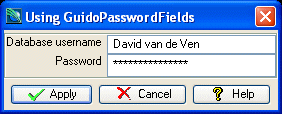
The example form below demonstrates use of a GuidoPasswordField to get a database username and password.
# GuidoPasswordField Example 1
# define the form
set formDef {
  GuidoForm form {
    -label "Using GuidoPasswordFields"
    -default_buttons
    GuidoField username {
      -label "Database username"
      -width 15
      -format none
      -null false
    }
    GuidoPasswordField password {
      -label "Password"
      -width 15
      -format none
      -null false
    }
  }
}
# Create and run the form
SclCreateGuidoForm formHandle $formDef {}
$formHandle SclRun {}
puts "Username = $username"
puts "Password = $password"
|
Example 2
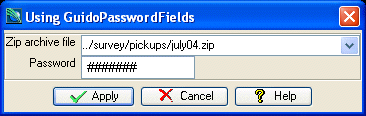
The example below demonstrates use of a GuidoPasswordField to get a zip file name and password. Note the use of the -echo switch to change the echoed character in the field.
# GuidoPasswordField Example 2
# define the form
set formDef {
  GuidoForm form {
    -label "Using GuidoPasswordFields"
    -default_buttons
    GuidoFileBrowserField zipFile {
      -label "Zip archive file"
      -width 25
      -format none
      -null false
      -file_mask "*.zip"
      -file_access read
    }
    GuidoPasswordField password {
      -label "Password"
      -width 10
      -format none
      -null false
      -echo "#"
    }
  }
}
# Create and run the form
SclCreateGuidoForm formHandle $formDef {}
$formHandle SclRun {}
puts "Zip file = $zipFile"
puts "Password = $password"
|