


GuidoMenu
Overview
A GuidoMenu is a container object that can hold any number of GuidoMenuItems, GuidoCheckBoxMenuItems, GuidoButtonGroups, GuidoRadioButtonMenuItems, GuidoSeparators, and further GuidoMenus. The purpose of the menu is to group logically related menu items together. The effect of inserting GuidoMenus inside of GuidoMenus is to create submenus that will be displayed as cascading drop down menus when selected.
A GuidoMenu is inserted into a GuidoMenuBar which is displayed at the top of the screen. The label assigned to the menu is used as the display text in the menu bar. When the menu item label is selected with the mouse or keyboard it causes all items defined within the menu to be displayed in a drop down list under the menu bar.
Synopsis
GuidoMenu Name Body
Description
The GuidoMenu command when processed will define a logical grouping of menu items for display. It may be selected with the mouse or space bar on the keyboard when it has focus.
Arguments
Name Name is a unique identifier that you assign and is used to differentiate this object from other Guido objects in the menu definition.
Body The body of the menu may contain a number of switches to modify the default behaviour. The body begins with an opening curly brace and ends with a closing curly brace. If there is no required body the curly braces {} are required as a place holder for this argument.
Switches The following switches can be used to modify the default behaviour of the menu:
| -label text | The -label switch allows you to specify the text that
appears inside the menu item
-label "Edit" -label "Delete" |
| -icon pathname | The -icon switch allows you to insert a gif/jpg/png
image icon into the menu item for display. The pathname is relative to
the standard SSI_RESOURCES: logical (normally set to /ssi_V?.??/share/resource/)
-icon my_icons/edit.gif |
| -delayed_script script | The -delayed_script switch allows the processing of
the actual menu items to be delayed until the menu is first activated.
This is to improve load performance when the software starts.
-delayed_script $menuItems |
Common Guido switches reference
Examples
Example 1
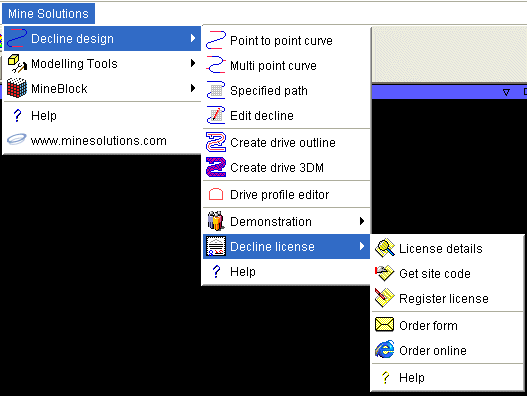
A GuidoMenu cannot be displayed from a form and are only loaded on software startup so a working example cannot be given. The following code segment shows a menu definition that makes use of most of the menu components. Take note of the use of the -delayed_script switch.
set Decline_items {
  GuidoMenuItem Decline_item1 {
    -label "Point to point curve"
    -icon minesolutions/icons/ms_declinep2p.gif
    -command server "macro:MS_DECLINE:decline_design.tbc"
  }
  GuidoMenuItem Decline_item2 {
    -label "Multi point curve"
    -icon minesolutions/icons/ms_declinempc.gif
    -command server "macro:MS_DECLINE:multi_point.tbc"
  }
  GuidoMenuItem Decline_item3 {
    -label "Specified path"
    -icon minesolutions/icons/ms_declinesp.gif
    -command server "macro:MS_DECLINE:specified_path.tbc"
  }
  GuidoMenuItem Decline_item4 {
    -label "Edit decline"
    -icon minesolutions/icons/ms_declineep.gif
    -command server "macro:MS_DECLINE:edit_path.tbc"
  }
  GuidoMenuItem Decline_item1 {
    -label "Spiral around centreline"
    -command server "macro:MS_DECLINE:decline_spiral.tbc"
  }
  GuidoSeparator separatorDecline1 {
  }
  GuidoMenuItem Decline_item5 {
    -label "Create drive outline"
    -icon minesolutions/icons/ms_declinedo.gif
    -command server "macro:MS_DECLINE:drive_outlines.tbc"
  }
  GuidoMenuItem Decline_item6 {
    -label "Create drive 3DM"
    -icon minesolutions/icons/ms_decline3dm.gif
    -command server "macro:MS_DECLINE:drive_3dm.tbc"
  }
  GuidoSeparator separatorDecline2 {
  }
  GuidoMenuItem Decline_item7 {
    -label "Drive profile editor"
    -icon minesolutions/icons/ms_declinepe.gif
    -command server "macro:MS_DECLINE:profile_editor.tbc"
  }
  GuidoSeparator separatorDecline3 {
  }
  GuidoScript minesolutions/scripts/menus/Decline_demo_menu.tcl
  GuidoScript minesolutions/scripts/menus/Decline_license_menu.tcl
}GuidoMenu Decline_menu {
  -label "Decline design"
  -icon minesolutions/icons/ms_declinep2p.gif
  -delayed_script $Decline_items
}
|
See Also
Guido
GuidoForm
Common guido switches
GuidoButtonGroup
GuidoCheckBoxMenuItem
GuidoMenuItem
GuidoRadioButtonMenuItem
GuidoSeparator
GuidoMenu
GuidoMenuBar
GuidoPopupMenu
Guido
action events and callbacks