GuidoHTMLPane
Overview
A GuidoHTMLPane is a special purpose container that is used to insert informational text onto forms. The text inserted into the pane can be in html format which provides you with a rich set of text formatting techniques to utilise.
A GuidoHTMLPane may be placed inside of a GuidoScrollPane to provide you with a scrollable text area that may contain a large amount of information to be displayed on your form.
Synopsis
GuidoHTMLPane Name Body
Description
The GuidoHTMLPane command when processed will define some text / html that will be displayed on the form.
Arguments
Name Name is a unique identifier that you assign and is used to differentiate this object from other Guido objects in the form definition.
Body The body of the html pane may contain a number of switches to modify the default behaviour of the label.
Switches Any of the common guido container switches can be used with a GuidoHtmlPane and the -label switch is used to set the content of the pane. See the examples below for further information. Common Guido switches reference
Examples
Example 1
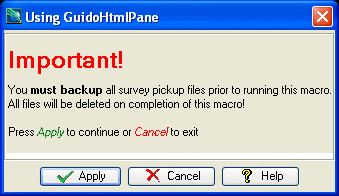
The example form below demonstrates using GuidoHTMLPanes that include Html tags to alter the standard appearance of text. Using Html tags allows you to select fonts, colours, bolding, etc. Note that you must begin the label with the tag <html> to indicate that it is html formatted text.
# GuidoHtmlPane Example 1
# define the form
set formDef {
  GuidoForm form {
   -label "Using GuidoHtmlPane"
   -default_buttons
   -layout BoxLayout Y_AXIS
   GuidoHTMLPane infoMessage {
      -label "<html><h1><font color=red>Important!</font></h1><p>
    You <b>must backup</b> all survey pickup files prior to running<br>
    this macro. All files will be deleted on completion of this macro!<p><p>
    Press <i><font color=green>Apply</font></i> to continue or <i><font color=red>Cancel</font></i> to exit<p><p></html>"
   }
  }
}
# Create and run the form
SclCreateGuidoForm formHandle $formDef {}
$formHandle SclRun {}
|
Example 2
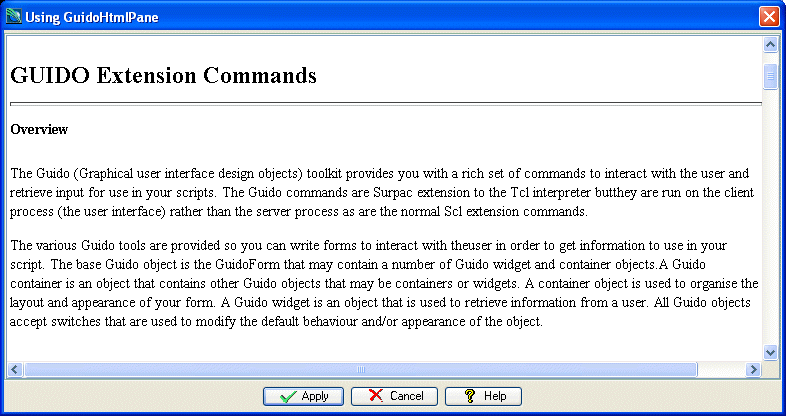
The example form below demonstrates using a GuidoHTMLPane to place the contents of a html file into a form. Note that the html pane is defined inside of a GuidoScrollPane so that scrollbars will be attached to the pane. One of the Surpac reference pages has been choosen but this could be any help documentation that your write yourself.
# GuidoHtmlPane Example 2
# define the form
set formDef {
  GuidoForm form {
    -label "Using GuidoHtmlPane"
    -default_buttons
    -layout BoxLayout Y_AXIS
    GuidoScrollPane scroller {
      -width 80
      -height 20

      GuidoHTMLPane infoMessage {
      }
    }
  }
}
# read a html document and append each line into a variable that uses same name
# name as the GuidoScrollPane on the form. This sets its default value or label
set infoFile [open "SSI_REFMAN:default/guido/guido.htm" "r"]
gets $infoFile line
while {![eof $infoFile]} {
  append infoMessage $line
  gets $infoFile line
}
close $infoFile
# Create and run the form
SclCreateGuidoForm formHandle $formDef {}
$formHandle SclRun {}
|