GuidoColourBrowserField
Overview
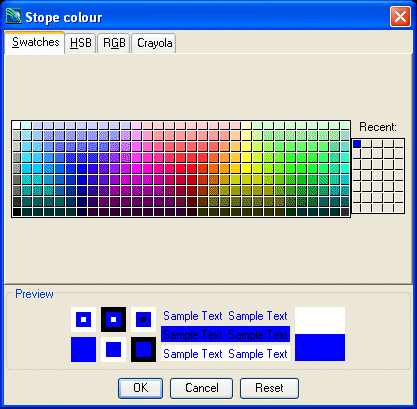
A GuidoColourBrowserField is a special implementation of a GuidoField in that it provides a colour chooser popup browser to assist with entering colour names. The colour chooser allows selection of colours in a variety of formats including swatches (see examples), HSB (Hue Saturation Brightness), RGB (Red Green Blue), and standard Crayola colours. Colour names when returned are converted to the RGB format or to a Crayola colour name.
The colour chooser is invoked via selecting the small triangle icon to the right of the text input box or by pressing the Assist key (Usually F1) when the field has input focus. The GuidoColourBrowserField will understand all the switches that can be used for a GuidoField.
Synopsis
GuidoColourBrowserField Name Body
Description
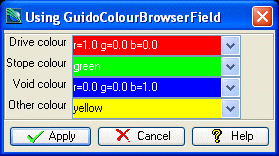
The GuidoColourBrowserField command when processed will define a rectangular text entry region on the form with a triangle icon on the right that allows the colour chooser popup to be invoked when pressed with the mouse. It accepts any of the standard Guido switches however an important one to note is -format colour which ensures that a valid colour name or specification is input and it also colours the background of the text entry area with the selected colour.
Arguments
Name Name is a unique identifier that you assign and is used to differentiate this object from other Guido objects in the form definition. The name you assign will become the name of a variable in the Tcl interpreter that will contain the value as entered into the field on the form.
Body The body of the field may contain a number of switches to modify the default behaviour of the field. The body begins with an opening curly brace and ends with a closing curly brace. If there is no required body the curly braces {} are required as a place holder for this argument.
Switches Any switch that can be used on a GuidoField may be applied to the GuidoColourBrowserField. See the reference for GuidoField for further information.
| -format colour | The -format switch is a standard Guido Widget switch and can be used with a colour browser to validate that a correct colour name / format has been entered.
It also causes the background of the text entry area to be filled with the selected colour.
-format colour |
Common Guido switches reference
Examples
Example 1
The example form below demonstrates using GuidoColourBrowserFields to get colour names.
# GuidoColourBrowserField Example 1
# define the form
set formDef {
  GuidoForm form {
    -label "Using GuidoColourBrowserField"
    -default_buttons
    GuidoColourBrowserField driveColour {
      -label "Drive colour"
      -width 15
      -format colour
      -null false
    }
    GuidoColourBrowserField stopeColour {
      -label "Stope colour"
      -width 15
      -format colour
      -null false
    }
    GuidoColourBrowserField voidColour {
      -label "Void colour"
      -width 15
      -format colour
      -null false
    }
    GuidoColourBrowserField otherColour {
      -label "Other colour"
      -width 15
      -format colour
      -null false
    }
  }
}
# Create and run the form
SclCreateGuidoForm formHandle $formDef {}
$formHandle SclRun {}
puts "Colours for:"
puts "  drives = $driveColour"
puts "  stopes = $stopeColour"
puts "  voids = $voidColour"
puts "  other = $otherColour"
|