


GUIDO Validation Callbacks
A validation call-back is used to provide a set of validation rules that cannot be coded with the standard Guido switches such as -format and -high_bound. An example of a situation where a user validation may be required is an instance where the values of two or more widgets on the form must be combined and checked in relation to each other. The following example illustrates this.
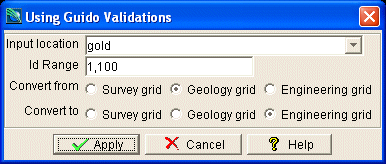
In this example it makes no sense to convert files from and to the same grid, so a user validation has been coded to avoid this situation.
To attach a validation call-back the -validation switch is used to code a boolean expression that will either evaluate to true or false. If the expression is simple it can be coded within the switch definition, but more complex examples may invoke a form procedure to evaluate the dependency and then return a true (1) or false (0) value. The example code below demonstrates using a validation expression to achieve this.
# GuidoValidation Example 1
# define the form
set formDef {
  GuidoForm form {
    -label "Using Guido Validations"
    -default_buttons
    GuidoFileBrowserField location {
      -label "Input location"
      -width 25
      -format none
      -null false
      -extension "*.str"
      -link idRange
    }
    GuidoField idRange {
      -label "Id Range"
      -width 15
      -format range
      -null false
    }
    GuidoButtonGroupPanel convertFrom {
      -label "Convert from"
      -validation {"[$convertFrom getCurrentValue]" != "[$convertTo getCurrentValue]"}
      GuidoRadioButton fSurvey {
        -caption "Survey grid"
        -selected_value "survey"
      }
      GuidoRadioButton fGeo {
        -caption "Geology grid"
        -selected_value "geology"
      }
      GuidoRadioButton fSurvey {
        -caption "Engineering grid"
        -selected_value "engineering"
      }
    }
    GuidoButtonGroupPanel convertTo {
      -label "Convert to"
      -validation {"[$convertFrom getCurrentValue]" != "[$convertTo getCurrentValue]"}
      GuidoRadioButton tSurvey {
        -caption "Survey grid"
        -selected_value "survey"
      }
      GuidoRadioButton tGeo {
        -caption "Geology grid"
        -selected_value "geology"
      }
      GuidoRadioButton tSurvey {
        -caption "Engineering grid"
        -selected_value "engineering"
      }
    }
  }
}
# Create and run the form
SclCreateGuidoForm formHandle $formDef {}
$formHandle SclRun {}
puts "Converting $location files from $convertFrom to $convertTo"
|
This example could have been coded better using a call-back procedure. With the callback procedure an error message can be printed to alert the user to what the problem with the inputs is. Notice the use of the Tcl square brackets ([]) to signify that a procedure must be invoked. Also note that the validation procedure validateGrids returns either a 1 or 0 to indicate true or false.
# GuidoValidation Example 2
# define the form
set formDef {
  proc validateGrids {fromGrid toGrid} {
    if {"[$fromGrid getCurrentValue]" == "[$toGrid getCurrentValue]"} then {
      puts "Validation error: Cannot convert from / to the same grid!"
      return 0
    }
    return 1
  }
  GuidoForm form {
    -label "Using Guido Validations"
    -default_buttons
    GuidoFileBrowserField location {
      -label "Input location"
      -width 25
      -format none
      -null false
      -extension "*.str"
      -link idRange
    }
    GuidoField idRange {
      -label "Id Range"
      -width 15
      -format range
      -null false
    }
    GuidoButtonGroupPanel convertFrom {
      -label "Convert from"
      -validation {[validateGrids $convertFrom $convertTo]}
      GuidoRadioButton fSurvey {
        -caption "Survey grid"
        -selected_value "survey"
      }
      GuidoRadioButton fGeo {
        -caption "Geology grid"
        -selected_value "geology"
      }
      GuidoRadioButton fSurvey {
        -caption "Engineering grid"
        -selected_value "engineering"
      }
    }
    GuidoButtonGroupPanel convertTo {
      -label "Convert to"
      -validation {[validateGrids $convertFrom $convertTo]}
      GuidoRadioButton tSurvey {
        -caption "Survey grid"
        -selected_value "survey"
      }
      GuidoRadioButton tGeo {
        -caption "Geology grid"
        -selected_value "geology"
      }
      GuidoRadioButton tSurvey {
        -caption "Engineering grid"
        -selected_value "engineering"
      }
    }
  }
}
# Create and run the form
SclCreateGuidoForm formHandle $formDef {}
$formHandle SclRun {}
puts "Converting $location files from $convertFrom to $convertTo"
|
The validation procedure must return a Tcl true value if it is valid or a false value if it is invalid. The value 0 represents false and any value that is not zero is considered true, usually the value 1 is used to signify true.
A validation can be placed on individual widgets, on containers, or on the form itself. Validation procedures are first invoked on widgets and containers with any form validation procedure being invoked last. As soon as a validation returns false the form engine stops evaluating further conditions and then highlights the widget that caused the error.
See Also
Guido
Dependency Callbacks
Action Callbacks
Validation Callbacks
Common guido switches