


GUIDO Dependency Callbacks
Dependency callbacks are used to make the form visually responsive to certain conditions as the user changes values of widgets on the form. For example, if a form contained a checkbox that asks if a plot is to be produced then there maybe other widgets on the form that only require valid inputs if the checkbox is ticked on, such as a plot size and a plot scale input. The example form below demonstrates this.
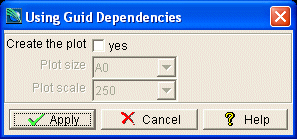
To attach a dependency callback the -dependency switch is used to code a boolean expression that will either evaluate to true or false. If the expression is simple it can be coded within the switch definition but more complex examples may invoke a form procedure to evaluate the dependency and then return a true or false value. The example below demonstrates the first method that produces the result as pictured above. Note that the dependency expression makes use of the object method getCurrentValue.
# GuidoDependency Example 1
# define the form
set formDef {
  GuidoForm form {
    -label "Using Guido Dependencies"
    -default_buttons
    GuidoCheckBox plotNow {
      -label "Create the plot"
      -height 1
      -caption "yes"
      -selected_value "yes"
      -unselected_value "no"
    }
    GuidoComboBox plotSize {
      -label "Plot size"
      -width 5
      -value_in A0 A1 A2 A3 A4
      -null false
      -dependency {"[$plotNow getCurrentValue]" == "yes"}   }
    GuidoComboBox plotScale {
      -label "Plot scale"
      -width 5
      -value_in 250 500 1000 2000 5000
      -null false
      -dependency {"[$plotNow getCurrentValue]" == "yes"}   }
  }
}
# Create and run the form
SclCreateGuidoForm formHandle $formDef {}
$formHandle SclRun {}
if {"$plotNow" == "yes"} then {
  puts "Plot sheet size = $plotSize"
  puts "Plotting scale  = $plotScale"
} else {
  puts "Not producing a plot"
}
|
The following example demonstrates using a callback method to produce the same result as above. Notice the use of the Tcl square brackets ([]) to signify that a procedure must be invoked. Also note that the callback procedure doingPlot returns either a 1 or 0 value to indicate true or false.
# GuidoDependency Example 2
# define the form
set formDef { proc doingPlot {plotting} {
    if {"[$plotting getCurrentValue]" == "yes"} then {
      return 1
    } else {
      return 0
    }
  } GuidoForm form {
    -label "Using Guido Dependencies"
    -default_buttons
    GuidoCheckBox plotNow {
      -label "Create the plot"
      -height 1
      -caption "yes"
      -selected_value "yes"
      -unselected_value "no"
    }
    GuidoComboBox plotSize {
      -label "Plot size"
      -width 5
      -value_in A0 A1 A2 A3 A4
      -null false
      -dependency {[doingPlot $plotNow]}   }
    GuidoComboBox plotScale {
      -label "Plot scale"
      -width 5
      -value_in 250 500 1000 2000 5000
      -null false
      -dependency {[doingPlot $plotNow]}   }
  }
}
# Create and run the form
SclCreateGuidoForm formHandle $formDef {}
$formHandle SclRun {}
if {"$plotNow == "yes"} then {
  puts "Plot sheet size = $plotSize"
  puts "Plotting scale  = $plotScale"
} else {
  puts "Not producing a plot"
}
|
When defining a dependency it is imperative that the widget that controls the dependency (the widget being depended on) be mentioned in the definition of the dependency switch expression. In the instance when a callback procedure is used the controlling widget must be defined as one of the procedure arguments. This is how the form processing engine knows to evaluate dependencies when value of the widget changes.
Validation criteria for widgets that have dependencies are only evaluated if the dependency is true when the form is applied. This avoids the user having to make valid entries into widgets that are of no significance with current form inputs.
See Also
Guido
Action Callbacks
Validation
Callbacks
Common guido switches