


Create sections from DTM
You can use this function to extract cross sections from a DTM that has been created using the Create DTM function. The sections to be extracted are defined by using a cross-section axis and the spacing along the axis. The sections are taken along the axis length, at the interval defined by the spacing value.
To run this function: Choose Surfaces > DTM file functions > Create sections from DTM, or...
The coordinates that define the start and end positions for the axis are found in the axis record of the layer that is associated with the DTM. If these coordinates define an axis that has a length of 0 (zero), you have to enter coordinates for the axis on the Define an axis line form. You can access the Define and axis line form using Define axis by coordinates or Define axis by graphics .
You can extract sections from only the upper DTM, or from both the upper and lower DTMs. Sectioning the upper DTM produces a new layer that has open strings for the sections. Sectioning the upper and lower DTMs produces a new layer that usually has closed strings for the sections. Forming a new DTM with closed strings can be useful if you are forming sections of topography and a pit excavation, or sections of the roof and floor of a coal seam.
You can use the boundary string to constrain the sections that are produced. The boundary string can consist of multiple closed segments.
Fields on the Extract sections from DTMs form
| Field | Description |
|---|---|
| Create cross sections from |
|
| Define the upper DTM | |
| Location | The DTM you want to use for the upper surface. |
 [Refresh] [Refresh] |
Loads the Object ID and Trisolation ID drop-down lists with the objects and trisolations of the DTM. In Surpac 6.6.1 and earlier versions, when you selected a DTM in the Location field, Surpac would load the DTM, validate it, and then load the Object ID and Trisolation ID drop-down lists. You could not interact with the form until the process was complete, which could be a long time for some large DTMs. Now, Surpac does not load the drop-down lists until you click the Refresh button, and validation does not occur until you click Apply in the form. Any validation errors are reported in the Message window. |
| Object ID | The object number of the upper DTM. You can type the Object ID or select it from the drop-down list, if the list is loaded. |
| Trisolation ID | The trisolation number of the upper DTM. |
| Define the lower DTM | |
|
Location |
The DTM you want to use for the lower surface. |
|
[Refresh] |
Loads the Object ID and Trisolation ID drop-down lists with the objects and trisolations of the DTM. |
| Object ID | The object number of the lower DTM. You can type the Object ID or select it from the drop-down list, if the list is loaded. |
| Trisolation ID | The trisolation number of the lower DTM |
| Define the boundary string | |
| Use a boundary string |
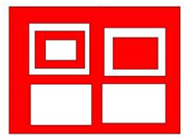
Imagine that you are viewing a surface along the normal to the plane used during surface creation (that is, looking directly at the plane), the rules for clipping are:
|
| Location | The name and location of the boundary string file. |
| ID number | The ID number of the boundary string file. |
| String number | The number of the string to use as the boundary string in the boundary string file. |
| Define the file to create | |
| Location | The name and location to save the output string file. |
| ID number | The ID number of the output string file. |
| Section |
|
| Section values | The range of values along the axis line at which the sections are created. |
Output
The new string file contains the section strings. You can switch the coordinate data fields in the strings, using STRING MATHS, to change them to plan view. Or, if you used an oblique axis, you can transform the section coordinates to real world coordinates.
When sectioning surfaces created on non-horizontal planes, the process is:
- The axis line is projected onto the plane.
- The surface and axis line are transformed so that the plane and axis line are horizontal.
- The section extraction process proceeds as for a horizontal plane surface.
 Note: If the number of string segments produced from the upper and lower DTMs are different for any section, the strings formed will not be closed.
Troubleshooting
| Message | Description |
|---|---|
The selected were not created on the same plane.
|
The DTMs used must be created on the same plane. Choose different DTMs and recreate the DTMs on the same plane, or transform the data in one of the DTMs to match the plane of the other. |
You can use this function with a clipped DTM. However, the function might run more slowly if the clipped DTM has a boundary that is concave in nature, for example:
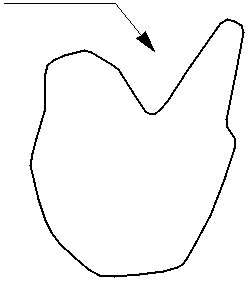
You will get a faster result if you use an unclipped DTM and nominate the boundary string in this function.