


Ore to waste ratio
With this function you can extract the ore to waste ratio for selected drill holes in the database. The selected zone is assumed to be ore while all other material above it is assumed to be waste. The major application of this function will be when dealing with near horizontal strata such as lateritic deposits or coal seams, since the output can be used to form a DTM and then contours extracted. Care should be taken when using this function where the drill holes are not vertical or the required zone is steeply dipping, since the ore to waste ratio that is calculated using downhole depths, so an ore to waste ratio calculated on a steeply dipping zone won't be the true ore to waste ratio at that point. The effect of this is shown in the following diagrams.
To run this function: Choose Database > Extract > Ore to waste ratio, or...
(a) correct ratio = waste/ore
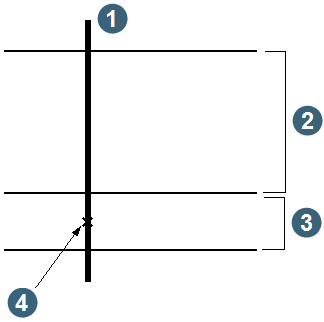
|
1. drill hole 2. waste 3. ore 4. y, x, z coordinate |
(b) incorrect ratio = reported waste/ore
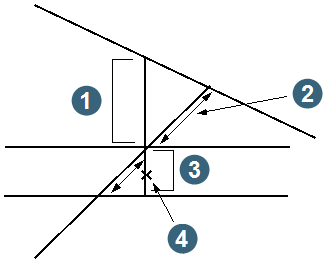
|
1. true waste 2. reported waste 3. ore 4. y, x, z coordinate |
Define the string file to create
The Location name and ID number of the string file to be created need to be entered, along with a String number to store the resulting ore to waste ratios.
Define the zone selection method
You can restrict the bulking of grades to be within particular geological zones by choosing one of the following:
- NO SELECTION, do not select by geology.
- MULTIPLE ZONES, define the zone by entering one or more geology codes.
- ZONE FROM TO, define the zone as being from the top or bottom of one geology code to the top or bottom of another.
No zone string
Enter the string number to store the points for any hole that does not contain the selected zone which will still be included in the output file and will have an ore to waste of zero. This will usually be necessary if the output file is to be used to produce contours of ore to waste ratio.
If you do not require the drill holes which do not intersect the zone of interest then you may prefer to enter 0 (zero) for the No Zone String. This will prevent these drill holes from appearing in the string file.
Complete the ORE TO WASTE RATIO form and choose Apply.
Depending on the zone selection method you chose at the Define the zone selection method prompt (Multiple zones or Zone from to), one of two forms is displayed to permit you to define the geological selection criteria.
Complete the zone selection forms and choose Apply to display the DEFINE QUERY CONSTRAINTS form.
Complete the DEFINE QUERY CONSTRAINTS form and choose Apply to commence processing and return you to the EXTRACTING POINTS submenu.
Once you have commenced the calculation of the ore to waste ratio, all hole ID's which match the selection criteria will be displayed in the message window. Upon completion of processing, the name of the output string file will be displayed in the message window. The output from Ore to Waste Ratio will be a string file in plan view containing the y, x and z coordinates at the centre of the ore zone, with the ratio and hole ID in the description fields. The location and ID of this file will have been specified by you in the ORE TO WASTE RATIO form. The elevation of the centre of the ore zone is stored in the z field of the output string file. The ore to waste ratio and the hole ID are stored in the D1 and D2 fields of the output string file.
The string file that is produced by this function can be used to generate contours of the ore to waste ratio by using the DTM TOOLS menu. The output string file could also be viewed using the GRAPHICS menu or used to generate a hard copy plot in the PLOTTING menu.