Define the geology zones form
This form appears when you are using one of the compositing functions and you choose the Multiple Zones option. It allows you to nominate multiple geological zones of interest by entering the codes for the zones.
You can enter up to 10 specifications for different tables and fields. Complex multiple table selection criteria are permitted to be defined. The selection criteria is in essence a continued refinement of the geological zone of interest, until ultimately a final zone or zone of interest is determined.
Fields on the Define the geology zones form
| Field | Description |
|---|---|
| TABLE | The name of the table that contains the geology codes which describe the zone of interest. |
| FIELD | The field name from the geology table that contains the data about the zone of interest. |
| SPECIFICATION |
The codes representing the geological zone of interest, to which the values from the table are compared. Wildcard specifications using the `*' and `?' characters are allowed. This allows you to specify that multiple codes should be considered. You can also enter multiple codes, for example, 'A, B, C' to obtain either 'A', 'B' or 'C' codes.
|
|
Intercept from Intercept to |
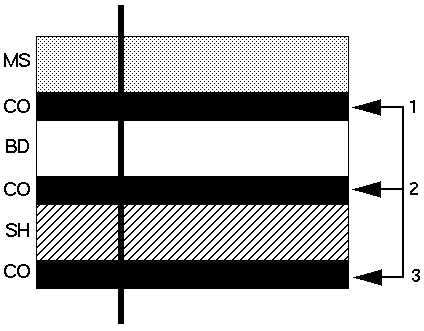
If a particular geological zone occurs more than once in a given drill hole, you must nominate the starting and ending intercept numbers for the code you have selected. For example, the following image shows a drillhole that intersects six geological zones, including three zones with a rock code of CO. Those three CO zones are intercept 1, intercept 2, and intercept 3 respectively.
If you specify an Intercept from and Intercept to of 1, samples are only selected from within the first occurrence of `CO' in the example above. If you specify an Intercept from of 1 and an Intercept to of 3 or greater, then samples are selected from within all three occurrences of the geological zone `CO'. If you enter an intercept number larger than the maximum number of intercepts in a drill hole, then the last intercept found is used, and the value in the Intercept to field is ignored. For example, if you enter '999' in the Intercept from field and five (5) intercepts of the specified code are found, then only intercept 5 is selected. The same applied to the Intercept to field.
|
 Note: This value is case sensitive. That is, 'a' does not equal 'A'.
Thus you must enter the zone code in the case which matches the zone code stored in the database.
Note: This value is case sensitive. That is, 'a' does not equal 'A'.
Thus you must enter the zone code in the case which matches the zone code stored in the database.