


Partial Percentages
The traditional constraints functions test all blocks to check whether they are inside or outside the constraint using the centroid position. This test is done on the minimum block size in the model (where required).
Occasionally, the centroid is outside the constraint, but a significant part of the block is still inside the constraint (see A in the following image). Usually, this is not a significant issue - the blocks in question are at the minimum block size, some blocks are inside the constraint, some are outside, and the two balance each other out. However, for some reporting, such as volume reconciliation, this is not accurate enough.
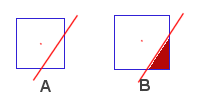
The partial percentage command determines a fractional value between 0 and 1 to show approximately how much of the block is inside the constraint. 0 is totally out, 1 is totally in, and 0.4 is 40% inside, as shown in B in the previous image. These values are stored inside a specified attribute.
To run this function: Choose Block model > Estimation > Partial Percentage, or...
The accuracy of the estimate is dependent on the Precision that you enter.
After partial percentage is calculated, you can use it as the Volume adjustment factor for other functions, for example in the block model report.
 Note: This might not be the most efficient method for calculating the partial percentage volume for an underground model with multiple stopes. Instead you can run a block model report using geometric grouping to report the partial percentage volume for each trisolation.
However, be aware that determining partial percentage volume through the block model report does not store the percentage value for each block as an attribute within the block model.
Note: This might not be the most efficient method for calculating the partial percentage volume for an underground model with multiple stopes. Instead you can run a block model report using geometric grouping to report the partial percentage volume for each trisolation.
However, be aware that determining partial percentage volume through the block model report does not store the percentage value for each block as an attribute within the block model.
Fields on the Block Model Partial Percentage Calculation form
| Field | Description |
|---|---|
| Constraint to apply | This field lets you select the constraint type to use to calculate the percentages.
The parameters for the individual types appear in the lower region of the form.
The available constraint types are:
Extended String constraint. A 2D string file is used and extruded in a particular direction to form a solid constraint. The solid constraint. This allows you to calculate partial percentages on a valid solid model. This is not a surface constraint - there is a separate command for surfaces. A valid, closed, solid must be used in this constraint type. This is a surface constraint - allowing you to constrain a model above or below one surface. You must have a valid surface to run this command. This is a surface constraint that allows you to constrain between an upper and a lower surface. You must have two valid surfaces to run this command.
Plane This option allows you to constrain by a plane, in the X Y or Z direction. If you want to use a different plane, then you have to use the PLANE EQ. method below. This option allows you to specify a plane to constrain by mathematically. Similar to the Constraint type in normal block model constraints, the results of this percentage calculation can be stored in a percentage file. This option allows you to re-load the percentages whenever required |
| Attribute to calculate | The output of this command is stored in a block model attribute. This attribute has to be either real or float, and must exist before this command is invoked. The values in this attribute will be between 0 and 1 for all blocks, with 0 meaning no part of the block was inside the constraint, 1 meaning the entire block was inside the constraint, and a percentage meaning that part of the block was inside the constraint. |
| Precision |
The number of times the function subdivides each block into 8 subblocks during the partial percentage calculation. Precision 1 creates 8 subblocks for each block. precision 2 creates 64 subblocks for each block and so on. The image at the end of this topic shows the effect of each of the 5 levels of precision. The topic Partial Percentages and Precision provides detailed information on how precision affects the partial percentage calculation. The subblocks are created in memory. When BM PARTIAL PERCENTAGES has finished running, the subblocks are discarded; they are not written to the block model. After BM PARTIAL PERCENTAGES is run, the block model has the same number of blocks as it did before BM PARTIAL PERCENTAGE was run.
The greater the precision, the greater the accuracy of the calculation, and the more processing time is required. Also, only a limited amount of precision is reasonable based on the equipment and method used to create the original block data. In most cases, a precision factor of 5 is unrealistic when you consider how the data was created. |
| Save partial percent as file | If a copy of the partial percentage calculation is required, enter the constraint information, then select this check box. The PERCENT FILE constraint type can then later be used to access any constraint that is saved. This allows for multiple attributes to be filled with the same percentage information without re-performing the calculation. |
Output
The attribute is created storing values between 0 and 1, where 1 = 100%. These values represent the percentage of the block sitting within the constraint.
 Troubleshooting