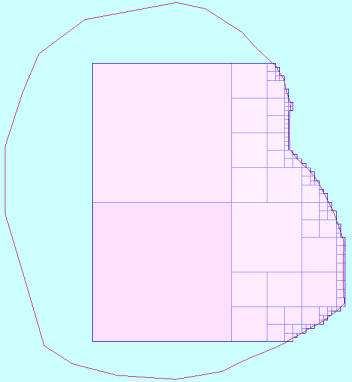
Partial percentages and precision
The following information explains the concepts of partial percentage and precision using a simple block model.
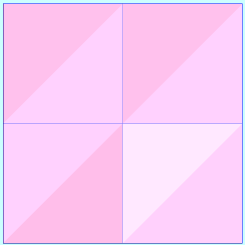
Consider a block model, with a minimum block size of 8x8x8, and a user block size of 8x8x8. The block model extends from 0 to 16 in the X and Y dimensions, and from 0 to 8 in the Z dimension. The following image shows the block model in plan view.
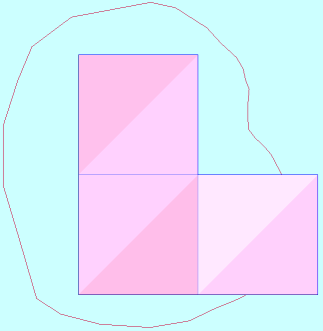
When this block model is constrained to the blocks within a specific boundary string (projected in the Z dimension), one of the blocks is excluded because the centroid of the block is outside the constraint. The following image shows the block model constrained by the boundary string, without running partial percentages on the block model.
You could run BM PARTIAL PERCENTAGES on the block model, constrain it to the blocks within the string, at precision level 1, and write the partial percentage value to an attribute pp that has two decimal places. When the function is running, it splits the 8x8x8 block in the top right of the model into eight subblocks. (Remember that the function splits blocks at the minimum block size, which is 8x8x8.) The following image shows the blocks and subblocks that BM PARTIAL PERCENTAGES considers to be inside the string.
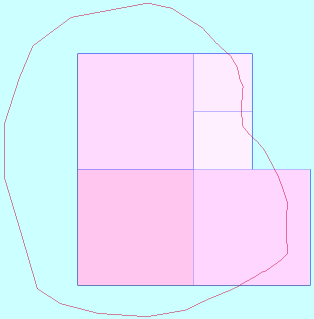
Four of the eight subblocks that are in memory have centroids within the string and four do not. Therefore, for the top right 8x8x8 block, 0.50 is written to the pp attribute. For the other three 8x8x8 blocks 1.00 is written to the pp attribute .
 Note: The previous image is in Plan view, which is why you can see only two of the four subblocks.
If you run BM PARTIAL PERCENTAGES on the same block model with the same constraint but change the precision level to 2, when the function is running, each 8x8x8 block is divided into 8 subblocks, and each of these subblocks is divided into 8 subblocks. The following image shows the blocks and subblocks that BM PARTIAL PERCENTAGES considers are inside the string.
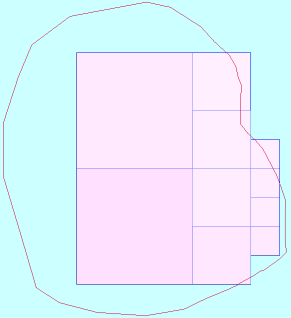
For the top right 8x8x8 block, the pp attribute is set to a value of 0.56, that is, a half plus a 16th of the block.
A more detailed explanation of why the calculation is a half plus a sixteenth is as follows. The image is shown in plan view, so there are two additional 4x4x4 subblocks below the two 4x4x4 subblocks that are visible, and there are three additional 2x2x2 subblocks under the 2x2x2 subblock that you can see. Therefore the included 4x4x4 subblocks are 4/8 of the 8x8x8 block, and the included 2x2x2 subblocks are 4/64 of the 8x8x8 block. 4/8 plus 4/64 expressed as a decimal, and rounded to two decimal places, is 0.56.
If you run BM PARTIAL PERCENTAGES on the same block model with the same constraint, but change the precision level to 3, the following image shows the blocks and subblocks that BM PARTIAL PERCENTAGES considers are inside the string. For the top right block, the pp attribute is set to a value of 0.45 (that is 20/64 plus 72/512).
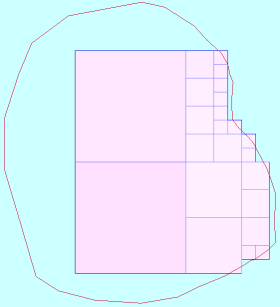
If you run BM PARTIAL PERCENTAGES on the same block model with the same constraint, but change the precision level to 4, the following image shows the blocks and subblocks that BM PARTIAL PERCENTAGES considers are inside the string. For the top right block, the pp attribute is set to a value of 0.46 (that is 20/64 plus 48/512 plus 256/4096).
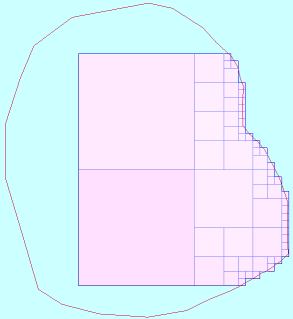
If you run BM PARTIAL PERCENTAGES on the same block model with the same constraint, but change the precision level to 5, the following image shows the blocks and subblocks that BM PARTIAL PERCENTAGES considers are inside the string. For the top right block, the pp attribute is set to a value of 0.46 (that is 20/64 plus 48/512 plus 128/4096 plus 864/32768).