


Service Menu
The Windows operating systems have a concept of a system service. A system service is a program that runs in the background of Windows. A system service starts running when the operating system starts, and stops again when you turn off the computer.
Licence Manager runs as a service called GEOVIA Licence Manager Service.
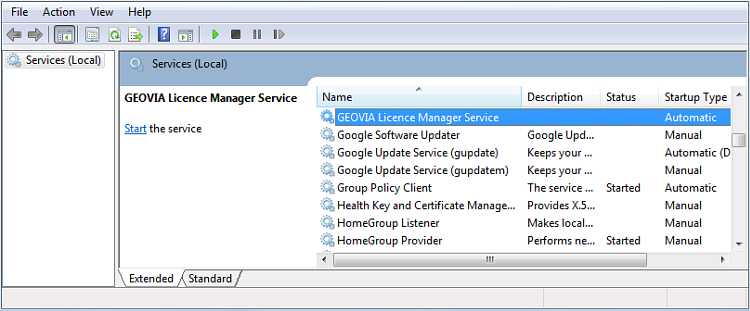
After you have configured Licence Manager to your needs, you start the service. Then the Licence Manager service continues to run automatically whenever the Licence Manager server computer is running. The service does not stop until you manually force it to stop.
You can use Services to start and stop the Licence Manager service. However, you might find it easier to use the Licence Manager window to perform all Licence Manager service management tasks including starting and stopping.
You must have Administrator level permission on the computer to run any of the functions in the Service menu.
 Tip: Alternatively, you can see the state of the GEOVIA Licence Manager service under Services in the operating system. To access Services quickly, click the Start menu, and in the Search box, type services.
Install
You use this function to install the Licence Manager as a service under Microsoft Windows.
 Note: Windows 95/98/ME/XP/Vista do not support the services required to run Licence Manager.
You must have Administrator level permission, on the computer, to install Licence Manager as a service.
If Licence Manager is already installed as a service, a warning message appears.
If the Licence Manager was not previously installed as a service, a confirmation message appears.
Note: Installing the Licence Manager as a service does not start the service. You must choose Service
> Start to start the service. Before starting the service,
you must also have a valid licence file.
Uninstall
You use this function to remove the Licence Manager from the installed services.
When you uninstall the Licence Manager service, it stops immediately. Any currently running sessions of Licence-Manager-enabled programs that rely on that service for authorization lose their licence soon after the Licence Manager service stops.
You must have Administrator level permission, on the computer, to uninstall Licence Manager.
If Licence Manager is not already installed as a service a warning message appears.
After successful removal of the Licence Manager service, a confirmation message appears.
Start
You use this function to start the Licence Manager program as a service under Microsoft Windows.
If the Licence Manager service is already running, attempting to start it has no effect.
You must have Administrator level permission, on the computer, to start the Licence Manager service.
The Licence Manager program MUST BE installed as a service before you try to start it as a service.
After successfully starting the service, a confirmation message appears.
Stop
You use this function to stop the Licence Manager program running as a service under Microsoft Windows.
If the Licence Manager service is already stopped, attempting to stop it has no effect.
You must have Administrator level permission, on the computer, to stop the Licence Manager service.
The Licence Manager program MUST BE installed as a service before attempting to stop it as a service.
After successfully stopping the service, a confirmation message appears.