


Setting an object to solid or void
Task: Set an object (trisolation) to solid or void
- Click Reset graphics
 .
. - Open mod11.dtm in Graphics.
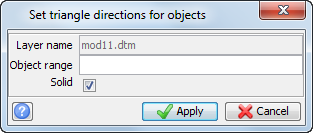
- Choose Solids > Validation > Set object to solid or void.
- Enter the information as shown, and click Apply.
- Choose File > Save > string/DTM, and save your model as mod11.dtm.
This will make both objects in mod11.dtm solids.
 Note:
Note:
- You can now use this solid to calculate a volume, or as a constraint in block model filling. Later, you will use the model you have created in this task to demonstrate viewing solid models, intersecting drill holes, and performing volume calculations.
- If you want to perform this task again, you will need to copy original_mod11.dtm and rename it as mod11.dtm.
- To see all of the steps performed in this task, run _07a_solids_validation.tcl. You need to click Apply on any forms presented.