Surpac concepts
Overview
In this chapter, you will learn about:
- Surpac data types
- function-centric versus data-centric operations
Surpac data types
Surpac uses many different file types. Each file type is represented by a unique icon in the Navigator. The following table describes the most common file types used in Surpac:
| File type |
Example |
Description |
|---|---|---|
|
String |
|
A string is a sequence of three-dimensional coordinates representing some physical feature. |
|
DTM |
|
Digital Terrain Model (DTM) files are generated from .str files and can represent surfaces or solids.
|
|
Geological database |
|
Drillhole database (DDB) files are used to connect to relational drillhole databases. It is a text file that tells Surpac which tables and fields to read from and write to in the client database. |
|
Survey database |
|
Survey database (SDB) files are used to connect to relational survey databases. It is a text file that tells Surpac which tables and fields to read from the database. |
|
Block model |
|
A block model is a form of spatially-referenced database that provides a means for modelling a 3D body from point and interval data such as drillhole sample data. It provides a method for estimating volume, tonnage, and average grade of a 3D body from sparse drillhole data. |
|
Plot files |
|
Files for printing that are generated using the Plotting module. The output files are in DWF format. You can open and edit them in the Surpac plotting window or send them to a plot device such as a plotter. |
|
Macros |
|
Macros are custom programs, created to perform a set of repetitive tasks or functionality specific to an operation. You can easily record and edit TCL scripts in Surpac. |
|
Plugins |
|
Plugins allow you to import files from other software applications directly into Surpac. If a file has this icon next to it in the Navigator, you can open the file in Surpac. For example, you can import any file that has one of the following extensions: .dxf, .dwg, .dgn, .dm, .shp, .dgd. |
|
Styles file |
|
Surpac styles files contain information such as drawing styles, colour settings for strings and DTMs, or default Surpac settings. |
 pit1.str
 pit1.dtm
 surpac.ddb
 ug_mine.sdb
 block.mdl
 pit_str.dwf
 macro.tcl
 topo2.dxf
 styles.ssi
Function-centric and data-centric operations
You can perform nearly all operations in Surpac using either a function-centric or a data-centric approach. When you use a function-centric approach, you select the function, then specify the data it is going to act on. When you use a data-centric approach, you select the data, by opening it and using the selection tools in Graphics, and then select the function. The data-centric approach is often faster because you do not have to wait for your data to display in Graphics to perform the function.
Function-centric
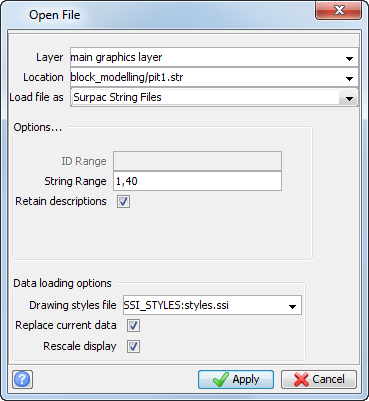
When you run a function first, and then specify the data you want to use, you are performing a function-centric operation.
For example, when you click the icon to
Open a file  , Surpac displays a form. Then you select the file you want opened.
Some non-graphical operations can only be performed using the function-centric approach..
For example, to calculate volumes between two DTM surfaces, you must use the function-centric approach, selecting Cut and Fill between DTMs from the Volumes submenu, on the Surfaces menu.
Data-centric
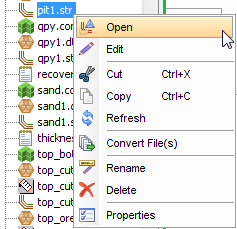
When you select data first, and then specify the function to be applied to the data, you are performing a data-centric operation.
For example, when you right-click a file, the shortcut menu is displayed. You then choose the operation to be performed, such as Open.
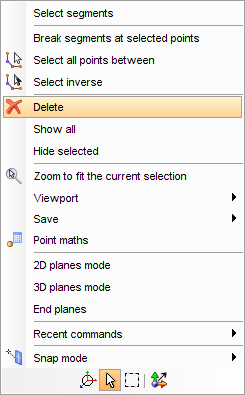
Many graphical operations are quicker and easier to perform using the data-centric approach.
For example, you can select data in a string file, and right-click to display functions that Surpac can perform on the data.