


Required files
Overview
This chapter will help you find the files required for this tutorial.
Requirements
In order to perform the exercises in this tutorial, you should:
- Install Surpac v6.6.
The files and directory structure for each tutorial are present if you have installed the software from the DVD.
If you have not installed the software from a DVD:
1. Create the following directory:
<installation directory>/demo_data/tutorials/geostatistics
 Note: <installation directory> is c:\users\public\GEOVIA\Surpac\66 for Windows 7.
2. Download the geostatistics tutorial data (contained in a single zip file):
- Go to http://www.GEOVIAsupport.com.
- Log in.
- Click the Downloads link.
- Click Surpac downloads.
- Click Tutorials.
- Click 6.4 tutorials to download the zip file.
3. Unzip the file geostatistics.zip into the directory you created.
Tutorial profile
Profiles are a collection of menu bars and toolbars. The tutorial profile contains a set of menus that assist you with learning various aspects of the software.
Task: Display the Tutorials profile
- Right-click in the blank area to the right of the menus.
- From the shortcut menu, choose Profiles > tutorials.
- Choose Geostatistics > CD to geostatistics folder.
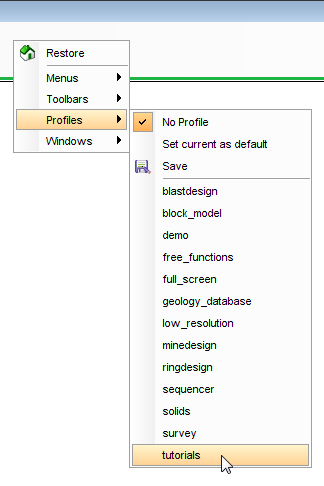
A new menu bar is displayed, listing all available tutorials.
Note: There are two Geostatistics menu items. Select the one on the tutorials menu bar, as shown:
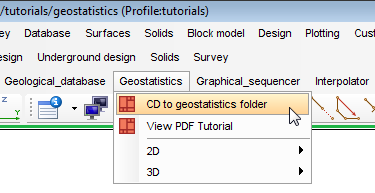
This should set your working directory to:
<installation directory>/demo_data/tutorials/geostatistics
This directory contains all of the files required to perform the steps in this tutorial.