Connecting to a Surpac database
Connect to a Surpac database
Task: Connect to a Surpac database
- Connect to the Surpac database surpac_training.ddb, by either:
- Double-clicking surpac_training.ddb in the Navigator.
- Dragging surpac_training.ddb into Graphics.
- Choosing Database > Open/New and navigating to surpac_training.ddb.
- Choose Database > Close.
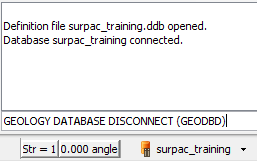
A message is displayed in the message window stating that the database is connected and the database name appears in the Status bar.