


SclCreateGuidoForm
Overview
Creates a GuidoForm object for developing user interface components in an Scl script. GuidoForm Objects used in Scl scripts may include:
- fields
- text labels
- radio buttons
- button groups
- check-boxes
- combo-boxes
- tables (for entering multiple rows of data for a field)
- etc.
The GuidoForm object that is created by the SclCreateGuidoForm command creates the object and provides a convenient method of assigning values stored in script variables to the various Guido objects (fields, button groups, etc.) so that the form is displayed with suitable default values.
The SclRun command must be used to display the Guido form and to permit a user to interact with the form. The SclRun command is also used to retrieve values from the form and to associate the user entered values with local script variables.
Synopsis
SclCreateGuidoForm GuidoObjectHandleVariable $GuidoScriptName Body
Description
Creates a GuidoForm object by sourcing Guido instructions from a Guido script (.tcl) file or from a variable to which the GuidoForm command has been assigned. The GuidoObjectHandleVariable argument is assigned a unique handle to the GuidoForm object for subsequent use by the SclRun command.
Arguments
- GuidoObjectHandleVariable
- GuidoScriptName
- Body
Passed by reference. A unique handle to the created GuidoForm object is returned into this variable. If an error occurs processing the instructions in the Guido script $SCL_UNDEFINED_HANDLE is assigned.
Passed by value. The Guido script that defines the GuidoForm to present to the user when the SclRun command is invoked. The Guido script may be defined within the Scl script that is being executed (by assigning it to a Tcl variable) or it may be defined in a separate Tcl script file. Either method is acceptable and the method used is entirely a matter of personal preference.
The former may be prefered as it keeps the Guidoform definition and the Scl script that uses it together. This has the advantage that changes to the scl script and associated GuidoForm need to be made in one file only.
The latter (i.e. the Guido script in a separate Tcl file) may be more useful when the GuidoForm is used by numerous Scl scripts. This avoids repetition of the Guido script definition in each Scl script.
If the Guido form is defined in its own Guido script file then the second argument to the SclCreateGuidoForm command must have a leading @ character to ensure it is interpreted as a file name rather than as a GuidoForm command.
The body of the SclCreateGuidoForm command contains commands to initialise the various fields and components in the GuidoForm with initial values.
At its simplest this is achieved with simple Tcl set commands with the name of the variable being set being the same as the name of the field for which the value is to be assigned. For example:
							SclCreateGuidoForm form_handle $guido_script {
							  set field1 "My name"
							}
Will display the value My name in a field called field1 in the Guido form.
Returns
The SclCreateGuidoForm command returns $SCL_OK if successful otherwise $SCL_ERROR.
Examples
A number of examples have been provided to show how different Guido components may be used and to show how, at its simplest, Guido forms may be easily used to obtain inputs from the user with minimal effort. More complex examples have also been included to assist the more advanced Scl programmer to see how sophisticated user interfaces can be constructed with Guido components.
- Entering a single value on a simple form
- Entering a single value on a simple form by referring to a Guido script file.
- A form with fields for text and numeric data with check box combobox and button groups
- Using dependencies to enable and disable selected fields
- A form with fields, combo boxes and checkboxes in a table
- Accessing form values outside the SclRun command body
Each example below includes the definition of the GuidoForm as well as the Scl script that is used to interact with the Guidoform.
Entering a single value on a simple form
This example is a very simple example of how Guido and Scl integrate through the SclCreateGuidoForm and SclRun commands.
Points to take note of in this example:
- The Guido form is assigned to a Tcl variable, form which is then used in the SclCreateGuidoForm command.
- The initial value for the variable person_name, set within the body of the SclCreateGuidoForm command, is displayed in the field person_name when the form is displayed.
- The value entered into the person_name field is automatically assigned by Scl to a variable of the same name, thus it can be used, but only within the body of the SclRun command.
- The SclRun command creates the _status variable and assigns the result of the form so that it is possible to determine whether the Apply or Cancel button was pressed. The _status variable will have either apply or cancel depending on which button was pressed.
- Testing the _status variable within the body of the SclRun command permits different code to be executed depending on the button that was pressed.
- To refer to the entered value outside of the body of the SclRun command you simply refer to the variable $field_name. See this example to see how this is done.
set form {
  GuidoForm sampleform {
    -default_buttons
    -label "How to enter your name"
    -tip "A simple data entry form - this is the tooltip text"
    GuidoField person_name {
      -label "Enter your name"
      -format none
      -translate none
      -display_length 10
      -max_length 30
    }
  }
}
SclCreateGuidoForm form_handle $form {
  set person_name "A. Name"
}
$form_handle SclRun {
  if {"$_status" == "apply"} {
    puts "Your name is ->$person_name<-"
  } else {
    puts "The form was cancelled returning: $_status"
  }
}
|
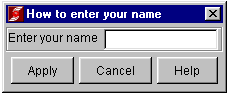
Here is an image of the form created using this script.
Entering a single value on a simple form by referring to a Guido script file
This example is identical to the example above with the exception that the GuidoForm is defined in the file name.tcl and refered to indirectly from the Scl script by using the special prefix @ to source the guido script from a file.
Points to take note of in this example:
- The Guido form is defined in the file name.tcl and is referred to by the @ operator. This instructs the SclCreateGuidoForm to load the script from a file.
The file name.tcl in which the form is defined
GuidoForm sampleform {
  -default_buttons
  -label "How to enter your name"
  -tip "A simple data entry form - this is the tooltip text"
  GuidoField person_name {
    -label "Enter your name"
    -format none
    -translate none
    -display_length 10
    -max_length 30
  }
}
|
The Scl script
SclCreateGuidoForm form_handle @name.tcl {
  set person_name "A. Name"
}
$form_handle SclRun {
  if {"$_status" == "apply"} {
    puts "Your name is ->$person_name<-"
  } else {
    puts "The form was cancelled returning: $_status"
  }
}
|
A form with fields for text and numeric data with checkbox, combobox and button groups
This example shows how to use the most commonly used Guido components (field, button groups, check boxes and combo boxes) and how the edit and validation characteristics can be changed to accept entry of integer values, real numbers and text data.
Points to take note of in this example:
- Three different GuidoFields are used, each with different edit characteristics and validation criteria.
- The person_name field is a text field that permits any data to be entered.
- The age field is an integer field that has low and high bound limits for data validation. It is permissible to only use low_bound or high_bound or neither if a completely unbounded value is permitted.
- The height field is a real number (a number with a decimal point) field with low and high bound limits.
- A GuidoPanel is used for panel1 to ensure a horizontal layout, using the -layout BoxLayout X_AXIS, for the buttons in the GuidoButtonGroupPanel sex panel. Button group panels may consist of any number of buttons and they may be arranged horizontally as with this example by using the X_AXIS orientation or vertically by using the Y_AXIS orientation.
- For GuidoRadioButton and GuidoCheckBox components the -selected_value and -unselected_value are used to define the value that is returned for the selected button or for the state of a GuidoCheckBox.
- The GuidoComboBox shows how a defined list of values can be provided to ensure that only specific values can be selected. It is possible to make a GuidocomboBox editable, i.e. values other than the defined list can be entered, by using the -exclusive false parameter. GuidoComboBoxes are exclusive by default.
set form {
  GuidoForm sampleform {
    -default_buttons
    -label "Person details"
    -tip "A simple data entry form - this is the tooltip text"
    GuidoField person_name {
      -label "Name"
      -format none
      -translate none
      -display_length 10
      -max_length 30
    }
    GuidoField age {
      -label "Age in years"
      -format integer_4
      -translate none
      -display_length 3
      -low_bound 0
      -high_bound 120
    }
    GuidoField height {
      -label "Height in metres"
      -format real_8
      -translate none
      -display_length 5
      -low_bound .5
      -high_bound 2.5
    }
    GuidoPanel panel1 {
      -label "Sex"
      -layout BoxLayout X_AXIS
      GuidoButtonGroupPanel sex {
        GuidoRadioButton male {
          -caption Male
          -selected_value m
        }
        GuidoRadioButton female {
          -caption Female
          -selected_value f
        }
      }
    }
    GuidoCheckBox CanVote {
      -label "Elligible to vote"
      -selected_value "y"
      -unselected_value "n"
    }
    GuidoComboBox state {
      -label "State of residence"
      -value_in "Australian Capital Terrirory" " New South Wales" "Northern Territory" "Queensland" \
      "South Australia" "Tasmania" "Western Australia" "Victoria"
    }
  }
}
SclCreateGuidoForm form_handle $form {}
$form_handle SclRun {
  if {"$_status" == "apply"} {
    puts "Your name is: $person_name"
    puts "You are $age  years old"
    puts "You are $height m. tall"
    if {"$sex" == "m"} {
      puts "You are male"
    } else {
      puts "You are female"
    }
    if {"$CanVote" == "y"} {
      puts "You are elligible to vote"
    } else {
      puts "You are inelligible to vote"
    }
    puts "Your state of residence is: $state"
  }
}
|
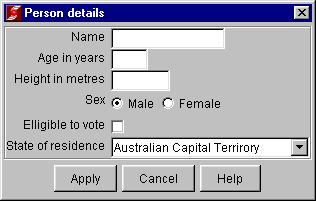
Here is an image of the form created using this script.
Using dependencies to enable and disable selected fields
This example shows how fields can be disabled subject to values that are entered into other fields on the same form.
Points to take note of in this example:
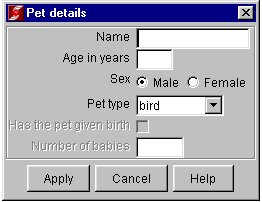
- The GivenBirth check box is dependent on the sex radio button group and the NumberOfBabies field is dependent on the GivenBirth field. The -dependency {"[$sex getCurrentValue]" == "f"} causes the value of the field refered to by the $sex variable, i.e. the GuidoField called sex, to be obtained and compared with the value "f". If this expression evaluates to false, then the field is disabled. If this expresion evaluates to true then the field is enabled.
- This example shows cascading dependencies with NumberOfBabies dependent on GivenBirth which in turn is dependent on sex.
- The syntax of the dependency expression is crucial in successful evaluation of the dependency expression. The examples as shown should be used as a model for dependency expressions in other forms.
set form {
  GuidoForm PetDetails {
    -default_buttons
    -label "Pet details"
    GuidoField name {
      -label "Name"
      -format none
      -translate none
      -display_length 10
      -max_length 30
    }
    GuidoField age {
      -label "Age in years"
      -format integer_4
      -translate none
      -display_length 3
      -low_bound 0
      -high_bound 120
    }
    GuidoPanel panel1 {
      -label "Sex"
      -layout BoxLayout X_AXIS
      GuidoButtonGroupPanel sex {
        GuidoRadioButton male {
          -caption Male
          -selected_value m
        }
        GuidoRadioButton female {
          -caption Female
          -selected_value f
        }
      }
    }
    GuidoComboBox PetType {
      -label "Pet type"
      -value_in "bird" "cat" "dog" "fish" "snake"
    }
    GuidoCheckBox GivenBirth {
      -dependency {"[$sex getCurrentValue]" == "f"}
      -label "Has the pet given birth "
      -selected_value "y"
      -unselected_value "n"
    }
    GuidoField NumberOfBabies {
      -dependency {"[$GivenBirth getCurrentValue]" == "y"}
      -label "Number of babies"
      -format integer_4
      -low_bound 0
      -display_length 4
    }
  }
}
set status [SclCreateGuidoForm form_handle $form {}]
$form_handle SclRun {
  if {"$_status" == "apply"} {
    puts "Pet name is      : $name"
    puts "Pet age is       : $age"
    puts "Type of pet is   : $PetType"
    if {"$sex" == "m"} {
      puts "Pet sex is       : male"
    } else {
      puts "Pet sex is       : female"
      if {"$GivenBirth" == "y"} {
        puts "Number of babies : $NumberOfBabies"
      }
    }
  }
}
|
Here is an image of the form created using this script.
A form with fields, combo boxes and checkboxes in a table
This example shows how a GuidoTable can be used to obtain inputs in a scrolling region so that multiple values can be entered for each parameter of interest. The organisation is very similar to the columns and rows commonly seen in spreadsheets and database tables.
Points to take note of in this example are:
- The GuidoscrollPane command defines the need for a scroll pane with vertical and horizontal scrollbars. In this instance only the -height parameter of the scroll pane is defined. The -width parameter is not explicitly defined. Consequently the width is determined by Guido so that all columns can be seen. By specifying an explicit -width parameter a horizontal scrollbar may be enabled. The values used of the -height and -width parameters are nominal row and column sizes for a single character. Trying different values will quickly guide towards the most suitable value.
- The GuidoscrollPane has a -border etched true parameter which causes a thin border to be drawn around the extent of the scroll pane into which is inserted the label specified by the -label parameter.
- The GuidoTable command defines the initial number of rows, the minimum number of rows and the maximum number of rows, respectively, with the -instances 1 1 10 parameter.
- The GuidoTable is made interactive, that is the user can add and delete rows interactively, with the -interactive true parameter.
If -interactive false were used then the user would not be able to add or delete rows.
Note: When a table is interactive, right clicking on the row heading buttons will present a small popup menu that can be used to add, insert or delete rows in the table. It is also possible for the user to re-order the columns by doing a select and drag operation with the column title.
- All Guido components defined within the body of the GuidoTable command will appear as columns in the table. While it is possible to use radio button groups they are not well suited to a table implementation.
- Dependencies expressed in this example are determined on columns within the same row. If the dependency is on a Guido component that exists outside the GuidoTable then the dependency enables or disables the entire column in the table, not just a single row.
- The variables created by the SclRun command are arrays, one per column in the table, that have one element per row in the table. The row indexes start at 0 for the first instance and increase to one less than the number of rows in the table.
- The fields, combo boxes and checkboxes used in the table may be initialised with values using a variety of methods. Each of these methods are described
here. The fields, combo boxes and checkboxes are all initialised with values inside the body of the SclCreateGuidoForm command. The following
explanations relate therefore to the body of code between the {} for the SclCreateGuidoCommand below.
Since the GuidoTable returns values, after executing the SclRun command, into Tcl array variables, array variables are also used to initialise the rows in each column of the GuidoTable. Thus initialising values is simply a matter of assigning the required values to an array variable that has the same name as the name of the Guido object (field, combo box, check box, etc.) in question. The examples below, excerpts from the body of the SclCreateGuidoForm command, show some different methods that can be used to initialise the arrays. Which method is most appropriate is dependent on the circumstances prevailing for a particular application.
array setvalues name [list "rover" "fido" "beth"]
This is perhaps the simplest method to assign a list of values to a Tcl array variable with appropriate integer indexes, starting from 0 for the first element, to initialise the array with values that are then presented in each row of the name column in the GuidoTable.
The result of the Tcl command above is to create a Tcl array variable name that has three elements:
												    name(0) = rover
												    name(1) = fido
												    name(2) = beth
The setvalues option to the Tcl array command is a special extension implemented by GEOVIA to simplify the initialising of an array from a Tcl list where the array is constructed from the list with integer indexes starting from 0 for the first element in the list and incrementing for each subsequent element.
Note that array setvalues [list value1 value2 ...] is non standard Tcl and will only work with the Tcl interpreter embedded in GEOVIA software products.
set age(0) 2
												set age(1) 4
												set age(2) 3
This method of initialising the arrays is perhaps the simplest to understand. The values are explicitly assigned to array variables with an explicit index for the array element in question.
- set NumberOfBabies(2) 3
This method shows how a single value can be set in an array with obvious gaps in the array index values. In this instance a value with an index value of 2 is set. This is interpreted by the GuidoTable as meaning that other index values in the array have no value and so only the values explicitly set will be displayed in the table while the missing rows in the table will be created but they will have no initial value.
On some occasions it is not possible to define the permitted set of values statically in the GuidoComboBox since the permitted set of values is variable and dependent on the data being processsed.
It is possible to determine the permitted set of values for a GuidoComboBox when the Scl script is executed. By determining the permitted set of values when the script is executed any statically defined permitted value list in the GuidoScript is superceded by the dynamically defined set of values.
In the example below, this line
set PetType.setValues [list "dog" "cat" "mouse" "elephant"]
within the body of the SclCreateGuidoForm command ensures that the permitted set of values for the GuidoComboBox with the name PetType is modified accordingly. Thus, to alter the permitted set of values for any GuidoComboBox when executing the SclCreateGuidoForm command, create a variable using the name of the GuidoComboBox and append to the variable name .setValues
Since the values are returned in Tcl array variables, any of the Tcl array command options can be used to examine the values in the arrays. The body of the SclRun command in the Scl script below shows how these arrays can be used.
set form {
  GuidoForm PetDetails {
    -default_buttons
    -label "Entry of pet details for multiple pets"
    GuidoScrollPane scrollpane {
      -label "Pet details"
      -border etched true
      -height 10
      GuidoTable PetTable {
        -instances 1 1 10
        -interactive true
        GuidoField name {
          -label "Name"
          -format none
          -translate none
          -display_length 10
          -max_length 30
        }
        GuidoField age {
          -label "Age in years"
          -format integer_4
          -translate none
          -display_length 3
          -low_bound 0
          -high_bound 120
        }
        GuidoCheckBox sex {
          -label "Male"
          -selected_value "m"
          -unselected_value "f"
        }
        GuidoComboBox PetType {
          -label "Pet type"
          -value_in "bird" "cat" "dog" "fish" "snake"
        }
        GuidoCheckBox GivenBirth {
          -dependency {"[$sex getCurrentValue]" == "f"}
          -label "Has the pet given birth "
          -selected_value "y"
          -unselected_value "n"
        }
        GuidoField NumberOfBabies {
          -dependency {"[$GivenBirth getCurrentValue]" == "y"}
          -label "Number of babies"
          -format integer_4
          -low_bound 0
          -display_length 4
        }
      }
    }
  }
}
SclCreateGuidoForm form_handle $form {
  array setvalues name [list "rover" "fido" "beth"]
  set age(0) 2
  set age(1) 4
  set age(2) 3
  array setvalues sex [list "m" "f" "f"]
  set PetType.setValues [list "dog" "cat" "mouse" "elephant"]
  array setvalues PetType [list "dog" "cat" "elephant"]
  array setvalues GivenBirth [list "n" "n" "y"]
  set NumberOfBabies(2) 3
}
$form_handle SclRun {
  if {"$_status" == "apply"} {
    # determine how many rows exist
    set count [array size name]
    for {set i 0} {$i < $count} {incr i} {
      #get values from each row
      puts "Pet name is      : $name($i)"
      puts "Pet age is       : $age($i)"
      puts "Type of pet is   : $PetType($i)"
      if {"$sex($i)" == "m"} {
        puts "Pet sex is       : male"
      } else {
        puts "Pet sex is       : female"
        if {"$GivenBirth($i)" == "y"} {
          puts "Number of babies : $NumberOfBabies($i)"
        }
      }
    }
  }
}
|
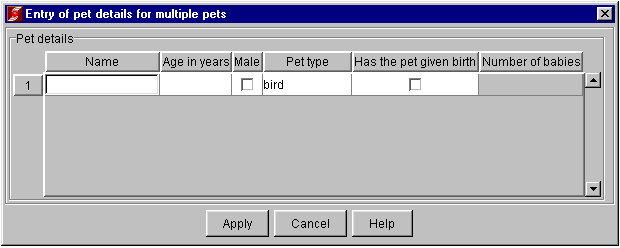
Here is an image of the form created using this script.
Accessing form values outside the SclRun command body
The SclCreateGuidoForm and SclRun commands create a set of variables whose names correspond to the names of the Guido components on the form.
To refer to any of the variables created by the SclCreateGuidoForm or SclRun commands is a simple matter of using the component name. For example, the variable name person_name refers to the data entered into the field person_name. Care must be taken to avoid using the same field name in two different forms if both values are required simultaneously after form processing.
Finally, the SclDestroy command can be used after the form is no longer required to free all resources associated with the GuidoForm.
While the SclDestroy command explicitly destroys the resources associated with the GuidoForm and this may be wise in large complex scripts, these resources are automatically destroyed when a script finishes execution.
set form {
  GuidoForm sampleform {
    -default_buttons
    -label "How to enter your name"
    -tip "A simple data entry form - this is the tooltip text"
    GuidoField person_name {
      -label "Enter your name"
      -format none
      -translate none
      -display_length 10
      -max_length 30
    }
  }
}
set DefaultName "A. Person"
SclCreateGuidoForm form_handle $form {
  set person_name $DefaultName
}
$form_handle SclRun {
  if {"$_status" == "apply"} {
    if {$DefaultName != $form} {
      puts "The name was    : $DefaultName"
      puts "The name is now : $person_name"
    }
  } else {
    puts "The form was cancelled returning: $_status"
  }
}
#
# the variables in the form can be referenced:
#
puts "The name is: $person_name"
SclDestroy form_handle
|
Defaults management for a form
If you require the last values entered on a form to be displayed on that same form the next time the script is invoked, you can do this by adding a -defaults_key option to your GuidoForm. The name you give this key must be unique in the defaults management system so it can easily identify the last values that were entered into a particular field on your form. Hence they key specified cannot be the same name as any Surpac function and cannot contain quote ("), full stop (.) or question mark (?) characters.
In the example below, the unique key used to identify the last values entered for fields on the form in the defaults management database is "GET NAME OF PERSON".
set form {
  GuidoForm sampleform {
    -default_buttons
    -defaults_key "GET NAME OF PERSON"
    -label "How to enter your name"
    -tip "A simple data entry form - this is the tooltip text"
    GuidoField person_name {
      -label "Enter your name"
      -format none
      -translate none
      -display_length 10
      -max_length 30
    }
  }
}
|