Planes projection distance
When you set up planes, you define the default thickness of the corridor. This is also known as the projection distance. You can modify the projection distance of a plane.
Usually, Surpac displays, selects, and reports data that is inside the projection distance of the active plane.
A plane has projection distances on each side:
- toward the view plane
- away from the view plane
The orientation of the plane determines which projection distance is towards and which is away. Together, the two projection distances determine the total thickness of the plane corridor.
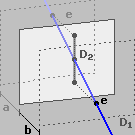
In the following example, the plane thickness is a + b. The projection distance away is a. The projection distance towards is b. D1 is the drillhole trace, and D2 is the trace orthogonally projected onto the plane. Point e shows where the drillhole trace exits the plane.