Geology patterns selectable
You can use this function to make it easier for you to digitise points in section view that snap to geological zones. When you run the menu command for this function, Surpac alternates between running BLASTHOLE GEOLOGY SELECTABLE and BLASTHOLE GEOLOGY NOT SELECTABLE. When geology is selectable, you can create a point that snaps to a geological zone.
 Tip: You might also want to make label tickmarks not selectable (BLASTHOLE LABELS NOT SELECTABLE). This step makes it much more difficult for you to accidentally select a label or another part of a blast hole.
 Note: Make sure that Snap mode is set to Point. When Snap mode is set to Plane, you can click anywhere in the current plane, so the points you create do not snap to geology.
Prerequisites: Blast holes are displayed in section view with geology patterns displayed.
To run this function: Choose Design > Blast design > Display > Geology patterns selectable, or
- In the Function Chooser, type BLASTHOLE GEOLOGY SELECTABLE or BLASTHOLE GEOLOGY NOT SELECTABLE, and press ENTER.
Output
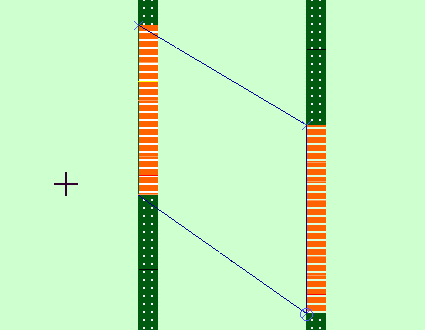
If you ran BLASTHOLE GEOLOGY SELECTABLE, you are able to create a point that snaps to a geology pattern (when snap mode is set to Point). If you ran BLASTHOLE GEOLOGY NOT SELECTABLE, you cannot create a point that snaps to a geology pattern.
The following image shows an example of digitising with geology patterns selectable, label tick marks not selectable, and snap mode set to Point.