Blast hole traces selectable
This function allows you to switch on or off the ability to select blast holes. Switching this option to on is useful if you are digitising or editing points and you want to create points precisely on the blast holes. When you run the menu command for this function, Surpac alternates between running BLASTHOLES SELECTABLE and BLASTHOLES NOT SELECTABLE.
 Note: Make sure that Snap mode is set to Point. When Snap mode is set to Plane, you can click anywhere in the current plane, so the points you create do not snap to blast holes.
Prerequisites: Blast holes are displayed in Graphics.
To run this function: Choose Design > Blast design > Display > Blast hole traces selectable, or...
Output
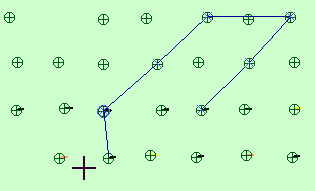
If you ran BLASTHOLES SELECTABLE, you are able to create a point that snaps to a blast hole collar or toe (when snap mode is set to Point). If you ran BLASTHOLES NOT SELECTABLE, you cannot create a point that snaps to a blast hole.
The following image shows an example of digitising, in plan view, where blast hole traces are selectable and snap mode is set to Point.