GuidoCheckBox
Overview
A GuidoCheckBox provides an easy to use widget that is useful for entering yes or no type of inputs from the form. For example to ask the script user a question such as 'Do you want to plot now?'; The best way of displaying this on your form would be to use a check box where a visual box on the form can be checked on or off with a tick.
The GuidoCheckBox is used in instances were you have a true or false, yes or no, on or off type of input. Basically if you are endeavouring to get an input that can only have two possible answers you would use a check box.
Synopsis
GuidoCheckBox Name Body
Description
The GuidoCheckBox command when processed will define a small box on the form which when selected with the mouse or space bar on the keyboard will either 'check on' or 'check off'. When 'checked on' a tick will be displayed inside the box to signify this. The default for a check box is to be 'checked off'.
Arguments
Name Name is a unique identifier that you assign and is used to differentiate this object from other Guido objects in the form definition. The name you assign will become the name of a variable in the Tcl interpreter that will contain the value as entered into the field on the form.
Body The body of the check box may contain a number of switches to modify the default behaviour. The body begins with an opening curly brace and ends with a closing curly brace. If there is no required body the curly braces {} are required as a place holder for this argument.
Switches The following switches can be used to modify the default behaviour of the check box:
| -caption text | The -caption switch allows you to specify some extra
text to appear with the check box in addition to the standard label switch.
The caption text is actually part of the check box widget and can be selected
with the mouse. The purpose of the caption is to give more context to
the check box. See the examples below for more information.
-caption "Yes" -caption "Tick to plot" |
| -caption_placement left|right|top|bottom | The -caption_placement switch gives you flexibility
in placing the caption text in relation to the actual check box icon.
By default the caption is placed to the right of the check box.
-caption_placement right -caption_placement bottom |
| -selected_value value | The -selected_value switch sets the actual value that
you want returned from the check box when it has been selected. By default
the text true is returned, but usually you will want to change
this to give more context to your meaning, ie yes may have more
contextual meaning for a check box called plotNow when used in
your script.
-selected_value "yes" -selected_value "on" |
| -unselected_value value | The -unselected_value switch sets the actual value
that you want returned from the check box when it has not been selected.
By default the text false is returned but usually you will want
to change this to add more context to your meaning, ie no may have
more contextual meaning for a check box called plotNow when used
in your script.
-selected_value "no" -selected_value "off" |
It is common when using a standard -label switch with a check box to also use the -height switch to set a height of 1 for the widget. This is because the default height for a check box icon is slightly bigger than 1 character in height and so by setting a height of 1 it will line the widget up correctly with the label. See the common Guido switches reference and the examples below for further information. Common Guido switches reference
Examples
Example 1
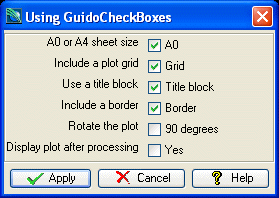
The example form below demonstrates using checkboxes to gather a variety of different inputs for a plotting macro. Note the use of the -selected_value and -unselected_value switches as well as the standard -default switch to set the initial state of the check box.
# GuidoCheckBox Example 1
# define the form
set formDef {
  GuidoForm form {
    -label "Using GuidoCheckBoxes"
    -default_buttons
    GuidoCheckBox sheet {
      -label "A0 or A4 sheet size"
      -caption "A0"
      -height 1
      -selected_value "A0"
      -unselected_value "A4"
      -default "A0"
    }
    GuidoCheckBox grid {
      -label "Include a plot grid"
      -caption "Grid"
      -height 1
      -selected_value "GRID"
      -unselected_value "NOGR"
      -default "GRID"
    }
    GuidoCheckBox titleBlock {
      -label "Use a title block"
      -caption "Title block"
      -height 1
      -selected_value "TB"
      -unselected_value "NOTB"
      -default "TB"
    }
    GuidoCheckBox border {
      -label "Include a border"
      -caption "Border"
      -height 1
      -selected_value "BORD"
      -unselected_value "NOBD"
      -default "BORD"
    }
    GuidoCheckBox rotatePlot {
      -label "Rotate the plot"
      -caption "90 degrees"
      -height 1
      -selected_value "90"
      -unselected_value "0"
    }
    GuidoCheckBox display {
      -label "Display plot after processing"
      -caption "Yes"
      -height 1
      -selected_value "YES"
      -unselected_value "NO"
    }
  }
}
# Create and run the form
SclCreateGuidoForm formHandle $formDef {}
$formHandle SclRun {}
puts "Sheet size\t- $sheet"
puts "Plot grid \t- $grid"
puts "Title block\t- $titleBlock"
puts "Plot border\t- $border"
puts "Plot totation\t- $rotatePlot"
puts "Preview plot\t- $display"
|
Example 2
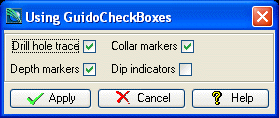
The following example demonstrates using the -caption_placement switch to change the default placement of the caption text. This produces a different effect on the form which may in some instances display your meaning in a more logical fashion.
# GuidoCheckBox Example 2
# define the form
set formDef {
  GuidoForm form {
    -label "Using GuidoCheckBoxes"
    -default_buttons
    GuidoCheckBox drillholeTrace {
      -caption "Drill hole trace"
      -caption_placement left
      -selected_value "yes"
      -unselected_value "no"
      -default "yes"
    }
    GuidoCheckBox collarMarkers {
      -caption "Collar markers"
      -caption_placement left
      -selected_value "yes"
      -unselected_value "no"
      -default "yes"
    }
    GuidoCheckBox depthMarkers {
      -caption "Depth markers"
      -caption_placement left
      -selected_value "yes"
      -unselected_value "no"
      -default "yes"
    }
    GuidoCheckBox dipIndicators {
      -caption "Dip indicators"
      -caption_placement left
      -selected_value "yes"
      -unselected_value "no"
      -default "no"
    }
  }
}
# Create and run the form
SclCreateGuidoForm formHandle $formDef {}
$formHandle SclRun {}
puts "Drill hole trace $drillholeTrace"
puts "Collar markers $collarMarkers"
puts "Depth markers $depthMarkers"
puts "Dip indicatorss $dipIndicators"
|