


Properties pane
With the Properties Pane, you can view and modify information about files and data in Graphics.
Properties tab
When data is selected in Graphics using a Select Tool, information relative to the type of data is presented. For example, point coordinates, segment area, or 3D length of a string can be displayed.
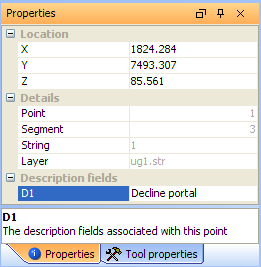
Data in black can be changed. Values in grey cannot be changed.
Point operations
After using the Select Tool to select a point, you can change the X, Y, Z, or any existing Description value.
|
To: |
Click the field containing the value, and then: |
|---|---|
| Manually enter a different value | Change its value. |
|
Perform simple math operations on a value.
|
Enter a formula, using numbers and fields. For example: X-240.937 or Z*2.5 or D2+D3 |
String operations
After using the Select Tool to select a string, you can change the string number.
|
To: |
Click the field containing the value, and then: |
|---|---|
| Manually enter a different string value | Change its value. |
Triangle operations
After using the Select Tool to select a triangle, you can change the X, Y, or Z value of any of the triangle vertexes.
|
To: |
Click the field containing the value, and then: |
|---|---|
| Manually enter a different coordinate value for a vertex. | Change its value. |
File operations
After selecting a file in the Navigator, you can change the file name.
|
To: |
Click the file, and then: |
|---|---|
| Manually enter a different file name | Change its value. |
| Manually enter a different file extension | Change its value. |
Tool properties tab
When a tool is selected, information relative to the tool is presented. If a tool is activated, and the Tool properties tab is not displayed, the text on the tab will flash red.
The only tool for which this tab is applicable is the Triangulate Shape tool.
For the Triangulate Shape tool, the fields are:
Options
New triobject
If this options is selected, the object number will be automatically incremented every time you create triangles with the Triangulate Shape tool. If this option is not selected, the object number will be assigned based on the value in the Triobject field.
Design
Triobject
The object number for the triangulation being created. This must be a positive integer value. This field is available when the New triobject option is not ticked.
Trisolation
The trisolation number for the triangulation being created. This must be a positive integer value.
Triobject name
The name for the triangulation being created. This can be any alphanumeric value.
Triangles
The number of triangles in the last triangulation which was created.