Krige Polygons
You can use this function to estimate grades inside one or more closed segments. The grades are estimated by discretizing the interior of a polygon with a regular grid of points and then kriging grades on each of these points and then taking the mean of the discretisation point grades as the value for the polygon.
To run this function: Choose Block model > Geostatistics > Krige polygons, or...
- In the Function Chooser, type POLYGON KRIGING, and press ENTER.
Care should be taken to ensure that a reasonable density of discretisation points falls within the polygon.
Procedure
- Choose Geostatistics > Polygon kriging.
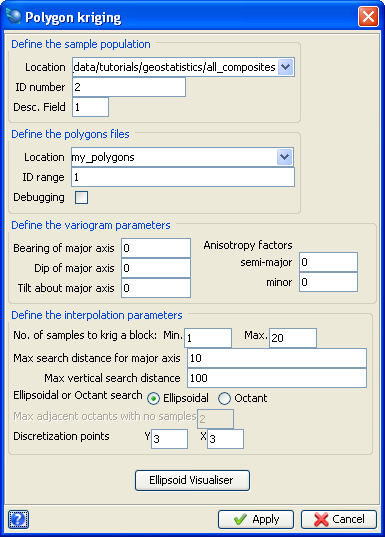
| Form Feature |
Description |
| Define the sample population |
The sample data which is to be used for kriging grade values at block centroids must be identified by entering the string file Location and ID number and the description Field number which contains the grade values. |
| Define the polygon files |
The polygons which are to be kriged must be defined by entering the Location and ID number of the string files.
The files may contain any number of strings, each of which may contain any number of segments.
All the segments must be closed or it will not be possible to krige the grades.
At the end of processing the string files which contain the polygons are created but in the description fields the kriged grade (D1), the kriging variance (D2), two times the standard deviation (D3) and the distance to the nearest sample (D4) are present.
|
| Debugging |
If you select this check box then the '.not' file will contain the calculation steps for the first five blocks.
Additional information includes:
Estimated Grade
Kriging variance
Standard deviation * 2
Block variance
Kriging efficiency = (block variance - kriging variance) / block
variance
Slope of regression = standard deviation / Estimated grade
Conditional bias slope = (block variance - kriging variance + |
LaGrange |) /
(block variance - kriging variance + |2 * LaGrange |) |
| Define the variogram parameters |
These conventions were explained previously in Variogram Calculation.
|
| Bearing of major axis, Dip of major axis, Tilt about major axis |
Tilt is described as though you are standing at the origin looking out along the direction of the major axis.
A clockwise tilt is negative and an anti-clockwise tilt is positive. |
| Anisotropy factors semi-major and minor |
Anisotropy factors are the ratios of the length of the major axis to the lengths of the semi-major and minor axis.
The anisotropy factors can be calculated as follows:
semi-major = maximum range in direction of major axis / maximum range in direction of semi-major axis
minor = maximum range in direction of major axis / maximum range in direction of minor axis
For an isotropic search ellipsoid these ratios would be equal to 1.
They cannot be less than 1 as the length of the major axis is always greater than the other axes if there is anisotropy.
The following image shows tilt about major axis.
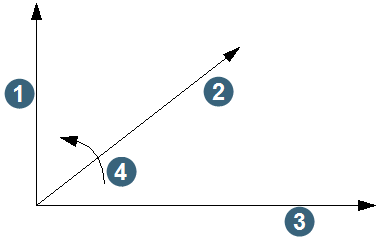
1. minor axis
2. major axis
3. semi-major axis
4. positive tilt direction
|
Define the interpolation parameters
No. of samples to krig a point
Minimum, Maximum
|
The number of samples used to calculate the kriged value for each point can be restricted by entering a minimum number and a maximum number.
The minimum number of samples to use depends on the number of samples available and the sampling density.
Usually at least two samples should be used and if the sampling density is high then at least five samples should be used.
The maximum number of samples to use affects the time taken to carry out the kriging calculations in a non-linear fashion, so that twice the number of samples quadruples the processing time.
Since the process of kriging forces samples close to the point being estimated to screen out samples further away (by assigning very small or negative weights to samples far away), the maximum number of samples to use should be restricted to about 15-20 so that processing time is minimised. |
| Maximum search distance for major axis |
The maximum search distance is used in conjunction with the maximum number of samples to select samples to be used in the kriging calculations.
It should generally (although not necessarily) be set to a value slightly greater than the range of the variogram of the major axis.
The exception to this would be where it has been established that the Kriging Weights based on a typical block / sample configuration tend to zero at a distance shorter than this range.
An example value is 10.
While the range of the variogram gives the maximum distance at which there is some correlation between data points, it is the magnitude of the kriging weights that ultimately determine the distance to which significant samples will be found.
The maximum search radius is measured in the direction of the major axis.
The search distances for the semi-major and minor axes are influenced by the anisotropy ratios which are used to define the shape of the ellipsoid.
Only if these ratios are both equal to 1.0 will the maximum search distance be equal in all directions. |
| Maximum vertical search distance |
This distance is used to exclude samples that are greater than the maximum vertical search distance from the kriging calculations.
If 2-dimensional kriging is required, then this distance should be set to a value less than the vertical length of the samples used.
If 3-dimensional kriging is required, then the vertical distance can be set to quite a large value.
In orebodies that show definite layers, such as coal deposits or lateritic deposits, the vertical search would normally be set to the thickness of the deposit. An example value is 100.
Note that this is a VERTICAL search distance and is not influenced by the orientation of the search ellipsoid.
To be used in estimating a value for a block, a point must first fall within the search ellipsoid and it must also be within the maximum vertical search distance.
|
| Ellipsoidal or Octant search |
A 3D ellipsoid search can be used if the samples used for kriging are roughly on a regular grid and do not show any clustering of points.
It simply uses the nearest samples to the point being estimated up to the maximum number of samples specified.
An octant search should be used if there is significant clustering of data.
It divides the horizontal plane into eight equal areas, and takes only up to n/8 samples from each octant for use in the kriging calculation, where n is the maximum number of points specified.
This ensures that clusters of data do not overly influence the estimation of any point.
If there are too many empty octants surrounding a point then that point will not be estimated. |
| Max adjacent octants with no samples |
This defines the maximum number of adjacent octants which may have no samples and yet calculations will still be performed.
The number of empty octants allowed is specified by the user, with a default of 2.
|
| Discretization points |
Example values are Y 3 and X 3. |
- Fill in the fields on the Polygon kriging form.
- Click Apply.
| Form Feature |
Description |
| Variogram File name |
Enter the file name of the variogram model. |
| Define the variogram model |
The type of model and the model parameters.
One of the three variograms model types can be specified here, or if none of these is available then inverse distance to a nominated power can be selected.
If a variogram model is selected, then the model parameters need to be provided.
Enter the model type which is to be used for the kriging.
The values which may be entered are:
SPH
for a spherical model,
EXP
for an exponential model,
INV
for an inverse distance to a power model,
NSP
for a nested spherical model
Power- If an inverse distance to a power model has been selected you must enter the power required (2=squared, 3=cubed, etc.).
For other cases this value is ignored.
Number of structures - This value must be 1 for SPH and EXP type models.
For NSP and NEX type models values from 2 to 5 may be entered. |
| Nugget (Co) |
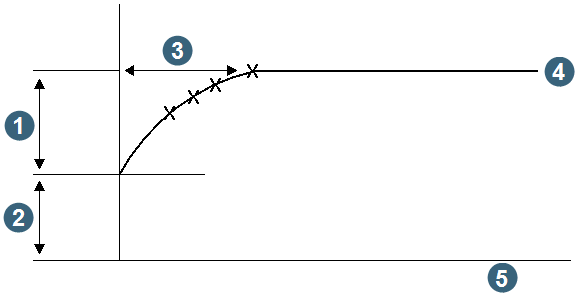
1. C
2. nugget Co
3. range a
4. sill
5. distance h
The nugget effect is the value of gamma(h) at zero distance on the variogram.
The nugget effect represents the inherent variability of the data which could be due to both the spatial distribution of the values, along with any errors in determining those values, such as errors in sampling.
The value of the nugget effect should be close to zero in those deposits that have a very uniform grade distribution, such as porphyry coppers.
In most gold deposits the nugget effect tends to be quite large due to the `nuggety' nature of the mineralisation, so that samples taken close together can potentially have very different grades.
A good estimate of the nugget effect is important.
However, in most deposits, the sampling density is such that short-range variability, including the nugget effect, is difficult to estimate.
In this case, the nugget effect can be determined using a downhole variogram with a direction of the average azimuth and dip of the drill holes and lag distance equal to the downhole sample spacing.
|
| C (#) |
Enter the C values for each of the required nested structures. |
|
Range (A(#))
|
Enter the range values for each of the required nested structures.
|
- Fill in the fields on the Variogram Model form.
- Click Apply.
| Form Feature |
Description |
| Location and ID number |
The result file must be identified by entering the string file Location and ID number. |
| Format |
Select from the list of available report file formats, including .not, .csv, .htm, .html, .rtf, .pdf, and .ps. |
- Fill in the fields on the Define result file form.
- Click Apply.
Messages
WARNING - Negative kriging variance - check block size and/or number of descretisation points
A negative kriging variance will occur if the dispersion variance of a block is greater than the weighted average extension variance of the samples informing the block.
This may be due to overly large blocks relative to the spacing between samples, an insufficient number of descretisation points used to characterise the block, or an unfortunate coincidence of sample and descretisation points.
No block will be written where a negative kriging variance occurs. If it becomes obvious that negative kriging variances are being calculated for each block, the function may be halted using the ABORT key.
ERROR - Kriging error - see notefile for details
Incorrect anisotropy ratios were specified. Each ratio must be at least 1.
ERROR - Maximum of polygon points exceeded
The specified polygon comprises over 100 points.
ERROR - Maximum of integration point exceeded
More than 125 descretisation points were generated for the polygon.



 Polygon kriging form.