


acQuire Interface
Background
acQuire from acQuire Technology Solutions Pty Ltd is a highly-normalised relational database system used primarily for storing drillhole data. The acQuire database is very general (and normalised) to be able to accommodate a wide range of needs; as a result, it is not a database suitable for direct use by Surpac. Instead, this interface provides a means of importing into a local database for use by Surpac.
There are two functions in Surpac that can be used to load data from acQuire into a Surpac database, ACQUIRE IMPORT DRILLHOLES to import drillhole data from acQuire into an existing Surpac database and ACQUIRE IMPORT SAMPLES to import discrete sample data from acQuire into an existing Surpac database.
Creating a database to be used with this interface
Although in general any Surpac database can be loaded with these functions, if you are creating a new database care should be taken to ensure that the hole_id fields in the Collar and Survey tables have the same length as the HOLEID field in acQuire.
Note on macros
In order for a macro recording of ACQUIRE IMPORT DRILLHOLES or ACQUIRE IMPORT SAMPLES to be able to connect to acQuire, you must specify the name of an existing selection file when the macro is recorded:
Scheduling a load from acQuire
To schedule a load from acQuire on a regular basis or while Surpac is unattended, you must:
-
Record a macro of the acQuire import function (ACQUIRE IMPORT DRILLHOLES or ACQUIRE IMPORT SAMPLES), specifying the name of an existing selection file during recording.
-
Create a scheduled task. Scheduling a task is largely a Windows operating system task. There are two specific acQuire interface points to note:
-
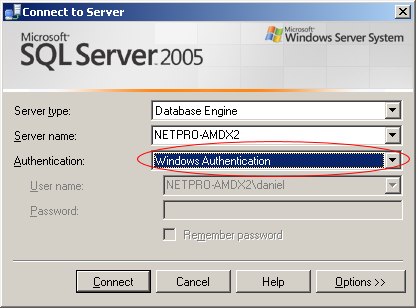
The SQL Server that contains the acQuire database must use Windows authentication, otherwise the scheduled task will stall when waiting for a password to be entered for SQL Server Authentication.
-
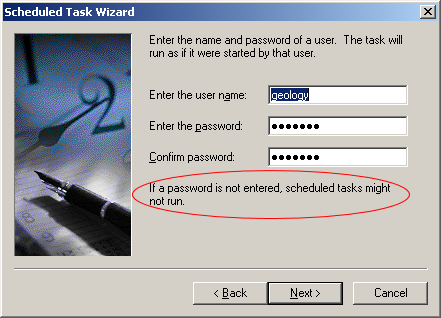
The user name used when creating the scheduled task must have a password or the process will not run:
Note on older versions of Surpac
The mappings of acQuire tables and fields to Surpac tables and fields are stored in the database .ddb file as db_specific entries of the form:
DB_SPECIFIC "acQuireName=<acquire table or field name>". For example:
  TABLE collar
    DB_SPECIFIC "acQuireName=Collar"
    FIELD hole_id
      DB_SPECIFIC "acQuireName=HOLEID"
      ...
If the ddb file is used with an older (pre-6.1) version of Surpac, warnings will be issued for the new db_specific lines. Apart from the warnings, the database will work as expected.