Dilution and reduction
You can use this function to apply dilution and reduction to ore/waste contacts, bench contacts, and to the tops and bottoms of columns in the block model.
To run this function: Choose Block model > Column processing > Dilution & reduction, or...
To run this function: Choose Block modelling > Column processing > Dilution & reduction.
Fields on the Block model reduction & dilution form
| Field | Description |
|---|---|
| Volume Factor | |
| Use volume factor? |
|
| Attribute |
The name for the attribute in which to store the volume factor. |
| Thickness | |
| Dilution (Top and Bottom layer) |
The dilution thickness for the top and bottom of the column or the ore layer. These amounts of material will be added to the column. If no blocks exist in these thicknesses above and below the column, a grade of 0.0 is assumed. |
| Reduction (Top and Bottom layer) |
The reduction thickness for the top and bottom of the column or the ore layer. These amounts of material will be removed from the column. |
| Attributes to composite (list master first) | |
| Attribute |
The numeric attribute to dilute. The first attribute in this list is the master attribute whose value relative to the cutoff will determine possible ORE and WASTE reclassifications. |
| Diluted grade |
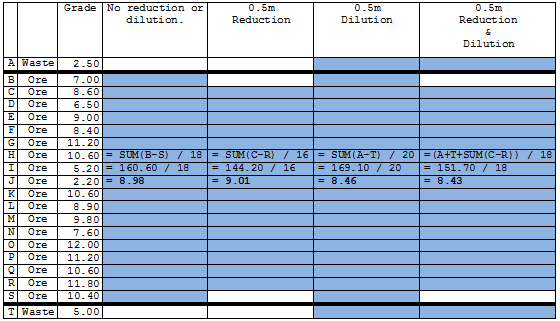
The existing attribute in which to store the diluted grade. The attribute must have a type of real. The dilution grade is calculated as follows: Diluted grade = ([Grade of interval * length of interval] - [Grade of reduction interval * length of reduction interval] + [grade of dilution interval * length of dilution interval]) / (length of interval - length of reduction interval + length of dilution interval) |
| Replace negatives with |
When Surpac calculates the diluted grade, all negative grades (that is, all negative values for the attribute defined in the Attribute field) are replaced with this value. The default value is 0.0. |
| Ore attribute properties | |
| Ore attribute |
The name of the attribute that stores the ORE and WASTE flags. |
| Ore Value |
The value that will signify ORE blocks. This value must conform in type to the ore attribute. |
| Waste Value |
The value that will signify WASTE blocks. This value must conform in type to the ore attribute. |
| Direction of columns |
The direction that will define the orientation of columns in the model. This may be X, Y, Z -X, -Y or -Z. The directions that you can use include:
|
| Bench attribute |
The block model attribute that contains a bench identifier. Where the value of this attribute changes in a column, a bench contact exists and reduction/dilution is calculated. |
| Constrain discrimination? |
|
| Report file name |
The name of the report file. |
| Format | The file type for the report. |
| Cutoff |
The value that the master attribute for block or interval must meet or exceed for that block or interval to be reclassified as ORE. |
| Change WASTE above cutoff to ORE? |
|
| Change ORE below cutoff to WASTE? |
|
Result
The diluted grades of selected blocks are stored in the model and, if nominated, ORE and WASTE layers are reclassified.
 Example