


Cokriging
To run this function: Choose Block model > Estimation > GSLIB > Cokriging, or...
Fields on the GSLIB interface: Cokriging (cokb3d) form
Files tab
| Field | Description |
|---|---|
| Location | The location of the string file that contains the sample data. |
| ID Number | The ID range of the string file that contains the sample data. |
| String range | The range to use for estimation. |
| D-fields | The description fields that contain the data to use for estimation. |
| Minimum | All samples less than this value are not used in estimation. |
| Maximum | All samples greater than this value are not used for estimation. |
| Estimate | The attribute that stores the estimated grade of each block. If a block is not estimated this attribute is given a background value of -999. |
| Estimation variance | The attribute that stores the kriging variance for each block. |
| Constrain interpolation |
|
| Debug file | The name of the GSLIB debug file created. |
| Debug level | The level of detail included in the debug output file. The higher the debugging level, the more output. The none and low levels summarise the results. Medium and high levels provide all the kriging matrices and data used for the estimation of every point/block. It is recommended that you do not use a high debugging level with a large block model. |
| Clean up |
|
Kriging Options tab
| Field | Description |
|---|---|
| Kriging type |
The type of kriging to use. The options are:
|
| Minimum primary samples to krige a block | The minimum number of data points for the primary variable to use for kriging a block. If fewer than this number of samples are found, the block is not estimated. |
| Maximum primary samples to krige a block | The maximum number of data points for the primary variable to use for kriging a block. For example, specifying 8 uses the closest eight sample points to the centroid of the block being sampled. |
| Maximum secondary samples to krige a block | The maximum number of data points for the secondary and subsequent variables to use for kriging a block. |
| Block descretization | The number of descretisation points in X, Y, and Z. These points are evenly distributed on an X x Y x Z grid inside each block being estimated. If you set the number of descretisation points to 1 for X, Y, and Z, point kriging is performed at the block centroid. |
| Primary Search radius | The search radius for the primary variable in the maximum horizontal direction (hMax), the minimum horizontal direction (hMin), and the vertical direction (Vert). See Ellipsoid Definition for more detail on specifying these radii. |
| Secondary search radius | The search radius for the secondary variables in the maximum horizontal direction (hMax), the minimum horizontal direction (hMin), and the vertical direction (Vert). See Ellipsoid Definition for more detail on specifying these radii. |
| Search angles | The angle parameters that describe the orientation of the search ellipsoid. See Ellipsoid Definition for more detail on specifying these angles. |
 Note: For
 Variograms tab
| Field | Description |
|---|---|
| Nugget |
The nugget constant for the variogram. |
| Type |
The type of structure represented by the structure. The structure types supported by GSLIB are:
|
| Cc | The sill for this structure. |
| hMax | The maximum horizontal range. See Ellipsoid Definition for more detail on specifying these values. |
| hMin | The minimum horizontal range. See Ellipsoid Definition for more detail on specifying these values. |
| Vert | The vertical range. See Ellipsoid Definition for more detail on specifying these values. |
| Angle1 | The first angle defining the geometric anisotropy. See Ellipsoid Definition for more detail on specifying these angles. |
| Angle2 | The second angle defining the geometric anisotropy. See Ellipsoid Definition for more detail on specifying these angles. |
| Angle3 | The third angle defining the geometric anisotropy. See Ellipsoid Definition for more detail on specifying these angles. |
Result
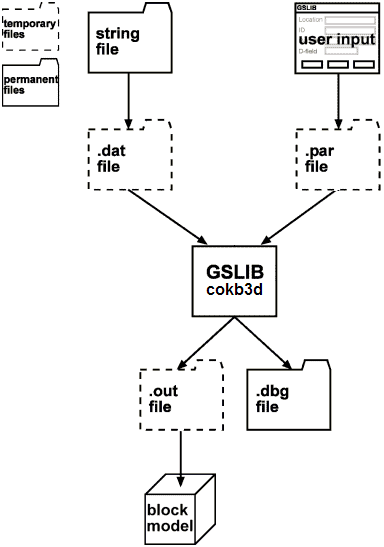
After you click Apply the information you have selected is sent to GSLIB.
The flow of data is described in the following diagram:
Messages
| Message | Description |
|---|---|
Error loading file filename0.str
|
There was an error loading the specified string file. |
You must select a model first.
|
You must load a block model before you can use this function. |
File c:\Program Files\Gslib90\cokb3d.exe not found
|
cokb3d.exe could not be found in the specified directory. Make sure the gslib90 user option is pointing to the directory containing kt3d.exe. |
You have terminated "c:\Program Files\Gslib90\cokb3d.exe" sample.par.
				Results were not loaded.
|
You chose to abort the kriging process. This terminated the executable before the results were loaded. |
"c:\Program Files\Gslib90\cokb3d.exe" sample.par terminated prematurely. Results were not loaded.
|
cokb3d crashed or otherwise ended prematurely (for example, it was terminated outside of Surpac by using Task Manager) before the results were loaded. |
|
|
An error occurred while writing the specified file. Check that there is enough disk space available to write the file. |
|
|
An error occurred while trying to open the specified file for writing. Check that the file is not read-only or in use by another process. |
Error opening file sample.out
|
An error occurred while trying to open the specified file for reading. Check that kt3d.exe did not end prematurely and that the file is not in use by another process. |
|
|
You chose to abort the block model loading process. |