


Variable Arguments
Variable arguments are used in output messages where the exact value of the message is not known or is defferent all the time (for example when outputting the result of a calculation). There is a variety of syntaxes for these variable arguments, but on the whole they are very simple. Adding a variable argument to a message is a case of adding a placeholder in the message at the position required, and then defining the variable type so that the message translating system can correctly output the variable.
Placeholder Syntax
Every variable argument obviously has to know where in the message it is required. This is the function of the placeholder. If you had a message that said :
Cannot find file to open
it's a fairly generic message. If you want to output a message like:
Cannot find file <filename> to open
Then you would have to use a variable argument and a placeholder.
There are two ways of defining a placeholder:
| {arg#} | Where arg# is a number that defines what argument to output in that position. If you have multiple arguments in the same message, you will increase this arg# as required. For example, typical placeholders are {0}, {1} etc. Arguments are then sent to the message subsystem in an array that is in the correct order for the arguments. |
| {arg#, argType, format} | The more definite type, this placeholder defines the argument number (as above),
but also provides extra information to the messaging subsystem. The argType when this
placeholder is used is always number to define that we have a numeric argument.
The format is then defined width.precision (eg XXXXX.XX - which will output a
minimum of 5 numerals (space padded), and 2 decimal places). Without this special
placeholder, numeric arguments are simply given default output. If you want to
format an integer message, simply leave off the precision.
In the new message subsystem, all messages are passed as strings (which must be formatted by the programmer before sending to the message subsystem, so this method of placeholder is unlikely to be needed in future. |
Variable type
For the old message system to correctly output an argument, it needed to know it's type. This meant that each message needed to have format arguments associated with it. This was simply a string of concatenated letters, one for each variable argument. The available letter for use are:
- f - floating point number
- d - integer
- s - string
Therefore a format string could be "fffds". Again, this may fall into disuse due to the new messaging system, but it is important that we add the correct placeholders and formats for the time being.
Adding Arguments
Adding arguments to a message is made even easier in the new Translation Manager. It provides a very easy way to fill in all the information required. The following is displayed on both the "Add" and "Edit" message panels.
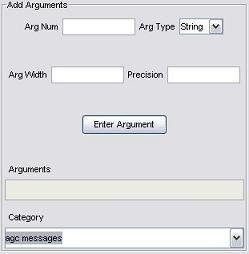
Adding a variable is as simple as filling in the few fields (arg num, arg type, width and precision) and then pressing the "Enter Argument" button. This will do two things. Firstly it will add the placeholder to the current cursor position in the message. Second, it will insert the variable type in the "Arguments" text area. This will ensure that the message is always kept up-to-date with the arguments. You can add any number of variable to a message in this way.
If you are adding a string variable, ignore the width and precision fields, and if you are adding an integer variable, ignore the precision field.