


Resection
The RESECTION function allows you to manually enter horizontal angle, vertical angle and slope distance observations from an unknown station (the resection station) to known stations. You may enter single face or double face observations. The function then uses a least squares method to calculate the coordinates of the resection station. You have the option of inserting the resection station into the survey_stations table of the survey database.
Resection is a method for determining the unknown 3D position of an occupied station by measuring angles and distances to stations whose 3D coordinates are known. Surpac allows you to enter observations to multiple known stations, and uses a least squares solver to find the best coordinates for the unknown station based on all the data. The least squares solver uses several parameters related to the instrument accuracy of the particular data recorder (measured angle standard deviations etc). These parameters are entered on the Defaults tab of the Resection Observations form.
To run this function: Choose Survey > Stations > Resection, or...
Note on the use of Resection: Resection is a form of triangulation. Therefore for optimum results, points for observation (i.e. the resected point and the known stations to be used for the resection observations) should be selected to give strong geometric figures. That is, for the resection observations you should avoid features such as very acute turned angles between known stations, and having the new resection point and two or more of the known stations being used for the resection being in (approximately) a straight line. Another well documented limitation of the Resection method is that if you are performing a resection without recording any slope distances (i.e. you only record horizontal and vertical angles), then the resection point itself and the first three known stations used in the resection observations must not all lie on the same circle.
From the Survey menu, select Stations, then Resection to invoke the function.
Fields on the Use existing resection observations file form
Use existing resection observations file?
Tick the box to use an existing manual resection survey (.mrs) file. Leave the box unticked to enter a new set of observations.
Observations file
Enter the name of the existing manual resection survey (.mrs) file.
Select Apply on the Use existing resection observations file? form, to display the Resection Observations form. This form has several different sections, these are explained separately below.
The Options section of the Resection Observations form allows you to set some options for the resection calculations:
Single or double face observations
Select the Single button to enter single face observations (face left only), or the Double button to enter double face observations (face left and face right observations).
Resection station
Enter the name of the resection station. This is the station whose unknown position is to be calculated. In general, the station that you enter here should be a new station that does not currently exist in the survey database. There is a drop-down list of existing stations in the survey database in case you want to overwrite an existing station in the database.
Height
Enter the height of the instrument axis above the resection station. The convention used is that distances measured up to the axis are positive, while distances measured from the station down to the axis are negative. Therefore, for example, if the resection station is an underground station and it is in the back of the drive, the instrument height will be negative.
Observations file
Enter the name of the file for saving the resection observations.
Resection report file
Enter the name for the resection report file.
Report file format
Enter the file format for the Resection report file.
Observations tab
The Observations tab of the Resection Observations form allows you to enter the observations for the resection calculations:
Include
Select the Include box to include this row of observations in the resection calculations. Clear the Include box to exclude this row from the calculations. This facility (when combined with the Results Checking facility on this form) can be useful for identifying and removing rows with erroneous observations from the resection calculations. Keep in mind that if angles and slope distances are present then resection observations to a minimum of two known stations are required. If only angles are present then resection observations to a minimum of three known stations are required.
Station
Enter the name of the known station to which the observations on this row were made.
Target Ht
For the known station to which observations are being made on this row, enter the height of the target axis above the known station. A n example value is 0.000. The convention used is that distances measured up to the axis are positive, while distances measured from the station down to the axis are negative. Therefore, for example, if the known station is an underground station and it is in the back of the drive, the target height will be negative.
FL Hz Angle
Enter the face left horizontal angle for this observation. For the first row this will just be the initial reading on the horizontal angle circle of the instrument as it points to the station. So the horizontal angle on the first row is a "reference angle" for the subsequent rows. For example, say the instrument is pointed at the first known station and the reading on the instrument horizontal circle is 0.0000, this will be the horizontal angle for the first row. If the instrument is then turned to point at the station on the second row on the table and the reading on the instrument horizontal circle is now 35.2244, then the horizontal angle for the second row will be 35.2244. The horizontal angle values must be entered in Degrees, Minutes and Seconds format (DDD.MMSS).
FL Vert Angle
Enter the face left vertical angle for this observation. The vertical angle values must be entered in Degrees, Minutes and Seconds format (DDD.MMSS). An example value is 88.3615.
FL Slope Dist
Enter the face left slope distance for this observation. Unlike horizontal and vertical angles, slope distance observations are optional for the resection calculations. If you leave the slope distance field as null, or set it to 0.0, then Surpac will perform the calculations based on the entered angles only. It is a requirement that if you record horizontal and vertical angles and slope distances, then observations to at least two known stations are needed. If you record horizontal and vertical angles only, then observations to at least three known stations are required. An example value is 16.234.
Face right values
The following three fields on the row will only be present if you selected Double in the Single or double face observations field in the Options section of this form.
FR Hz Angle
Enter the face right horizontal angle for this observation. The horizontal angle values must be entered in Degrees, Minutes and Seconds format (DDD.MMSS). An example value is 185.3453.
FR Vert Angle
Enter the face right vertical angle for this observation. The vertical angle values must be entered in Degrees, Minutes and Seconds format (DDD.MMSS). An example value is 277.4232.
FR Slope Dist
Enter the face right slope distance for this observation. Unlike horizontal and vertical angles, slope distance observations are optional for the resection calculations. If you leave the slope distance field as null, or set it to 0.0, then Surpac will perform the calculations based on the entered angles only. It is a requirement that if you record horizontal and vertical angles and slope distances, then observations to at least two known stations are needed. If you record horizontal and vertical angles only, then observations to at least three known stations are required. An example value is 223.3701.
Defaults tab
The Defaults tab of the Resection Observations form allows you to enter some accuracy values associated with the instrument (to find the appropriate values for the instrument you are using, refer to the manufacturer's handbook):
Instrument type
An Instrument type is a set of accuracies for a survey instrument in a particular surveying environment. This box lists the instruments that have been defined. When you select an instrument, the Accuracies for Resection fields show the accuracies for that instrument. To create a new instrument, type a new name, fill in the accuracy fields, and then click Apply. To overwrite an existing instrument, select its name in the Instrument type field, and enter new accuracies.
 Note: The set of accuracies is saved to SSI_ETC\Instruments.ssi.
Distance standard deviation
Distance standard deviation. This value should be entered in the same units as the measured distances (eg metres or feet). An example value is 0.005.
Angle standard deviation
Angle standard deviation (seconds). An example value is 3.
Distance error (ppm)
This is the distance parts per million error. It is a ratio value, and so has no units. An example value is 2.
Instrument height standard deviation
Instrument height standard deviation. This is the error associated with measuring the height of the instrument. This value should be entered in the same units as the measured distances (eg metres or feet). An example value is 0.003.
Instrument centring standard deviation
Instrument centring standard deviation. This value should be entered in the same units as the measured distances (eg metres or feet). An example value is 0.003.
Target height standard deviation
Target height standard deviation. This is the error associated with measuring the height of the target. This value should be entered in the same units as the measured distances (eg metres or feet). An example value is 0.003.
Target centring standard deviation
Target centring standard deviation. This value should be entered in the same units as the measured distances (eg metres or feet). An example value is 0.003.
Results check tab
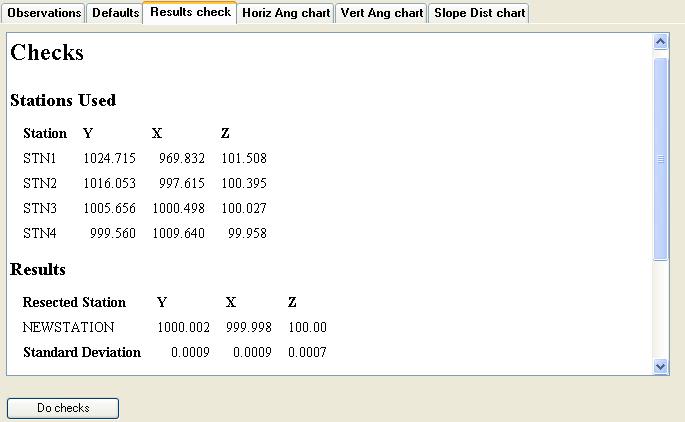
The Results check tab of the Resection Observations form allows you to do some preliminary checking on the observation data that you have entered on the Observations tab, to ensure that you are happy with the results before you insert the new station into the database:
Initially the text box on this tab is blank. The checks can be done by selecting the Do checks button on this tab.
Do checks
Selecting this button fills in the text box on this tab with information and checks on the resection calculations. Selecting this button also displays the bar charts relating to the observation adjustments on the Horiz Ang chart, Vert Ang chart and Slope Dist chart tabs of this form.
Below is an example of the text in the text box of the Results check tab, after the Do checks has been selected.
Horiz Ang chart tab
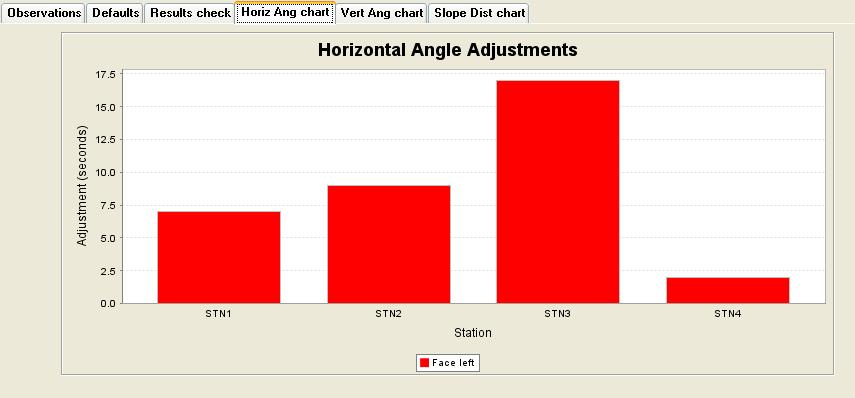
The Horiz Ang chart tab of the Resection Observations form, displays a bar chart of the horizontal angle adjustments from the text box of the Results check tab. The bar chart shows the results corresponding to the last time the Do checks button on the Results check tab was selected.
Below is an example of a bar graph of the horizontal angle adjustments:
Vert Ang chart tab
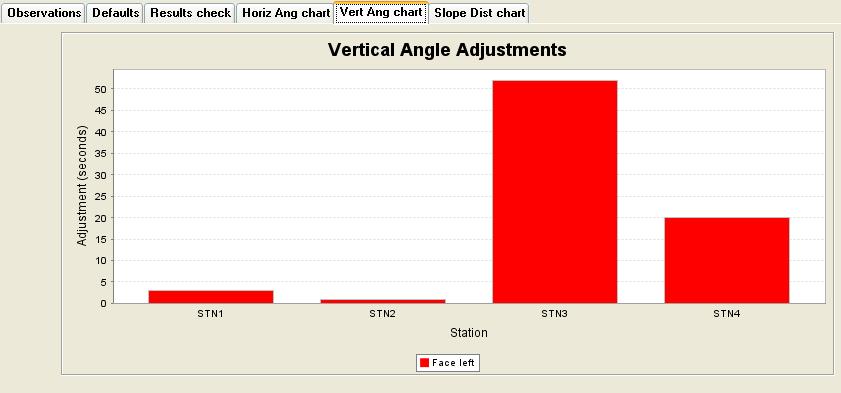
The Vert Ang chart tab of the Resection Observations form, displays a bar chart of the vertical angle adjustments from the text box of the Results check tab. The bar chart shows the results corresponding to the last time the Do checks button on the Results check tab was selected.
Below is an example of a bar graph of the vertical angle adjustments:
Slope Dist chart tab
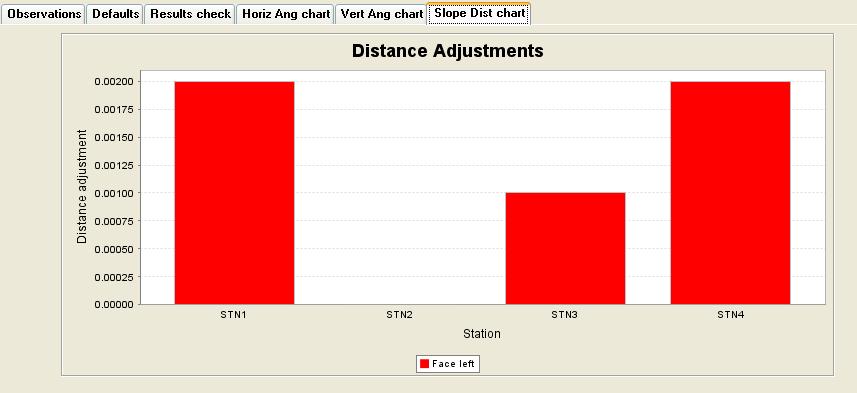
The Slope Dist chart tab of the Resection Observations form, displays a bar chart of the slope distance adjustments from the text box of the Results check tab. The bar chart shows the results corresponding to the last time the Do checks button on the Results check tab was selected.
Below is an example of a bar graph of the slope distance adjustments:
When you are satisfied with the resection calculations, APPLY the Resection Observations form to create the new resection station.
You are given some options regarding the creation of the resected station. This is done via the Options for Resected Station form, see here for more details.
Use of station errors table: If a station errors table exists in the survey database, information regarding the order of the new resected station may be displayed. See here for more details.
If you choose to insert the new resection station into the database a form will appear allowing you to set the values of the optional fields in the survey_stations table for the new station.
Summary of important points for resection:
- The resection observations must be to stations taken in clockwise order;
- You are allowed a maximum of observations to 20 known stations (either single or double face) to calculate the coordinates of a resection station;
- You must have horizontal angle and vertical angle readings for resection observations, but the slope distances are optional. If the slope distances are left as null on the form or are set to 0.0 then only the angles will be used in the least squares solver for the resection station coordinates. You can have some resection observations with and some without slope distances in the same resection calculation. For double face resection you can also have face left with a slope distance and face right without a slope distance (or vice versa).
- If angles and slope distances are present then resection observations to a minimum of two known stations are required. If only angles are present then resection observations to a minimum of three known stations are required;
- If you choose to store the new resected station as an underground type station in the database, then the first known station entered on the Observations tab of the Resection Observations form is stored as the 'station from' and the reverse bearing from the new resection station to that first known station is stored as the 'reverse bearing'.
Below is an example of a resection report:
May 19, 2006
RESECTION REPORT
Purpose : Testing purpose
|
Setup information : |
|
|
Resected Station |
NEWSTATION |
|
Instrument height |
0.000 |
|
Backsight station |
STN1 |
|
Backsight reference angle |
309.1831 |
|
Stations Used |
Y |
X |
Z |
Target Height |
|
STN1 |
1024.715 |
969.832 |
101.508 |
0.000 |
|
STN2 |
1016.053 |
997.615 |
100.395 |
0.000 |
|
STN3 |
1005.656 |
1000.498 |
100.027 |
0.000 |
|
STN4 |
999.560 |
1009.640 |
99.958 |
0.000 |
UNADJUSTED OBSERVATIONS
|
Station |
H. Angle |
V. Angle |
Slope Dist. |
|
STN1 |
309.1831 |
87.4708 |
39.028 |
|
STN2 |
351.3256 |
88.3615 |
16.234 |
|
STN3 |
5.0136 |
89.4230 |
5.678 |
|
STN4 |
92.3641 |
90.1508 |
9.650 |
INSTRUMENT ACCURACIES
|
Angle Standard Deviation (seconds) |
: |
3.000000 |
|
|
Distance standard deviation |
: |
0.005000 |
|
|
Distance ppm |
: |
2.000000 |
|
|
Instrument height standard deviation |
: |
0.003000 |
|
|
Instrument centring standard deviation |
: |
0.003000 |
|
|
Target height standard deviation |
: |
0.003000 |
|
|
Target centring standard deviation |
: |
0.003000 |
Results
|
Resected Station |
Y |
X |
Z |
|
NEWSTATION |
1000.002 |
999.998 |
100.000 |
|
Standard Deviation |
0.0009 |
0.0009 |
0.0007 |
Station NEWSTATION has been inserted into the database.
OBSERVATION ADJUSTMENTS
|
Station |
H. Angle |
V. Angle |
Slope Dist. |
|
STN1 |
-0.0007 |
-0.0003 |
-0.002 |
|
STN2 |
-0.0009 |
-0.0001 |
0.000 |
|
STN3 |
0.0017 |
0.0052 |
-0.001 |
|
STN4 |
-0.0002 |
-0.0020 |
0.002 |
Note: The Observation Adjustments are tabulated above to help highlight any erroneous observations.
Note on "Standard deviations" in the RESULTS section of the RESECTION REPORT file: In general the more stations that you take readings to for the resection, the better these values become as a measure of the accuracy of the coordinates of the unknown station. This is because the more readings that exist the more "redundant" information there is. Redundant information is important in a least squares adjustment as it helps to show the consistency of the observations used to calculate the coordinates. However, even if you only take resection observations to the minimum of two fixed stations there is still some redundant information, that is one slope distance and one vertical angle, so the standard deviations are still meaningful even in this most simple case.