Assign hotkeys to the freecodes on the TS15
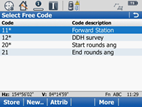
There are four freecodes that you have loaded onto the TS15. Each freecode is used for a different purpose.
- Code 11 –Allows a forward station to be read by taking a face left observation to the point.
- Code 12- Indicates the start of a code block for a drill hole survey by the extended rod method.
- Code 20 – Indicates the start of a code block for creating a new station by multiple face observations to a point. There is an option to enter a target height which must be entered in millimetres. For example, a target height of 1.5m equates to 1500mm. The new station must be read in the following order: Face Left Backsight then Foresight, Face Right Backsight then Foresight.
- Code 21 – Indicates the end of a code block for creating a new station by multiple face observations to a point.
To use the freecodes you must assign a 'hot key' to each of them.
 Note: When a freecode exists for a function you must use the freecode instead of the Leica function. For example, there is a Leica function that performs the same purpose as Code 20. To ensure Surpac interprets the station observations correctly you must use Code 20, and not the Leica function.
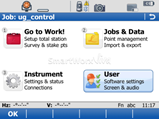
- On the TS15, select User.
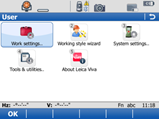
- Select Work settings.
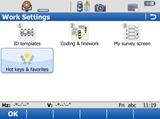
- Select Hot keys & favourites.
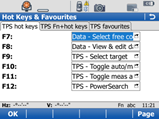
- Use the field next to the function key you would like as the hot key, and select Data - Select free code.
- To use the freecode function, press the hot key, and select the code you want to use from the menu.